n8n LangChain Tutorial: Chains, Parsers and the Code Node (2026)
What LangChain actually is inside n8n: chains vs agents, the Basic LLM Chain, output parsers, and why the famous template-brace fix is now wrong.
By Ali Ilyas · · Updated September 22, 2026
There is no "LangChain node" in n8n. LangChain is the library n8n's entire AI section is built on, which is why every AI node you add belongs to a package called @n8n/n8n-nodes-langchain: the AI Agent, every Chat Model, every vector store, every output parser.
That matters for one practical reason: you do not need to learn LangChain to use these nodes, but the errors you hit are LangChain's errors, not n8n's. They arrive in a vocabulary that describes a templating layer you never asked for — which is also why the most-repeated fix in this area, doubling the curly braces in a prompt, is now wrong on current versions.
This is the tour of what that node pack gives you, when a chain beats an agent, and how to read the errors that come back in someone else's vocabulary.
What's on this page
- Chains vs agents: the decision that saves money
- The Basic LLM Chain
- The curly brace error
- The purpose-built chains
- Output parsers
- Connecting a model n8n doesn't list
- The LangChain Code node
- Reading LangChain errors
- When the AI section is slow
- Gotchas
- Frequently asked questions
Chains vs agents: the decision that saves money
Every AI build in n8n is one of two shapes, and picking the wrong one is the most expensive mistake in this part of the product.
| Chain | Agent | |
|---|---|---|
| Order of operations | Fixed, by you | Decided by the model at runtime |
| Model calls per run | One | Usually several |
| Can call tools | No | Yes |
| Debugging | One call to inspect | A reasoning trace to reconstruct |
| Cost predictability | High | Low |
A chain does one thing in one order: take input, call the model, return output. An agent is given tools and decides what to call, how often, and when to stop.
Default to a chain. Summarise, classify, extract, rewrite, translate. Every one of these has a fixed shape, and an agent adds cost and unpredictability for nothing. Reach for the AI agent only when the model genuinely needs to choose between actions, or when the number of steps depends on what it finds.
The tell that you picked wrong: your agent has exactly one tool and always calls it. That is a chain with extra steps and a bigger bill.
The Basic LLM Chain
The workhorse. One prompt, one model, one answer.
Two fields do the work:
- Prompt: either "Take from previous node automatically", or "Define below" where you write it with expressions.
- Messages: an optional system message, set through the node's message list. This is where behaviour instructions belong ("answer in one sentence", "reply only with JSON"), not in the user prompt.
Attach a Chat Model sub-node underneath and you have a working AI step. Credentials live on the sub-node, exactly as covered in the OpenAI integration guide.
Prefer "Define below" once anything is real. Automatic prompt-taking looks convenient and then breaks the moment your trigger changes shape, with a "No prompt specified" error that points at the chain rather than at the trigger that actually changed.
The curly brace error
The error reads:
Single '
{' in template. Can't escape
It is widely reported against n8n's AI nodes, and the usual advice is to double every brace in your prompt. On n8n 2.33.7 we could not reproduce it, and that advice now makes things worse. This section is what four runs actually produced, because the fix has outlived the bug.
What the error was: LangChain prompts are templates, and in that template language a curly brace marks a variable. A literal brace — pasted from a JSON example, a code snippet, an output format — was read as the start of a variable name, failed to parse, and threw.
What happens now. We put { "ref": "", "amount": 0, "due": "" } straight into a Basic LLM Chain's Prompt field on node version 1.9 and ran it. No error. Reading the run data back, the model received the braces exactly as typed:
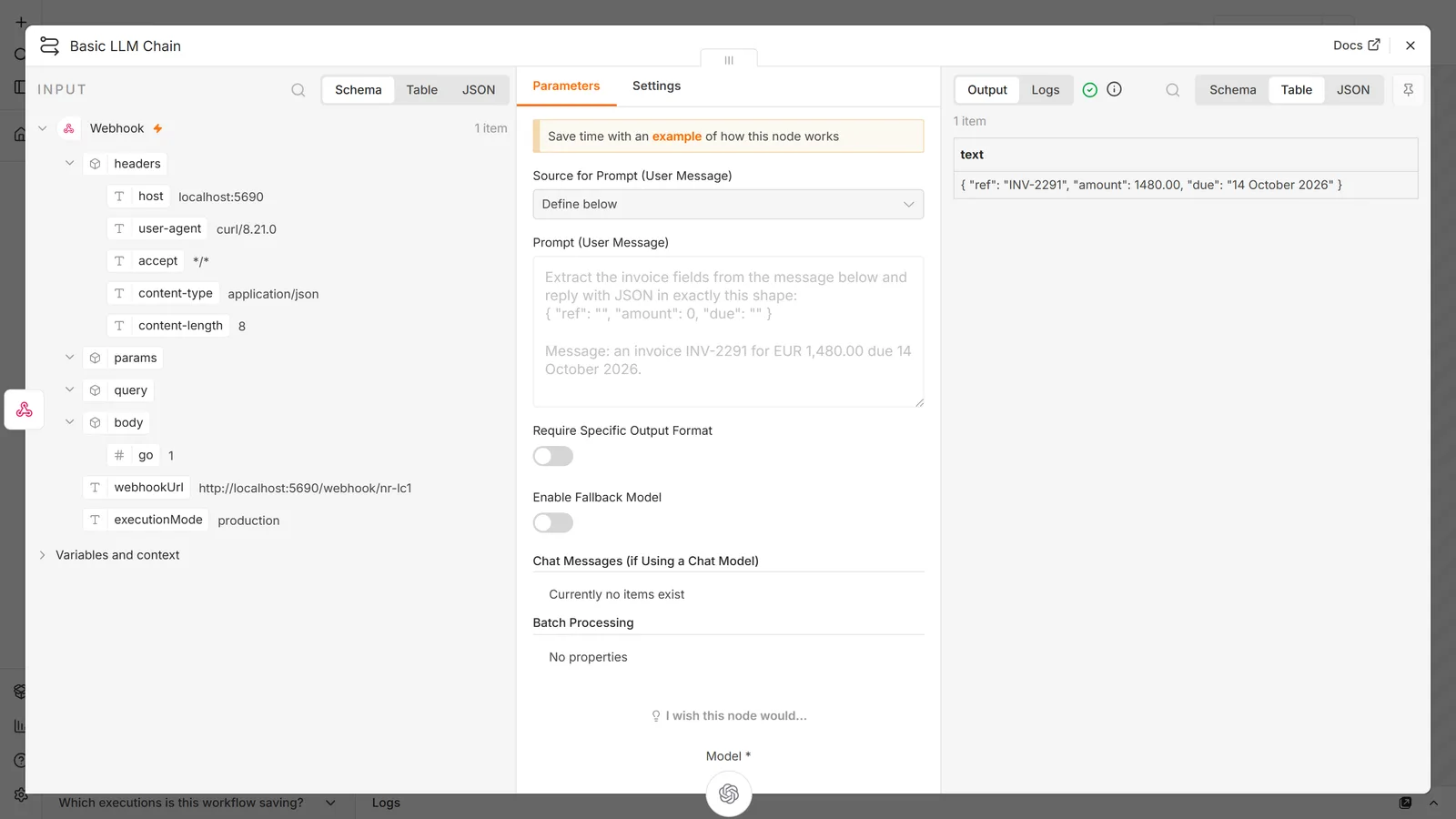
The reason is in the node's source: the prompt is not placed into the template, it is passed as a template variable. The template is the two characters {query}, and your text is substituted into it afterwards — so the template engine never reads your braces at all.
System messages are handled too, by a different route. We put the same literal brace in a chain's system message, and again in an AI Agent's System Message, and neither threw. Here n8n does escape: it doubles every { and } in the message before building the template, which the engine then collapses back to one. The model receives exactly what you typed, and you never see the intermediate step.
So the old fix is now the bug. Doubling the braces yourself means nothing un-doubles them:
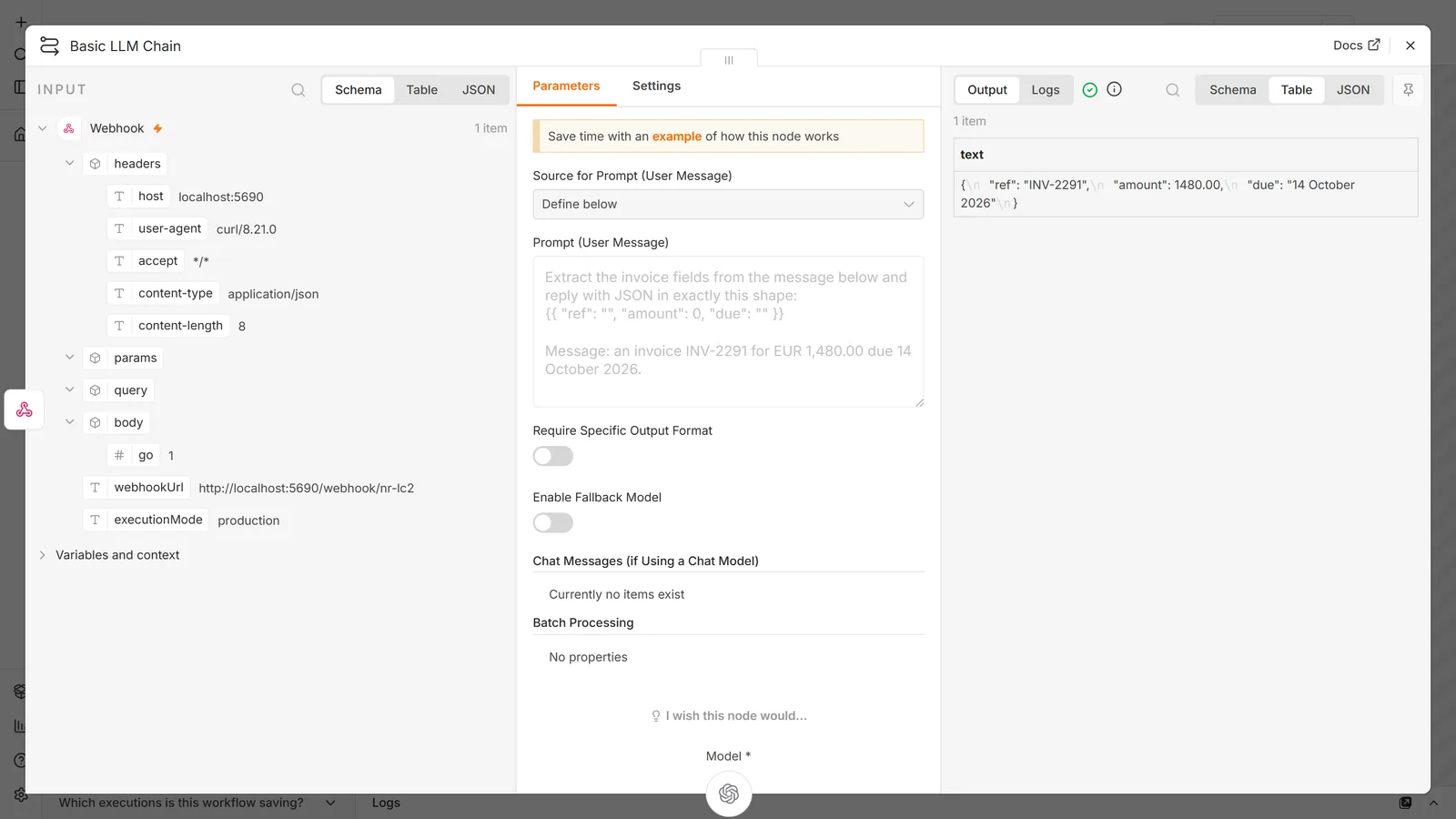
In that run the model was handed {{ "ref": "", "amount": 0, "due": "" }} and asked to reply in "exactly this shape". It returned single-brace JSON anyway, because a capable model quietly corrects the malformed example — which is the worst kind of bug, one that costs you output quality with no error to point at. Across our runs the reply's formatting drifted between plain JSON and a fenced code block, from nothing but that change.
What to do:
- Write the braces normally. In the Prompt field and in system messages on current versions, a literal brace is correct and needs no escaping.
- If you are on an older node version and genuinely see the error, move the example out of the prompt: put it in an earlier Set or Code node and reference it with an n8n expression. This works on every version and is the fix that does not expire.
- Describe the shape in words — "return an object with keys name, amount and due date" — which is often as effective as showing literal JSON and sidesteps the question entirely.
- Do not double braces pre-emptively. If you inherited a workflow with doubled braces in its prompts, check what the model is actually receiving in the run data before assuming it is fine.
There is a related trap worth naming: an Information Extractor schema and a chain prompt behave differently with the same text. The extractor takes its schema in a dedicated field that was never run through prompt templating. If you are fighting braces anywhere, the extractor may be the node you actually wanted.
The purpose-built chains
Beyond the basic chain, the pack ships several nodes that are a chain plus a preset. Each replaces a prompt you would otherwise write badly:
| Node | Job | Why not just prompt it |
|---|---|---|
| Information Extractor | Text to structured JSON against a schema you define | Handles the schema and parsing; no brace-escaping fight |
| Text Classifier | Assign text to one of your categories | Constrains output to your list, so downstream branching is safe |
| Sentiment Analysis | Score tone | Fixed categories, consistent output shape |
| Summarization Chain | Summarise text longer than the context window | Splits, summarises the pieces, then summarises the summaries |
| Question and Answer Chain | Answer from a vector store | Wires retrieval to generation without an agent |
Summarization Chain deserves special mention because it solves a problem that has no prompt-level fix. A document longer than the model's context window cannot be summarised in one call, at any price. The chain splits it, summarises each piece, then summarises those summaries. If you are chunking documents by hand before a model call, this node is what you were rebuilding.
Text Classifier over a raw prompt for any routing decision. Free-text classification returns "This appears to be a billing question." and your Switch node matches nothing; the classifier returns one of your categories. Same principle as the constrained-output advice in the OpenAI guide, enforced by the node instead of by your prompt discipline.
For retrieval-backed answering, the RAG chatbot guide covers the Q&A chain in context, including the vector store side.
Output parsers
An output parser is a sub-node that attaches to a chain and forces the response into a shape. Three of them:
- Structured Output Parser: you supply a JSON schema or an example; the response is validated against it.
- Item List Output Parser: the response becomes a list of n8n items rather than one blob of text.
- Auto-fixing Output Parser: wraps another parser, and when parsing fails it sends the broken output back to the model to be repaired.
The Auto-fixing parser costs a second model call every time it fires. That is fine occasionally and expensive if your prompt is chronically producing malformed output. Treat repeated auto-fixes as a signal to fix the prompt, not as a solution.
Parsers reduce failures; they do not eliminate them. The rule from the OpenAI guide still applies here: validate the fields you actually depend on, with an explicit branch for failures. A parser that returns an object with all-null values has succeeded as far as the node is concerned.
One reported behaviour worth knowing: the Item List parser can return fewer items than the model produced, where the execution log shows thirty and the output carries three. When counts don't match, compare the raw model output in the log against the parsed output before assuming the model under-delivered.
Connecting a model n8n doesn't list
The Chat Model sub-nodes cover the major providers, but "my provider isn't there" is not a dead end. Two routes:
The OpenAI-compatible route. Any endpoint implementing OpenAI's chat-completions interface (OpenRouter, Groq, vLLM, Ollama's compatible endpoint, most self-hosted gateways) works through the OpenAI Chat Model sub-node with a custom base URL on the credential. Use that provider's key and that provider's model names.
The model dropdown usually will not populate against a third-party base URL, because n8n lists models the credential can actually enumerate. Switch the field to an expression and type the model name.
The dedicated-node route. n8n ships sub-nodes for several providers directly, including Ollama, which is the cleaner path for local models than pointing the OpenAI node at localhost.
One networking note that costs people hours on self-hosted instances: the AI nodes have not always respected proxy environment variables the way core HTTP nodes do. If every other node reaches the internet through your proxy and only the AI nodes fail, that is the thing to check rather than your credentials. See the Docker setup guide for where those variables live.
The LangChain Code node
The escape hatch. It lets you write JavaScript against LangChain's own objects, and it exists because the visual nodes cannot cover everything.
Use it when:
- You need a vector store, loader or retriever that has no n8n node. Chroma is the usual example.
- You need a chain composed differently from any of the presets.
- You are porting a LangChain script that already works.
Do not use it as a default. Everything you build there is code you now maintain, invisible to people reading the canvas, and outside the version guarantees the packaged nodes get. Most workflows that reach for it needed a Code node and an HTTP Request node instead.
Version pinning matters here. The LangChain packages underneath n8n are updated regularly, and code written against one version's API can break on a later n8n release. If you rely on this node, note the n8n version you validated against, and read release notes before upgrading, as covered in the Docker guide.
Reading LangChain errors
These come from the library, so they use its vocabulary rather than n8n's. The frequent ones:
| Error | What it actually means |
|---|---|
Single '{' in template. Can't escape | Literal brace in a prompt. See above |
Cannot read properties of undefined (reading 'content') | The model returned nothing usable — often a failed call the node didn't surface, or a provider returning an unexpected shape |
Class could not be found | Version mismatch between an AI node and the LangChain packages underneath; usually fixed by updating n8n |
Cannot read properties of undefined (reading 'map') | Something expected an array and got a single object — commonly a tool returning an unexpected shape to an agent |
| Empty model dropdown | The credential failed. Not a model-availability problem |
The general approach: when the message names a property or a class rather than a node or a field, you are looking at the library layer. Check versions and check what the previous node actually output, in that order.
When the AI section is slow
Slowness here is almost never n8n. In order of likelihood:
- The model. Reasoning models spend real time before the first token. Time the same request with
curl. If it matches, n8n is not the bottleneck. - One call per item. A chain running over 500 items makes 500 sequential model calls. This is the big one, and it is invisible until your item count grows. Reduce items, batch them into one call, or accept the wall-clock cost.
- Agent loops. Each tool call is another round trip. An agent doing five is five times the latency of a chain.
- Retrieval on top. A RAG build adds an embedding call and a database query to every message.
The fix that matters most is the second one, and it is a workflow change rather than a setting: send ten records in one prompt instead of one record in ten prompts, wherever the task allows it.
Gotchas
Sub-node expressions resolve to the first item. Documented n8n behaviour, and the cause of "my chain used the wrong record" bugs that look like data corruption. It applies to every sub-node in this pack.
A system message is not a prompt. Behaviour instructions in the user prompt get diluted by the input text. Put them in the system message where they persist.
Chains have no memory. Each run starts clean. Conversational continuity requires memory, and memory attaches to agents and chat-oriented nodes, not to a Basic LLM Chain.
Temperature 0 is not determinism. It narrows variation. Do not build branching logic that assumes byte-identical output across runs.
Community nodes used as tools can hit naming rules. Tool names generated from node names have to satisfy the underlying library's naming conventions; a node with spaces or unusual characters in its name can fail for that reason alone.
Upgrading n8n can move the AI nodes underneath you. This part of the product changes faster than the rest. Pin a version on anything you depend on and read the release notes. The Docker guide covers doing that cleanly.
Frequently asked questions
Do I need to know LangChain to use n8n's AI nodes?
No. The nodes are the interface, and you can build agents, chains and RAG without writing any LangChain code. Knowing that LangChain is underneath is only useful when reading errors, which arrive in the library's vocabulary rather than n8n's.
What does the Single '{' in template error mean?
It meant a literal curly brace in your prompt was being read as the start of a template variable. On n8n 2.33.7 we could not reproduce it — the Prompt field is passed to the template as a variable rather than as template text, and system messages are escaped by n8n before the engine sees them. If you are on an older node version and do hit it, move the example into an earlier Set or Code node and reference it with an expression. Do not double the braces: on current versions nothing un-doubles them and the model receives them literally.
When should I use a chain instead of an agent?
Whenever the steps are fixed. Chains are cheaper, faster and much easier to debug because there is one model call to inspect. Use an agent only when the model must decide which action to take, or how many times.
What's the difference between the Basic LLM Chain and the OpenAI node?
The OpenAI node calls one provider's API directly and exposes its full operation set: images, audio, files, moderation. The Basic LLM Chain is provider-agnostic: swap the Chat Model sub-node and the same chain runs on a different provider. Use the chain when you may change models, the OpenAI node when you want operations only that provider has.
How do I get reliable JSON out of a chain?
Attach a Structured Output Parser, or use the Information Extractor, which is purpose-built for it. Then validate the fields you depend on anyway, because a parser can return a well-formed object full of nulls, and that counts as success.
What is the Auto-fixing Output Parser actually doing?
When parsing fails, it sends the malformed output back to the model with the error and asks for a corrected version. That is a second model call each time it fires. Useful as a safety net, not as a substitute for a prompt that produces valid output.
Why does my Item List parser return fewer items than the log shows?
Compare the raw model output against the parsed result in the execution log. Mismatches between what the model produced and what the parser emitted have been reported, and knowing which half is short tells you whether to fix the prompt or the parser configuration.
Can I use a model that isn't in n8n's list?
Yes, if it exposes an OpenAI-compatible endpoint. Set a custom base URL on the credential and type the model name as an expression, because the dropdown will not populate. For local models, the dedicated Ollama sub-node is cleaner than pointing the OpenAI node at localhost.
Why is the model dropdown empty?
The credential isn't working, or the base URL doesn't support listing models. An empty dropdown is a credential symptom far more often than a model-availability one.
What does "Class could not be found" mean in an AI node?
A version mismatch between the node and the LangChain packages beneath it. Updating n8n normally resolves it; on Docker, follow the update sequence in the Docker setup guide.
Why does "Cannot read properties of undefined (reading 'content')" appear?
The node expected a model response and got nothing usable. Check the provider call in the execution log, because a failed or empty response upstream shows up as a property error downstream.
Do the AI nodes respect my HTTP proxy?
Not always, historically. If core nodes reach the internet through your proxy and only the AI nodes fail, treat that as the likely cause rather than a credential problem.
Can I run several model calls in parallel?
Not within one chain, which processes items sequentially. Parallelism means restructuring: split the work across sub-workflows, or batch multiple records into a single prompt. The second is usually cheaper as well as faster.
Is the LangChain Code node worth using?
Only when the visual nodes genuinely cannot express what you need: an unsupported vector store, or a chain composed unusually. It is code you maintain, invisible on the canvas, and more exposed to version drift than the packaged nodes.
Do these nodes work on the free self-hosted version?
Yes, the whole AI section is in the Community edition. Costs come from model providers, not from n8n. See is n8n free.
Should I learn n8n or LangChain/LangGraph properly?
They are not competing for the same job. n8n gives you the whole surrounding workflow (triggers, credentials, retries, integrations, an execution log someone else can read) with the AI part as nodes. Writing LangChain or LangGraph directly gives you control over graph structure, state and custom logic that no visual builder matches, and you then rebuild the scheduling, credential storage and error handling yourself. Most people asking this want the workflow, not the framework. Reach for the framework when the orchestration itself is the hard part, and note that running both in one project is a normal architecture, n8n at the edges and a service you own in the middle, rather than a contradiction.
Can I use an output parser with a Tools Agent?
Not as freely as with a chain. Structured output and tool calling compete for the same mechanism at the model layer, so combining them is constrained and behaves differently across providers. If you need both a guaranteed shape and tools, the reliable pattern is to let the agent finish, then pass its answer through a separate chain with the parser attached. Two calls, but predictable.
Is the Structured Output Parser reliable?
Reliable enough to be worth using, and not enough to skip validation. It fails most on large or deeply nested schemas, on optional fields, and where the prompt and schema disagree about what is required. Keep schemas flat and small, include an example that matches the schema exactly, and branch explicitly on the fields you depend on. A parser returning a valid object full of nulls is a success as far as the node is concerned.
Can chains work with files, or only text?
Chains work on text. Get the text out first with an Extract from File node, then pass it in. The same pattern solves the PDF loading problem described in the RAG guide.
Primary references: n8n's Basic LLM Chain node docs, the Information Extractor reference, and the LangChain Code node documentation.
Next steps: for the agent shape and when it's justified, see building an AI agent in n8n. For retrieval-backed answering, the RAG chatbot guide covers vector stores end to end. The OpenAI integration guide covers credentials, billing and cost control, the three things n8n calls MCP covers connecting an agent to external tool servers, and our n8n workflow templates are importable starting points.