How to Build an AI Agent in n8n (2026): A Practical Guide
How an n8n AI agent works: Tools Agent anatomy, tool descriptions, $fromAI, session memory, and the retry problem that makes agents act twice.
By Ali Ilyas · · Updated September 22, 2026
An AI agent in n8n is a workflow where the model decides what to do next. You give it tools and a goal; it chooses which tools to call, in what order, and when it's finished. That's the whole idea, and it's the only thing that separates an agent from an ordinary workflow.
That distinction matters more than any setup step, because most workflows described as agents don't need one, and an agent costs more, runs slower, and is harder to debug than the alternative. So this guide covers both: how to build one properly, and how to tell whether you should.
One thing first, because it invalidates a lot of tutorials: n8n used to make you choose an agent type: Conversational Agent, ReAct, Plan and Execute, OpenAI Functions, SQL Agent. That selector is gone. Per n8n's docs, "This has now been removed and all AI Agent nodes work as a Tools Agent." If a guide has you picking an agent type in a dropdown, it predates the change, and there's nothing to pick.
What's on this page
- Agent or chain? Answer this first
- The anatomy of an n8n agent
- Build your first agent
- Where the prompt comes from
- Tools: the description is the interface
- Letting the model fill in parameters with $fromAI
- Sub-workflows as tools
- Memory and session keys
- Iterations, loops, and cost
- The problem nobody warns you about: no rollback
- Making an agent reliable
- Debugging an agent
- Gotchas
- Frequently asked questions
Agent or chain? Answer this first
Ask one question: does the sequence of steps vary depending on the input?
If it doesn't, you don't want an agent. "Summarise this email, classify it, write it to a spreadsheet" is a fixed sequence. You already know the order. Wiring that as an agent means paying a model to rediscover your own workflow on every run, and getting a slightly different answer each time about how to do it.
If you are not yet sure which of those two you are building, start from what n8n is and how a workflow runs — the agent question only makes sense once the ordinary case is clear.
Build it with plain nodes and a single model call instead. The OpenAI integration guide has that pattern. It's cheaper, it's faster, and when it breaks there's exactly one call to inspect. If the fixed sequence still needs a model in the middle of it, a chain is the shape you want: the LangChain tutorial covers the chain nodes and when each one beats an agent.
An agent earns its cost when the path genuinely can't be known in advance:
- A support assistant that might need to look up an order, check a delivery status, or escalate, depending entirely on what the customer asked.
- A research task where what you find in step one determines whether there's a step two.
- An assistant with a dozen possible actions where hard-coding every branch would be unmaintainable.
The honest test: if you can draw the flowchart, build the flowchart. Agents are for when you can't.
The anatomy of an n8n agent
An agent is a root node with sub-nodes attached underneath. The sub-nodes are the parts that do the work, and they connect to small connectors on the underside of the Agent node, not into the main flow.
| Slot | Required? | What it does |
|---|---|---|
| Chat Model | Yes | The reasoning engine. OpenAI, Anthropic, Groq, Mistral, Azure OpenAI. |
| Tool | Yes, at least one | An action the agent can choose to take. |
| Memory | Optional | Carries conversation history between turns. |
| Output Parser | Optional | Forces a specific output shape. |
If you've read the OpenAI guide, the Chat Model sub-node is the same one covered there, and the same rule applies: it can't run on its own, it only ever feeds a parent node.
Two documented errors come straight from this structure, and they're the first two you'll meet:
- "A Chat Model sub-node must be connected": the agent has no brain. Attach one via the Chat Model connector.
- "Error in sub-node Simple Memory": usually an outdated node. Simple Memory was previously called Window Buffer Memory; n8n's documented fix is to delete the node and re-add it so you get the current version.
Build your first agent
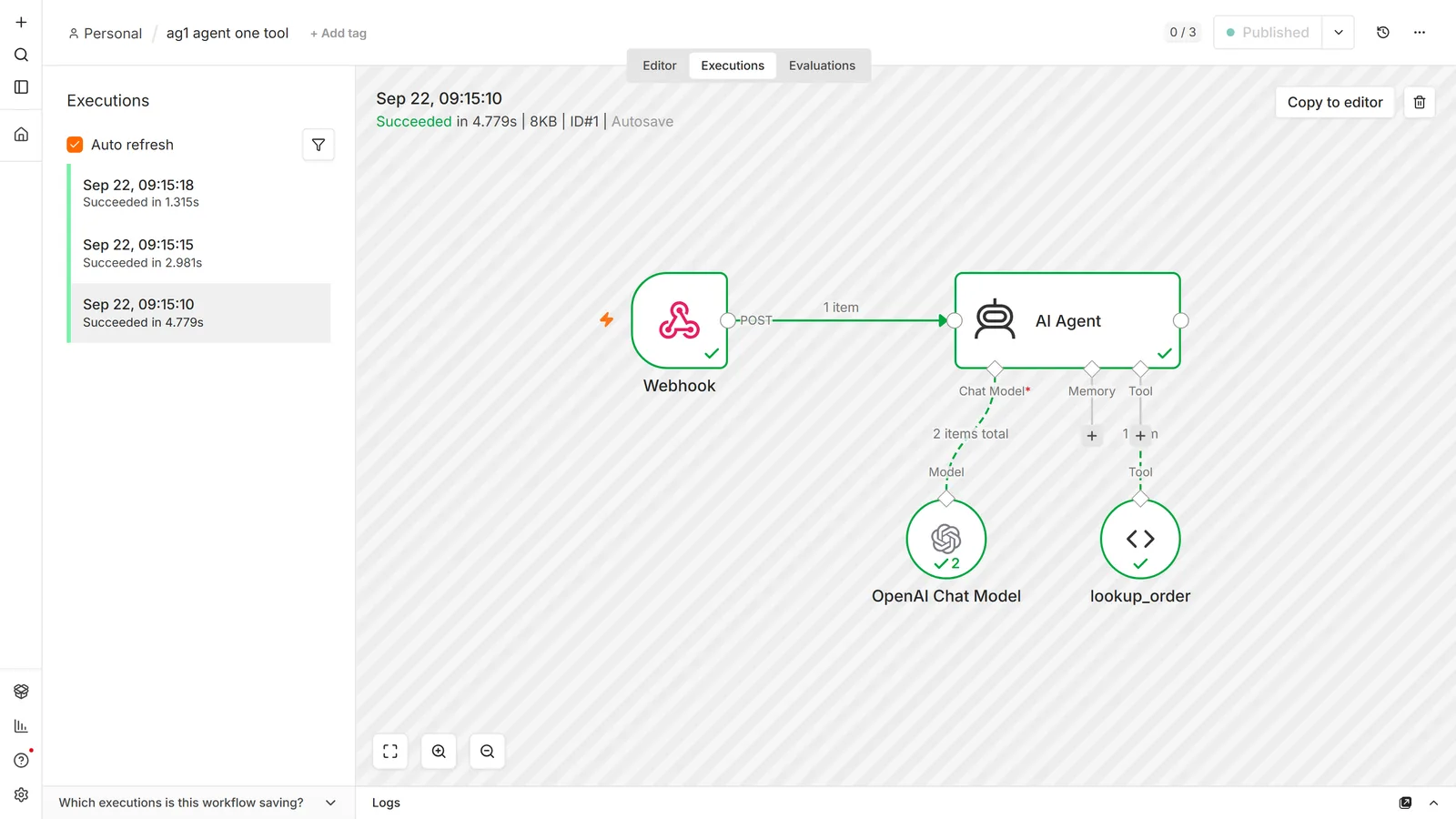
A working agent in five steps. Aim for one tool, not five. A broken agent with one tool is diagnosable.
1. Add a Chat Trigger. The When chat message received trigger gives you a chat panel to test in, and supplies chatInput and sessionId automatically. Both matter later.
2. Add the AI Agent node and connect the trigger to it.
3. Attach a Chat Model. Click the Chat Model connector underneath and pick your provider. Credentials work exactly as in any other node. See the OpenAI guide if the model list comes up empty.
4. Write a system message. Under Options → System Message. Be specific about scope and about what to do when the agent can't help:
You are a support assistant for an online shop. You can look up order status. If a question isn't about orders, say you can't help with that and suggest emailing support. Never guess an order status. If the lookup returns nothing, say so.
That last sentence prevents the failure mode people find most alarming: an agent inventing a plausible answer when a tool returns nothing.
5. Attach one tool. A Google Sheets node reading an orders sheet is a good first one. The Sheets guide covers the connection. Give it a clear description (next section).
Open the chat panel and ask something that requires the tool. Then ask something that doesn't, and check it declines rather than improvising.
Where the prompt comes from
The Prompt Source parameter has two settings, and picking the wrong one produces two of n8n's four documented agent errors.
Take from previous node automatically expects an input field called chatInput. The Chat Trigger provides it. Nothing else does, so if your agent is triggered by a webhook, a schedule, or an email, this setting fails with "No prompt specified". n8n's documented fix is to switch to Define below.
Define below lets you build the prompt yourself from static text and expressions. This is what you want for any non-chat trigger:
Handle this support request.
Customer: {{ $json.email }}
Message: {{ $json.body }}
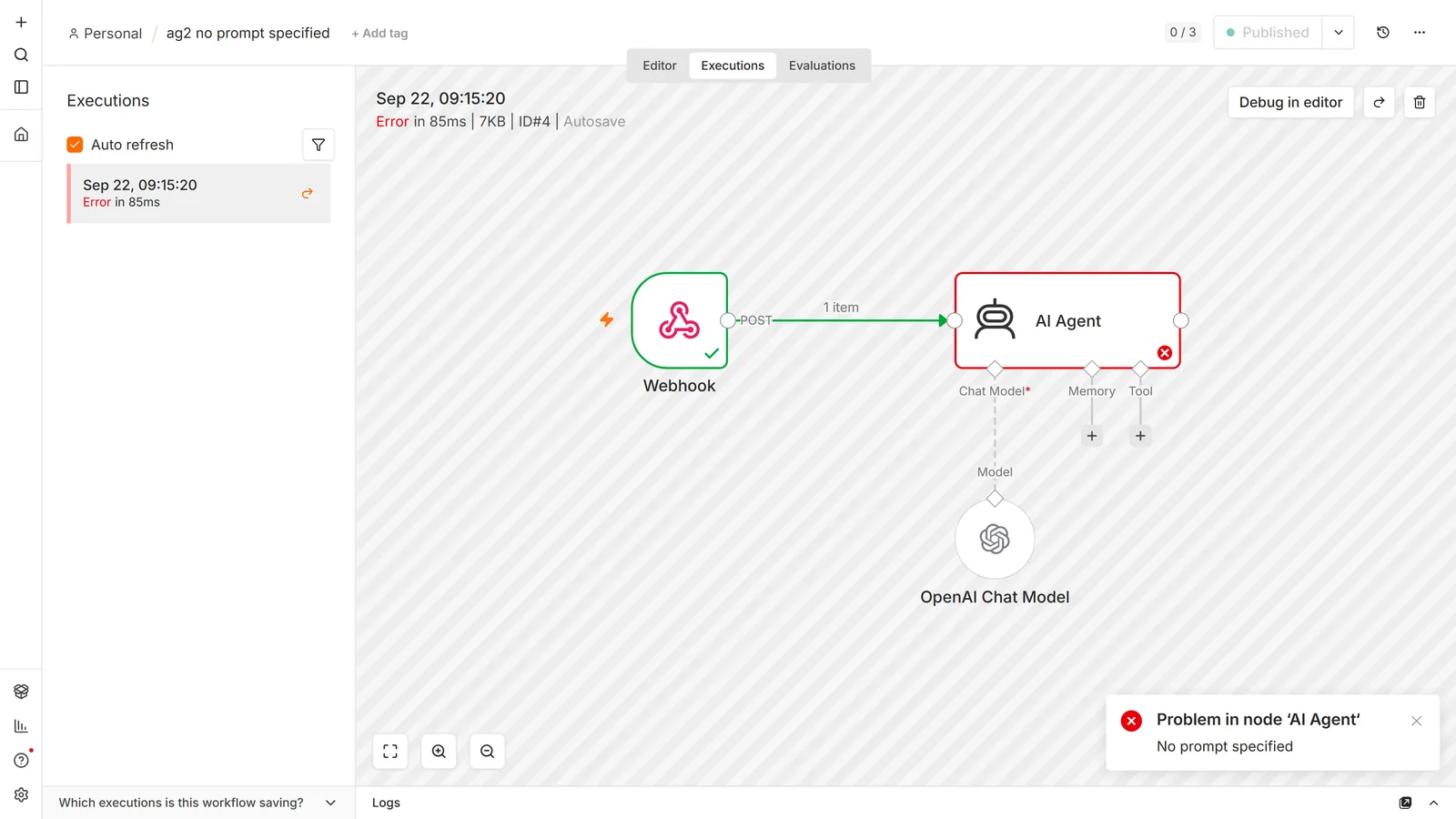
The related error is "Internal error: 400 Invalid value for 'content'", which means the prompt resolved to null. Either an expression is pointing at a field that doesn't exist, or chatInput arrived empty. The model is being handed nothing, and it's the field reference at fault rather than the agent.
Tools: the description is the interface
This is the part that decides whether your agent works, and it isn't a coding problem.
The agent chooses tools by reading their descriptions. It cannot see what a tool does; it sees a name and a sentence you wrote. A vague description means a tool that gets called at the wrong time, or never gets called at all while the model apologises that it lacks the ability you definitely gave it.
n8n's own example shows the register: "Call this tool to get a random color. The input should be a string with comma separated names of colors to exclude."
Note what it does: it states when to call it and what the input must look like. Write descriptions the same way:
- Bad: "Order lookup"
- Better: "Look up an order's status. Input: the order number, digits only, no # prefix."
- Better still: add the boundary: "Use only when the customer supplies an order number. If they don't have one, ask for it rather than calling this tool."
Two rules that save the most time:
One tool, one job. A "do everything with orders" tool that branches internally on a mode parameter will be called with the wrong mode. Separate tools for lookup, cancel, and refund are chosen correctly far more often, and they let you put a human approval step in front of only the dangerous one.
Say what the tool doesn't do. Models over-reach with plausible-sounding tools. Explicit limits in the description are the cheapest guardrail available.
Letting the model fill in parameters with $fromAI
Here's the mechanism that makes tools genuinely useful, and it's easy to miss in the UI.
Any parameter on a tool node can be handed to the model to fill in. Hover the field, choose Let the model define this parameter, and the field becomes an expression containing $fromAI(). At run time the model supplies that value based on the conversation.
So a Google Sheets lookup tool doesn't need a hard-coded order number. The model extracts it from what the customer wrote and passes it in. Same for a Slack channel, an email subject, a date range.
You can mix the two. Let the model fill the search value while you keep the sheet ID, credential, and range fixed. That's usually the right split: the model supplies data, you keep control of destinations. Letting a model choose which sheet to write to, or which channel to post in, is how an agent surprises you.
Sub-workflows as tools
The Call n8n Workflow Tool lets an agent "run another n8n workflow and fetch its output data," and it's the single most useful pattern in this guide.
Instead of attaching fifteen tool nodes to one agent, you build each capability as its own workflow (with its own error handling, its own retries, testable on its own) and expose it to the agent as one tool. Workflow inputs can be fixed, expression-driven, or $fromAI()-filled.
Why this is the right architecture:
- You can test the capability without the agent. Run the sub-workflow with sample input directly. When something breaks you find out whether the tool is broken or the agent's choice was.
- The agent's tool list stays short. Fewer, better-described tools produce better tool selection than a long list of overlapping ones.
- Real logic goes where logic belongs. Validation, retries, and conditional branches live in normal n8n nodes rather than in prompt instructions you hope the model follows.
One thing to keep in mind: each sub-workflow call is its own execution. A single agent run can produce a parent execution plus several children, which matters for quota if you're on n8n Cloud and for reading the executions list when you're debugging.
Memory and session keys
Without memory, every message is the first message. The agent has no idea what you just said.
Simple Memory is the starting point. It "stores a customizable length of chat history for the current session." It's the easiest to set up and has two traps.
The session key decides who shares a conversation. The Chat Trigger provides sessionId automatically. Anything else (a webhook, a Telegram bot, a Slack app) does not, and you'll hit a "No sessionId" error until you set one.
For testing, a static string like my_test_session is fine, and n8n's docs say exactly that, while adding that proper session handling should be in place before production. Take that seriously: a static session key in production means every user shares one conversation history. Two customers talking to your Telegram bot at once will see each other's context. Key it on something per-user: the Telegram chat ID, the Slack user ID, a customer ID from your database.
Multiple Simple Memory nodes share one memory instance. From n8n's docs: "If you add more than one Simple Memory node to your workflow, all nodes access the same memory instance by default." If you want separate memories, use different session IDs.
When to move off Simple Memory: it's per-instance and in-process, so it doesn't survive restarts and doesn't work across a multi-instance setup. For anything you rely on, use Postgres Chat Memory or Redis Chat Memory. If you're already running Postgres for n8n itself (as you should), it's the obvious choice.
Memory is not a knowledge base, and conflating the two is a common wrong turn. Memory holds this conversation; it cannot tell the agent anything about your documents. If the agent needs to answer from your own content, that's a vector store attached as a tool. The RAG chatbot guide covers ingestion, retrieval, and why a vague tool description is the usual reason an agent ignores the knowledge base you gave it.
One cost note that catches people: memory is re-sent to the model on every turn. A long conversation history means the token count per turn climbs steadily. The tenth message in a session costs meaningfully more than the first. Cap the window rather than letting history grow without limit.
Iterations, loops, and cost
Max Iterations defaults to 10. That's the number of reasoning passes the agent may take before it must stop, and it's your cost ceiling as much as a correctness setting.
A single agent run is many API calls: reason, call a tool, read the result, reason again. Ten iterations with tool calls in between can be twenty-plus model calls for one execution. Multiply that by a workflow looping over 500 rows and you have the one n8n mistake that can spend real money in an hour.
Practical settings:
- Lower Max Iterations for simple agents. A two-tool agent that needs ten passes is stuck in a loop, not thinking hard. Setting it to 3 or 4 converts a slow expensive failure into a fast cheap one.
- Set spending limits at the provider. Covered in the OpenAI guide. Do it before your first production run.
- Test on three items. Every expensive surprise lives in the gap between a test run and the full dataset.
The problem nobody warns you about: no rollback
This is the most important section here, and it's absent from nearly every agent tutorial.
An agent's tool calls are not a transaction. If your agent calls four tools and the third one fails, the first two already happened. Nothing in n8n unwinds them. There's no rollback, no compensating action, no record that step two succeeded.
Now add a retry. The execution failed, so you re-run it, and the agent starts over from the beginning. It calls tool one again. If tool one sent an invoice, the customer now has two invoices. If it created a record, there are two records. And nothing errored, because both calls succeeded exactly as instructed.
This is worse with agents than with fixed workflows, because the agent may not even take the same path on the retry. You can't reason about what already happened by reading your own flowchart.
The fix is idempotency, and it has to be built rather than configured:
Before any state-changing tool acts, check whether it already did. Give each request a stable key (an order ID, a message ID, a hash of the inputs), write it to a table, and have the tool check that table on entry. Already present? Return the previous result instead of acting again.
Put the check inside the tool, not around the agent. The agent decides when to call things; only the tool knows what it's about to do. This is another argument for sub-workflows as tools: the idempotency check is a couple of nodes at the top of the sub-workflow, written once.
Separate reads from writes. Reads are safe to retry, so let the agent call them freely. Writes need protection. Splitting tools that way, instead of one tool that reads and writes, makes it obvious which ones need the check.
The rule of thumb: any tool a customer would notice happening twice needs an idempotency key. Sending, charging, posting, creating. Reading and searching don't.
If it's any comfort, almost nobody does this. We parsed 2,030 published workflow files and 84.8% declare no error-handling field of any kind: no retry, no error output, nothing. That isn't permission to skip it; it's why the failure mode above is so common and so rarely diagnosed.
Making an agent reliable
Four things separate a demo from something you'd let touch production data.
Put a human in front of dangerous actions. For anything irreversible, don't let the agent complete it. Let it propose it. Slack's Send and Wait for Response operation pauses the workflow until someone approves, and it's covered in the Slack guide. Cheap to add and it converts your worst-case outcome from "the agent emailed 400 customers" to "someone declined a button."
Force the output shape when something downstream depends on it. Enable Require Specific Output Format and attach an output parser. Then validate anyway. As in the OpenAI guide, malformed model output usually doesn't raise an error, so an empty object flows downstream and the run finishes green.
Give it a Think tool for multi-step reasoning. The Think tool gives the agent a scratchpad to reason in before acting. It costs tokens and buys accuracy on tasks with several dependent steps. Not worth it for a one-tool agent.
Monitor for absence of success, not presence of failure. An agent that decides to do nothing produces a green execution. So does one that answers "I can't help with that" to every question because a tool description is wrong. Neither raises an error, and the same reasoning applies as for workflows that never trigger: assert on outcomes (was a ticket created, did the row appear), not on the absence of an error.
Debugging an agent
Agents fail differently from workflows. The execution is green, and the answer is wrong.
Turn on Return Intermediate Steps. It puts the agent's tool calls and their results into the output, so you can see what it decided and what came back. Without it you're guessing at what happened inside one opaque node. This is the first thing to enable when an agent misbehaves, and the first thing to turn off afterwards, because the output gets noisy.
Then read the trace against three questions, in order:
- Did it call the right tool? If not, the tool description is wrong. Fix the sentence, not the prompt.
- Did it pass the right input? If the tool was right but the arguments were wrong, your
$fromAI()parameter needs a clearer description of the expected format. - Did the tool return what you expected? If the tool returned an error or an empty result and the agent invented an answer anyway, your system message is missing an instruction about what to do with nothing.
Almost every agent bug lands in one of those three, and they have completely different fixes. Which is why guessing at the system prompt, the usual first move, so often makes it worse.
Gotchas
The agent claims it can't do something you gave it a tool for. Nine times in ten the description is too vague for the model to connect it to the request. Rewrite it to name the situation: "Use when the customer asks about delivery timing."
Sub-nodes resolve expressions to the first item only. An expression on a sub-node uses item one's value for every item, unlike a normal node. Documented, easy to trip over when processing a batch.
A static session key leaks context between users. Fine in testing, a data-exposure bug in production.
Simple Memory doesn't survive a restart. If conversations need to persist, use Postgres or Redis memory.
More tools makes it worse past a certain point. Overlapping descriptions produce wrong selections. Consolidate into sub-workflow tools instead of adding another near-duplicate.
Streaming changes what downstream nodes see. Enable Streaming sends the answer back in real time, which is right for a chat interface and wrong when a later node needs the complete output to work with.
Binary images pass through by default. Automatically Passthrough Binary Images sends images to the agent as image messages. Handy for vision work, and an unexpected token bill if your trigger happens to carry attachments.
Frequently asked questions
Which agent type should I choose?
There's no longer a choice. n8n consolidated them. Every AI Agent node is a Tools Agent. Tutorials with an agent-type dropdown are out of date.
What's the difference between an AI Agent and a Chain?
An agent decides which tools to call. A chain runs steps you defined. If the sequence is fixed, use a chain or plain nodes.
Do I need an agent to use AI in n8n?
No, and most AI workflows don't. A single OpenAI node call is cheaper, faster, and easier to debug.
Why does my agent say "No prompt specified"?
Prompt Source is set to take the prompt from the previous node, which expects chatInput from a Chat Trigger. With any other trigger, switch to Define below.
Why do I get "Invalid value for 'content'"?
The prompt resolved to null, usually an expression pointing at a field that doesn't exist.
How do I give an agent memory across sessions?
Attach a memory sub-node and key it per user. Use Postgres or Redis rather than Simple Memory if it needs to survive restarts.
Why do two users see each other's conversation?
They share a session key. Key memory on a per-user identifier instead of a static string.
How many tools can one agent have?
Technically many; practically, fewer than you'd think. Past a handful of overlapping tools, selection accuracy drops. Group related actions into sub-workflow tools.
How much does running an agent cost?
Several model calls per execution (reason, call, read, reason again), so budget multiples of a single call. Cap Max Iterations and set provider spending limits.
Can I run agents on the free version of n8n?
Yes. All AI nodes are in the free Community edition; you pay the model provider. See is n8n free.
Why did my agent do the same thing twice?
A retry re-ran tool calls that had already succeeded. n8n doesn't track which tool calls completed, so state-changing tools need their own idempotency check.
"Received tool input did not match expected schema"
The model called your tool with arguments that don't fit its parameter definition. This is a prompting problem more often than a schema problem. Vague parameter descriptions leave the model guessing. Describe every parameter in terms of what goes in it and in what format, mark the optional ones optional, and flatten nested objects, which smaller models routinely mangle. If one field keeps failing, accept it as a string and parse it yourself downstream.
"Non string tool message content is not supported"
A tool handed back something that isn't text (binary, or an object) and the agent's conversation history has nowhere to put it. Stringify the part the model actually needs before the tool returns, with a Set or Code node. An agent is a bad owner for a node whose natural output is a file; fetch the file in a separate branch and give the agent a reference to it.
Why is my agent so slow?
Every tool call is a full round trip: the model replies, n8n runs the tool, then the entire conversation goes back to the model. Four tools means at least five model calls, serially. Cut the tool count, lower Max Iterations, and ask whether the task needs an agent at all. A chain that calls the model once, covered above, is frequently ten times faster for the same result.
The agent stopped calling tools when I changed models.
Tool calling is a model capability, not an n8n feature. Support varies: some models have it, some have a weaker version that ignores complex schemas, some don't have it at all. If the agent chats normally but never calls anything, run the same workflow against a model you know handles tools before you start rewriting prompts. That tells you in one execution whether the problem is the model or your descriptions.
How do I see token usage for an agent run?
Open the execution and look at the model sub-node's output, not the agent's. Usage comes back on the model call. An agent makes several of those per run, so the real total is the sum across all of them. That summing is why agent costs surprise people who priced the work off a single call.
Postgres chat memory fails with a connection pool error.
The memory node opens its own connection through the Postgres credential you attached, so it competes for the same connection limit as everything else pointing at that database. A few concurrent agent runs will exhaust a small managed instance. Lower concurrency, point the memory node at a direct connection rather than a shared pooler, or stay on Simple Memory until the workflow is finished. Swapping the memory node at the end changes nothing else.
Primary references: n8n's AI Agent node docs, the Tools Agent parameters, and the Call n8n Workflow Tool reference.
Where to go next: the OpenAI integration guide covers the model side: credentials, billing, structured output, and the 429 that isn't a rate limit. To give the agent tools from an outside service rather than a node, n8n MCP covers the MCP Client Tool and what exposing every tool costs you. For tools worth attaching directly, see the Google Sheets, Slack, and Telegram guides, Notion too if your agent needs to read or write a knowledge base, and our n8n workflow templates are importable starting points.