n8n MCP: The Four Different Things That Name Means (2026)
n8n MCP means four things: n8n's own MCP server, two MCP nodes, and the community n8n-mcp. Which you need, a tested n8n-mcp setup, and what breaks.
By Ali Ilyas · · Updated October 24, 2026
"n8n MCP" is four separate things that share a name, and most of the confusion around them is people following instructions for one while trying to build another.
Three are n8n features, and they point in different directions. One turns your whole n8n instance into a server that Claude Code or Cursor can drive. One turns a single workflow into a server. One does the reverse and lets a workflow call somebody else's server. The fourth is not made by n8n at all: n8n-mcp is an open-source server that gives an AI client n8n's node documentation and, with an API key, control of your instance. Picking the wrong one costs you an afternoon, because each has its own setup path and none of the steps transfer.
This page sorts out which is which, then covers the parts that actually break: queue mode, reverse proxies, localhost blocks, and what you exposed without meaning to.
What's on this page
- Which one do you want?
- 1. Instance-level MCP access
- 2. The MCP Server Trigger node
- 3. The MCP Client Tool node
- 4. The community n8n-mcp server
- The five things that break it
- What MCP does not give you: the retry problem
- What you actually exposed
- Frequently asked questions
Which one do you want?
| You want to… | Use | Where it lives |
|---|---|---|
| Let Claude Code, Cursor or ChatGPT read, build and run workflows in your instance | Instance-level MCP access | Settings → Instance-level MCP |
| Hand an AI client a small, hand-built set of tools from one workflow | MCP Server Trigger node | A node on the canvas |
| Let an n8n AI agent call an outside service's MCP server | MCP Client Tool node | A sub-node under an AI Agent |
| Give Claude Code or Cursor n8n's node docs and a workflow validator, optionally with your instance's API | n8n-mcp (community project) | Runs next to your AI client, via npx or Docker |
The first two are both "n8n as a server" and they are easy to mix up. The distinction is scope: instance-level access is one connection for the whole instance with central authentication and a per-workflow allow-list, while the Server Trigger node exposes only the tools you wire into that one workflow. If you want an AI assistant that can generally operate n8n, you want the first. If you want to publish a deliberately narrow tool — "check stock levels", nothing else — you want the second.
The third is the odd one out. It is not about exposing n8n at all; it is about consuming someone else's MCP server from inside a workflow, and it only makes sense attached to an n8n AI agent.
The fourth sits outside n8n. It talks to your instance through the public API, so n8n's MCP settings do not apply to it, which matters more than it sounds (section 4).
1. Instance-level MCP access
This is the newest of n8n's three built-in MCP features. It lets a supported client connect to your instance and search workflows, run the ones you have exposed, and — from n8n 2.13.0 — create and edit workflows and data tables.
Turning it on:
- Settings → Instance-level MCP, then Enable MCP access. You need instance owner or admin permissions.
- In Connection details, select Connect, pick your client, and follow the steps shown.
- Copy the Server URL. It ends in
/mcp-server/http.
Authentication is either OAuth (n8n's recommendation) or an API key. The API key path has one detail worth catching before you close the tab: n8n shows the generated token once. Leave the tab and you get a redacted value, and the only way back is to rotate it — which revokes the old token and means updating every client already using it.
On self-hosted instances you can drive the same switch from the environment instead:
N8N_MCP_ACCESS_ENABLED=true      # turn instance-level MCP on
N8N_MCP_MANAGED_BY_ENV=true      # apply MCP settings at every startup, lock the UI controls
N8N_DISABLED_MODULES=mcp         # remove the feature entirely: endpoints and UI
N8N_MCP_MANAGED_BY_ENV is the one to reach for if you run more than one instance and want them to stop drifting apart. It locks the matching controls in the UI, so nobody fixes staging by clicking something that gets wiped on the next deploy. If you are not running n8n yourself yet, the self-hosted n8n setup covers where these variables go.
Exposing workflows, and the one exception
Enabling MCP on the instance exposes nothing by itself. Each workflow has to be enabled individually — from the Workflows exposed page, the workflow's own Settings → Available in MCP toggle, or the workflow card menu. From n8n 2.24.0 you can toggle a whole project or folder at once, and from 2.36.0 there is an Auto-expose new workflows setting that applies to workflows created afterward.
Not every workflow is eligible. A workflow can only be exposed if it is published and contains a webhook, form, schedule, or chat trigger.
The exception to the allow-list is search_workflows. It reaches every workflow the connecting user has permission to view, exposed or not. It returns previews only — names, descriptions, timestamps, tag and trigger counts — not the workflow body. That is still a real disclosure: workflow names in most instances are descriptive, and a preview list is a map of what the business automates.
What the client can actually do
The tools reference lists 47 entries across six categories — workflow management, execution management, credential management, the workflow builder, agent management, and data tables. Forty-six are tools; one is a reference resource.
Two of them deserve reading before you connect anything:
execute_workflowdefaults to production mode, meaning it runs the published version, not whatever is open on your canvas. It accepts amanualmode for the current unpublished version. The default is the safe one for your editor and the dangerous one for your data.list_credentialsexists. It does not hand over secrets, but it confirms which services the instance holds credentials for.
n8n also publishes n8n Skills — a set of capability modules in the n8n-io/skills repository, 13 capability skills plus a meta-skill that routes between them, with 50+ reference documents. They exist because a coding agent connected to the MCP server can build workflows but does not know n8n's conventions for expressions, error handling or sub-workflows. They are plain Markdown, so you can read them before installing them, which is the right order.
2. The MCP Server Trigger node
This node turns one workflow into its own MCP server, exposing only the tools you attach to it.
It behaves unlike every other trigger in n8n, and this is the part that confuses people on first use: it only connects to tool nodes. A normal trigger fires and passes its output down the chain. The MCP Server Trigger does not have a chain. Clients list the tools hanging off it and call them individually. To expose an existing workflow as one of those tools, attach it with the Custom n8n Workflow Tool node.
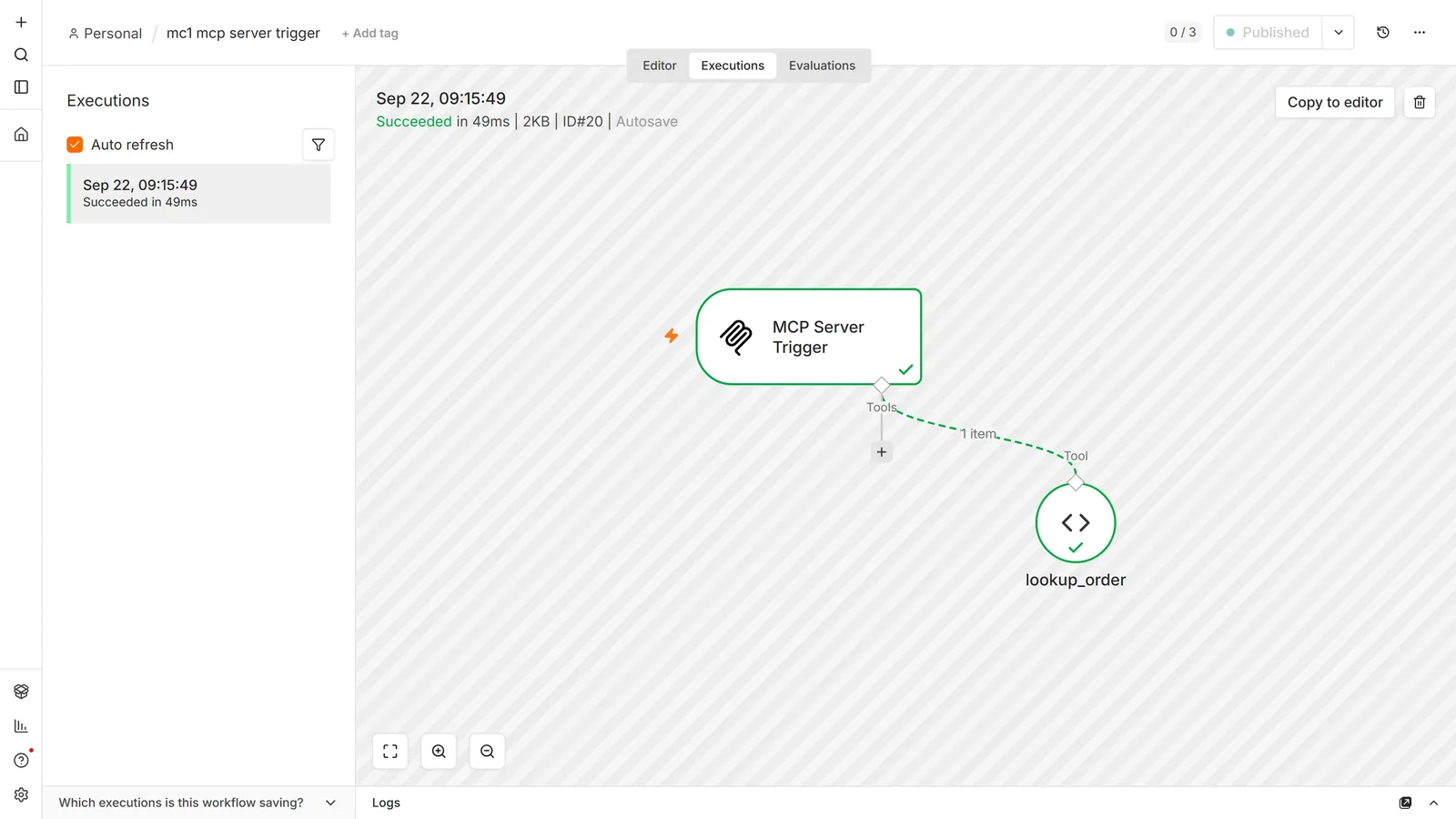
The node gives you two URLs, test and production, on the same split as the n8n Webhook node: the test URL registers when you click Listen for Test Event and shows data on the canvas; the production URL registers when you publish and shows nothing, with the run visible under Executions instead.
Authentication is None, Bearer, or Header. The path is randomly generated by default to avoid collisions with other Server Trigger nodes, and you can override it if you need stable endpoints.
Transport: why Claude Desktop needs a shim
The node supports Server-Sent Events (SSE) and streamable HTTP. It does not support stdio.
That matters because several desktop clients speak stdio. n8n's documented workaround is to run a gateway that proxies between them:
{
  "mcpServers": {
    "n8n": {
      "command": "npx",
      "args": [
        "mcp-remote",
        "<MCP_URL>",
        "--header",
        "Authorization: Bearer ${AUTH_TOKEN}"
      ],
      "env": {
        "AUTH_TOKEN": "<MCP_BEARER_TOKEN>"
      }
    }
  }
}
If a client connects to instance-level MCP without any of this, that is expected — the instance server speaks HTTP directly. The shim is a Server-Trigger-node problem, not a general n8n MCP problem, and this is exactly the kind of instruction that gets copied from the wrong section.
3. The MCP Client Tool node
The other direction. This is a sub-node you attach to an AI Agent, and it lets the agent call tools on an external MCP server.
Before adding it manually, check the node panel: n8n keeps a registry of MCP servers, and if the service you want is in it, you connect from the panel and sign in, and n8n creates the credential for you. The MCP Client Tool node is for servers that are not in the registry yet. The registry's contents change often enough that no written list is worth trusting — look in the panel.
Configured manually, the node takes an SSE Endpoint and an authentication method: Bearer, a generic header, multiple headers, or OAuth2. Multiple Headers Auth covers servers wanting both an API key and a username.
We pointed an MCP Client Tool at an MCP Server Trigger running on the same instance and asked the agent a question only the server's tool could answer:
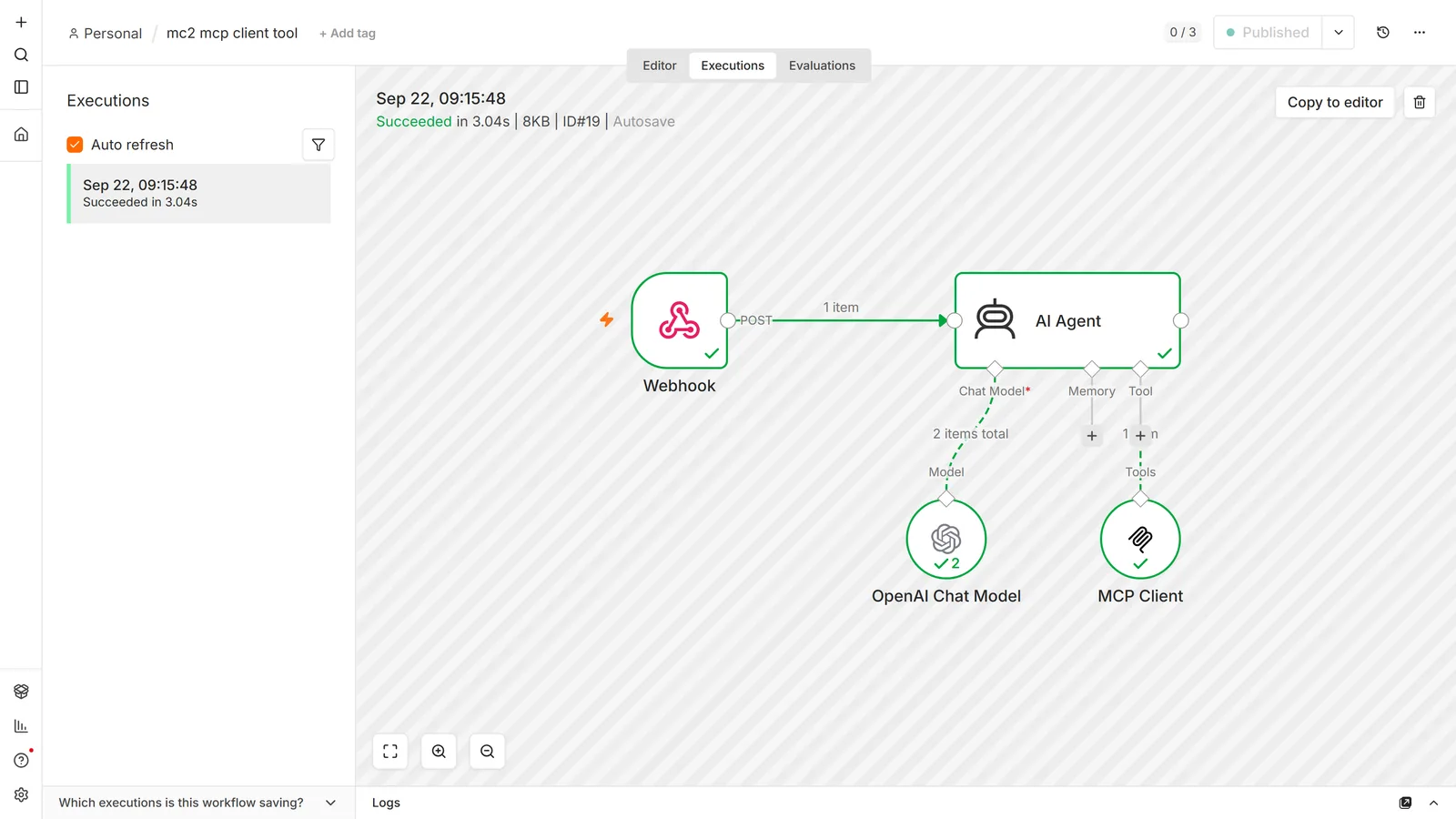
The parameter to think about is Tools to Include:
- All — the agent sees every tool the server exposes.
- Selected — only the ones you list.
- All Except — everything but the ones you exclude.
All is the default shape of least effort and the wrong one for most builds. Every exposed tool costs context on every call, and the agent's decision space grows with each one. n8n's own docs frame the trade directly: a built-in node gives you tighter control because you fix the operation and pin the parameters, leaving the model only the fields you choose; an MCP server gives the agent range at the cost of control and context. If you know the agent needs to post to one Slack channel, the Slack node is the better tool, not an MCP server that can also delete things.
4. The community n8n-mcp server
n8n-mcp is an MIT-licensed MCP server by Romuald Członkowski. n8n does not make it, but plenty of people searching "n8n MCP" are looking for it: the repository had over 23,000 GitHub stars on 24 October 2026. It works in two layers.
With no n8n connection it is a reference server. Seven tools search a bundled database of n8n nodes and templates, return a node's properties and documentation, and validate node settings and whole workflow JSON. Your AI client gets n8n knowledge it would otherwise guess at, and nothing on your instance is touched. Add N8N_API_URL and N8N_API_KEY and 21 management tools appear, 28 in total: create, edit, publish and run workflows, read executions, and manage folders, data tables and credentials.
That second layer is where it differs from n8n's own server. n8n-mcp drives your instance through the public API with an ordinary API key, so the per-workflow Available in MCP allow-list from section 1 does not apply. Whatever the key can read, the AI client can read.
Setting it up in Claude Code
claude mcp add n8n-mcp \
  -e MCP_MODE=stdio \
  -e LOG_LEVEL=error \
  -e DISABLE_CONSOLE_OUTPUT=true \
  -e N8N_API_URL=http://localhost:5678 \
  -e N8N_API_KEY=<your n8n API key> \
  -e WEBHOOK_SECURITY_MODE=moderate \
  -- npx n8n-mcp
Leave out the last three -e lines for the documentation-only mode. The API key comes from Settings → n8n API in your instance. The project's docs also cover Cursor, VS Code and Claude Desktop, a Docker image, and a hosted version.
The WEBHOOK_SECURITY_MODE line is missing from the project's own Claude Code setup page. Without it, the local setup above fails on every management call.
What we tested
We ran n8n-mcp 2.97.0 (its Docker image, over stdio) against a fresh n8n 2.44.6. The instance held one workflow that was never exposed to MCP, with a fake API token typed into a Set node, and one HTTP Header Auth credential.
| Check | Result |
|---|---|
| Tools with no n8n connection / with an API key | 7 / 28 |
N8N_API_URL on localhost, default settings | Every instance call failed: SSRF protection: Localhost access is blocked in strict mode |
Same, with WEBHOOK_SECURITY_MODE=moderate | Worked |
| n8n on a private address (172.27.x.x) | moderate still blocked it (Private IP addresses not allowed); permissive worked |
| Read the never-exposed workflow | Full JSON, fake token included |
| Read the credential | Name, type and dates; the secret value never appeared |
| Build, publish and call a webhook workflow over MCP | Worked, and the agent got the workflow's reply back |
n8n_test_workflow straight after publishing | 404, webhook not registered, for the first one to four calls after every publish, then 200 |
validate_workflow on a Webhook (default response mode) wired to Respond to Webhook | valid: true, with the strict profile too. n8n then failed every call: Unused Respond to Webhook node found in the workflow |
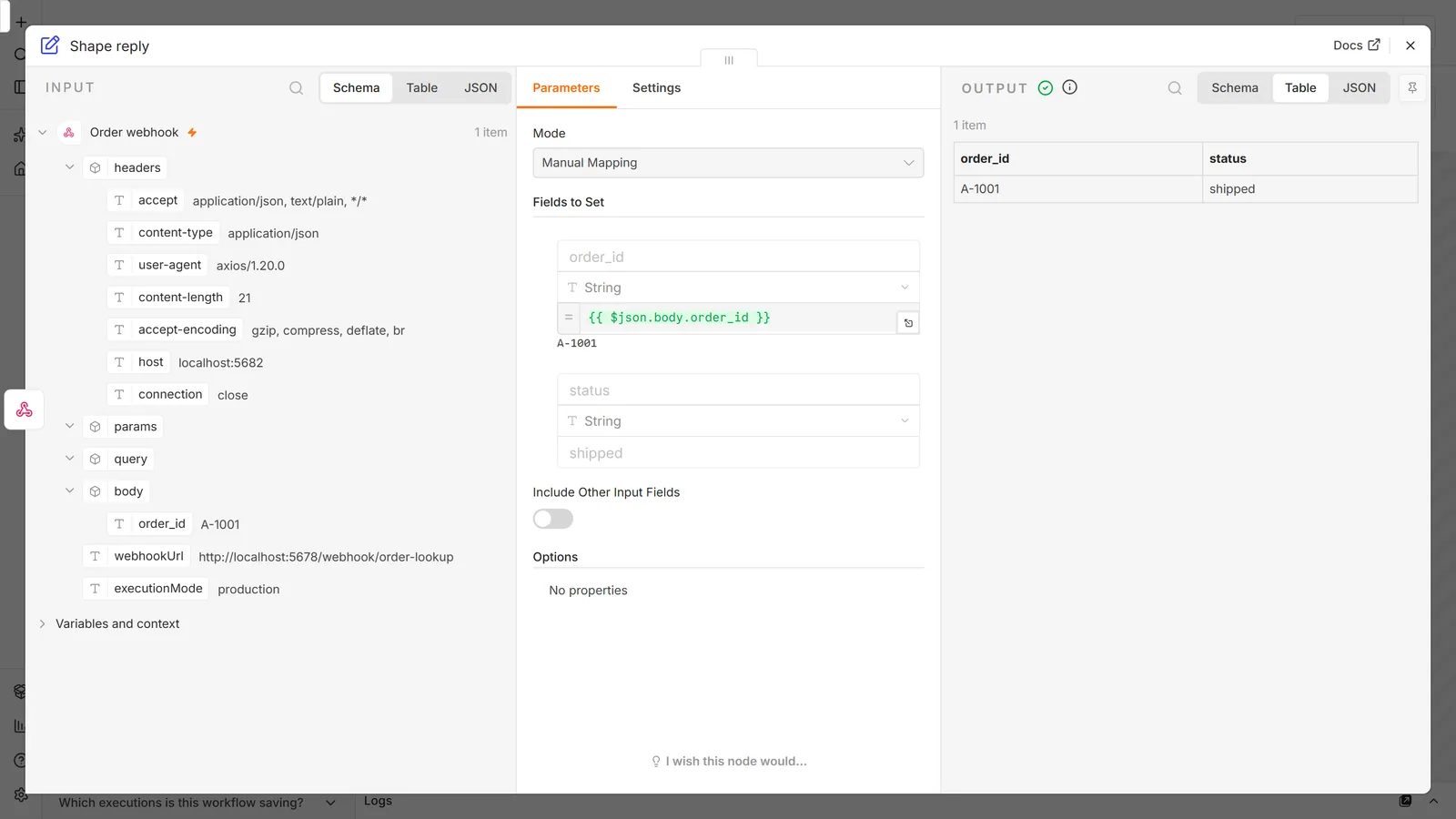
Three of those rows change how you should set it up.
Localhost is blocked by default. n8n-mcp refuses to call loopback addresses unless you set WEBHOOK_SECURITY_MODE=moderate, a guard against server-side request forgery. Its self-hosting guide says so. Its Claude Code page does not, and the failure is confusing: the documentation tools keep working, so the broken management calls look like a bad API key. If n8n runs on another machine on your network (a 192.168.x.x or 10.x.x.x address), moderate is not enough and you need permissive. One page of the project's docs says moderate covers private-network hosts. In our test it did not.
A valid workflow is not a working one. validate_workflow checks workflow JSON against node schemas and connections. It caught a connection to a misspelled node name. It passed a Webhook left on its default response mode with a Respond to Webhook node after it, which n8n publishes without complaint and then answers every request with a 500. So have the agent run what it builds, not just validate it. When it runs it, the first calls after publishing can return 404 while n8n registers the webhook, and n8n-mcp wraps those in "success": true because the HTTP request itself went through. An agent that reads only that flag reports a pass. Tell it to check the status code.
Limit the key, not just the tools. The DISABLED_TOOLS variable removes tools (the README's read-only list left 19 of 28), but the read tools left behind still return every workflow in full. The stronger control is the key. On our unlicensed 2.44.6 instance, Settings → n8n API → Create API key offered All, Read only and Custom scopes, although n8n's API docs still describe key scopes as an Enterprise feature. All is preselected: 108 of 108 scopes. Read only selects 35. With it, n8n-mcp could not create a workflow (Forbidden), but it still read every workflow and listed credential names, because the preset includes workflow:read, workflow:export and credential:list.
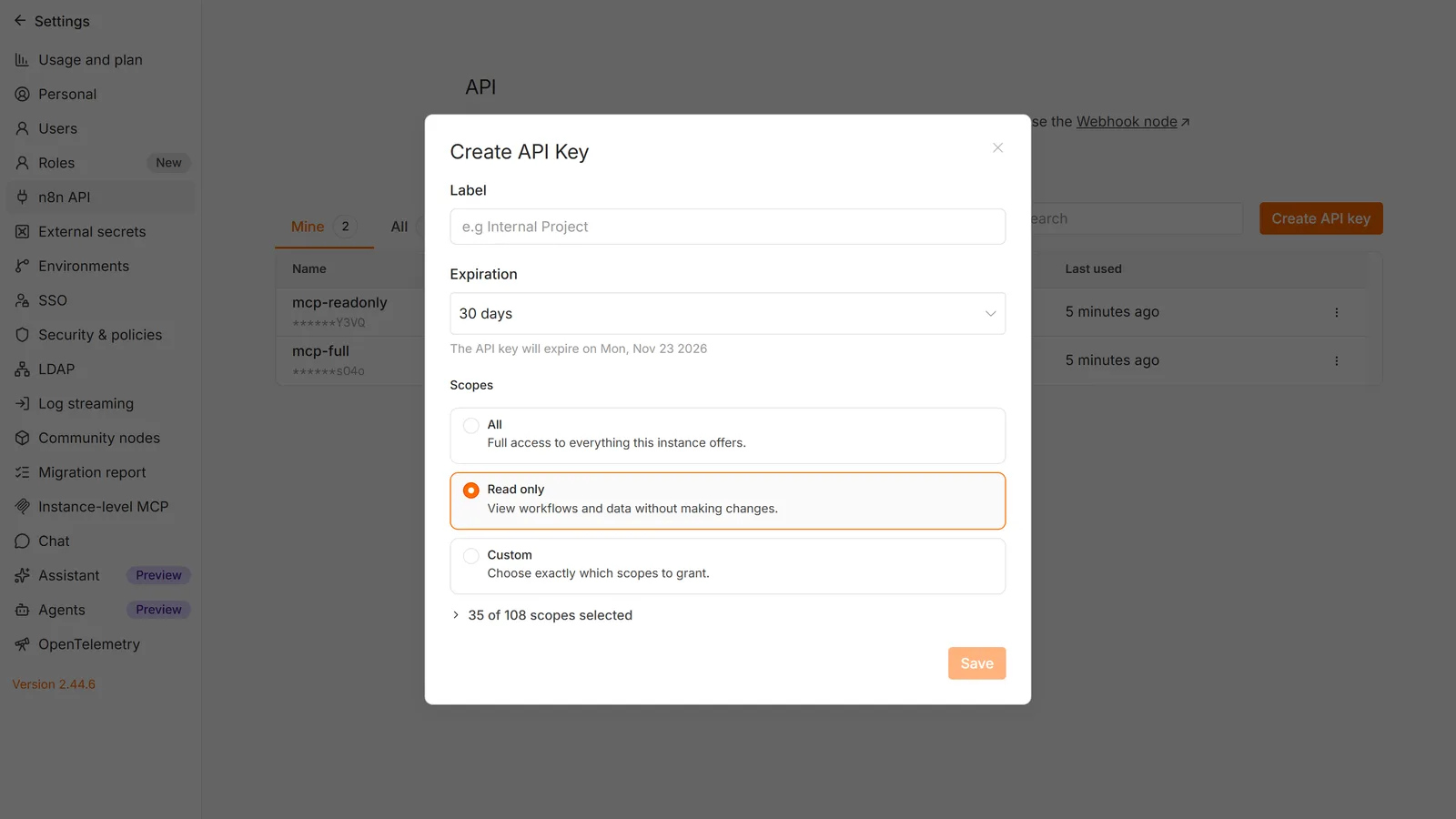
Two habits follow. Keep secrets in credentials, where none of our keys returned the value, and never type them into node parameters, where every key did. And point a full-access key at a development instance; the project's README itself warns against letting AI edit production workflows.
n8n-mcp or n8n's built-in server?
They overlap less than the names suggest. n8n's instance-level MCP gives you an allow-list, OAuth and tools maintained by n8n. n8n-mcp gives your AI client node documentation, templates and a validator that work with no instance at all, plus management through the public API. Running n8n-mcp in documentation-only mode next to the built-in server gets you the knowledge of one and the access control of the other. n8n-mcp also releases often (2.97.0 came out the day we tested it), so pin a version, for example npx n8n-mcp@2.97.0, if you want the behaviour above to hold.
The five things that break it
1. Queue mode with multiple webhook replicas. SSE and streamable HTTP need the same server instance to hold a persistent connection. One webhook replica is fine. With several, you must route all /mcp* requests to a single dedicated webhook replica — a separate replica set with one webhook container, and ingress or load balancer rules sending /mcp* there. Skip this and connections break intermittently or silently fail to deliver events, which is the worst failure shape to debug because it looks like the model being flaky.
2. Reverse proxy buffering. Behind nginx, the MCP endpoint needs buffering off. n8n's documented location block:
location /mcp/ {
    proxy_http_version          1.1;
    proxy_buffering             off;
    gzip                        off;
    chunked_transfer_encoding   off;

    proxy_set_header            Connection '';

    # The rest of your proxy headers and settings
}
Setting these explicitly on the MCP location matters even if you think they are already off — the point is to stop them being inherited from elsewhere in the config. A proxy, load balancer or WAF that strips MCP request headers will also break the connection; n8n allows the routing headers in its CORS policy from 2.36.0.
3. "You do not have sufficient permissions to authorize this request." This message is misleading. For the instance MCP server it means MCP access is not enabled on the instance — not that your user lacks a role. While the server is running, any signed-in user can approve a client; while it is off, n8n refuses everyone. Ask an owner or admin to turn it on.
4. claude.ai asks you to sign in even when Authentication is None. Known behaviour, and claude.ai is the only client documented as doing it. It assumes every MCP endpoint on a domain uses the same user authentication the instance offers elsewhere. Not a misconfiguration on your side.
5. Cloud clients cannot reach a private instance. Obvious written down, less obvious at 1am: a browser-based client needs your instance publicly reachable. If you are testing against localhost, only a local client will connect. Same class of problem as a webhook URL that still says localhost.
What MCP does not give you: the retry problem
MCP is a transport and a tool-description format. It is not a transaction system, and nothing about connecting a model to your workflows makes those workflows safe to call twice.
This is worth spelling out because the failure is invisible in testing and expensive in production. Of the 46 tools the n8n MCP server exposes, exactly one — archive_workflow — is documented as idempotent. Nothing in the MCP documentation describes deduplication, an idempotency key, or a replay guard for execute_workflow.
So, the four questions worth answering before you expose a workflow that does anything irreversible:
What happens on a retry? The action happens again. If an agent calls a tool, gets a timeout, and calls it again — which is ordinary agent behaviour, not a bug — the workflow runs a second time. If it sends, charges, posts or creates, it does that twice. n8n tracks nothing about which steps already succeeded.
What happens under concurrent execution? Nothing serialises MCP calls. Two clients are connected to the same instance and both can call execute_workflow on the same workflow at once. Any guard built as "look up a key, then write if absent" is not atomic and will let both runs through when they interleave.
What happens on partial failure? An agent that calls three tools and fails on the third leaves the first two done. There is no rollback and no compensating action unless you wrote one.
What happens out of order? The model decides the order. That is the entire point of an agent, and it means any sequencing assumption you would get for free in a fixed workflow is gone. A tool that is only correct when it runs after another tool needs to enforce that itself.
The practical answer is the same one that applies to any n8n AI agent: make the write idempotent at the destination, check a key before the irreversible step while accepting that the check is not atomic, and expose read-only tools freely while treating write tools as things you allow-list one at a time. Our free n8n workflow templates include an error handler and a heartbeat monitor, which is the floor for anything running unattended — and 84.8% of published n8n workflows have no error handling at all, so the floor is not where most people start.
What you actually exposed
Three properties of instance-level MCP that are easy to miss, and all three are disclosure questions rather than convenience questions:
Access is not scoped per client. Every client you connect sees every workflow you have enabled. Connect Claude Desktop and ChatGPT and both see the same set; you cannot give one client a subset. Visibility stays user-scoped — a user only sees MCP-enabled workflows they already have access to — but that is a different axis from client scoping.
search_workflows sees past the allow-list. Previews only, as above, and previews of everything the user can view.
OAuth callback URLs are unrestricted by default. n8n allows any callback URL unless you change it. Settings → Instance-level MCP → Access → Allowed callback URLs, switch to Only trusted URLs, and list the ones you expect. n8n's own documentation calls the default less secure, and this is a two-minute change.
If you enabled MCP to try it and moved on, the honest cleanup is to revoke the clients: Connected clients → View all → Revoke access. Note that API-key clients do not appear in that list, because they authenticate with a bearer token rather than an OAuth connection — for those, rotate the token.
Frequently asked questions
Is n8n an MCP server or an MCP client?
Both, through different features. Instance-level MCP access and the MCP Server Trigger node make n8n a server. The MCP Client Tool node makes a workflow a client of someone else's server.
Is n8n-mcp made by n8n?
No. n8n-mcp is an open-source project by Romuald Członkowski, at github.com/czlonkowski/n8n-mcp. n8n's own MCP server is instance-level MCP access, under Settings → Instance-level MCP.
Why does n8n-mcp say "Localhost access is blocked in strict mode"?
Its SSRF guard blocks loopback addresses by default. Set WEBHOOK_SECURITY_MODE=moderate when N8N_API_URL points at localhost, and permissive when it points at a private-network address such as 192.168.x.x.
Do I need the MCP Server Trigger node to connect Claude Code to n8n?
No. That is instance-level MCP access — Settings → Instance-level MCP — and it needs no node on any canvas. The Server Trigger node is for publishing a narrow, hand-built tool set from one workflow.
Why does my MCP connection keep dropping?
The two usual causes are queue mode with more than one webhook replica, and a reverse proxy buffering the response. Both break the persistent connection SSE and streamable HTTP depend on.
Does the MCP Server Trigger support stdio?
No — SSE and streamable HTTP only. Clients that speak stdio need a gateway such as mcp-remote in between.
Which workflows can I expose to MCP clients?
Published workflows containing a webhook, form, schedule, or chat trigger. Others are not eligible, regardless of the instance setting.
Can I stop MCP being available at all on a self-hosted instance?
Yes. N8N_DISABLED_MODULES=mcp removes the endpoints and hides the related UI.
Does exposing a workflow to MCP let a client see my credentials?
The list_credentials tool reports which credentials exist, not their secret values. Treat the names themselves as information you are disclosing.
Will an MCP client run my unpublished workflow?
execute_workflow defaults to production mode and runs the published version. It supports a manual mode for the current unpublished one, so the answer depends on what the client asks for.
Primary references: n8n's Connect to n8n MCP server guide, the MCP server tools reference, the MCP Server Trigger node docs, and the MCP Client Tool node reference. For n8n-mcp, its README and our own test run on 2026-10-24 (n8n 2.44.6, n8n-mcp 2.97.0).
Version notes for n8n's own features reflect its documentation as of 2026-09-15; MCP is moving quickly and feature availability is version-gated, so check your instance's version before assuming a setting exists. If MCP is the reason you are setting n8n up in the first place, start with n8n in Docker and then what n8n is and how it works — MCP is a good deal easier to reason about once workflows and items are familiar.