Build an n8n RAG Chatbot: Vector Store, Embeddings and Retrieval (2026)
Build an n8n RAG chatbot that works: ingest documents into a vector store, wire embeddings, retrieve real context, and avoid the silent failure modes.
By Ali Ilyas · · Updated September 22, 2026
A RAG chatbot answers questions from your documents instead of from whatever the model absorbed during training. In n8n it is two workflows, not one: an ingestion workflow that loads documents into a vector store, and a chat workflow that retrieves the relevant chunks and hands them to a model.
Almost every guide shows the happy path of the second workflow and skips the first. That is backwards. Retrieval quality is decided at ingestion time, and the most common outcome of a first RAG build is a bot that confidently answers from nothing, because the vector store is empty or full of chunks that can never match a question.
This covers both workflows, the sub-nodes that make them work, and the failure modes that produce a green execution and a useless answer.
What's on this page
- The five pieces of a RAG build
- Choosing a vector store
- Workflow 1: ingestion
- Chunking, which decides everything downstream
- Metadata is not optional
- Workflow 2: the chatbot
- Chain or Agent?
- The five operation modes
- Embeddings: the one rule
- When retrieval returns nothing
- Keeping the store in sync
- What this costs
- Gotchas
- Frequently asked questions
The five pieces of a RAG build
Every n8n RAG workflow is assembled from the same five components. Knowing which is a normal node and which is a sub-node saves the first hour:
| Piece | What it is | Where it sits |
|---|---|---|
| Vector Store | Root node — Supabase, Qdrant, Pinecone, PGVector, Simple Vector Store | In the main flow |
| Embeddings | Sub-node — turns text into vectors | Under the vector store |
| Default Data Loader | Sub-node — reads your document into chunks | Under the vector store, insert mode only |
| Text Splitter | Sub-node — decides where chunks break | Under the Data Loader |
| Chat Model | Sub-node — generates the answer | Under the Agent or Chain |
| Vector Store Retriever | Sub-node — wraps the store so a chain can query it | Between the store and a Question and Answer Chain |
The last row is the one that catches people, and it is covered in full further down: a vector store is not a retriever, and a Question and Answer Chain asks for a retriever.
The nesting goes three deep on the ingestion side: Vector Store, then Data Loader, then Text Splitter. That surprises people expecting a flat flow, and it is why an imported RAG template looks like a pile of boxes hanging off other boxes.
The connector rule from the OpenAI integration guide applies to all of these: a sub-node cannot run on its own and cannot connect into the main flow. If you dragged an Embeddings node onto the canvas and found nowhere to plug it in, that is working as designed.
Choosing a vector store
n8n ships several, and the choice matters less than the internet suggests. What actually differs:
| Store | Good for | The catch |
|---|---|---|
| Simple Vector Store | Learning, demos | In-memory. Everything is lost on restart — including a container restart you didn't notice |
| Supabase | Most production builds | Needs a SQL setup step before it works at all |
| Qdrant | Self-hosted, large collections | Self-hosted URL handling is the most-reported vector store problem on the forum |
| PGVector | You already run Postgres | Metadata filtering syntax is its own learning curve |
| Pinecone | Managed, zero ops | Paid, and the node's delete and filter behaviour is limited |
Start with Supabase if you have no strong preference. It is the best-documented path, it survives restarts, and the free tier is enough to build on. If you already self-host n8n with Postgres (see the Docker setup guide), PGVector avoids adding a service.
Do not build anything real on the Simple Vector Store. It is genuinely useful for a ten-minute test, and it will silently discard your entire knowledge base the next time n8n restarts. People lose an afternoon to this and conclude RAG is unreliable.
The Supabase setup step nobody mentions
Before the node works, the database needs the vector extension, a documents table, and a matching SQL function. Supabase publishes this as a quickstart snippet. Run it once in the SQL editor.
Two things about it are worth knowing in advance:
- The function name matters. The node's Query Name option defaults to
match_documents. If you named your function something else, set it here, or every search returns nothing with no error. - The embedding dimension is baked into the table. The quickstart creates a
vector(1536)column, which matches OpenAI's small embedding models. Point a different embedding model at that table and inserts fail on a dimension mismatch. Decide your embedding model before you create the table.
Workflow 1: ingestion
The workflow that loads your knowledge base. At minimum:
- Trigger: manual while building, then a webhook or a schedule.
- Source node: Google Drive, HTTP Request, Google Sheets, or a file upload.
- Extract from File: if the source is a PDF, DOCX or CSV, this converts binary to text.
- Vector Store node, Operation Mode set to Insert Documents.
- Embeddings sub-node attached underneath.
- Default Data Loader attached underneath, with a Text Splitter under that.
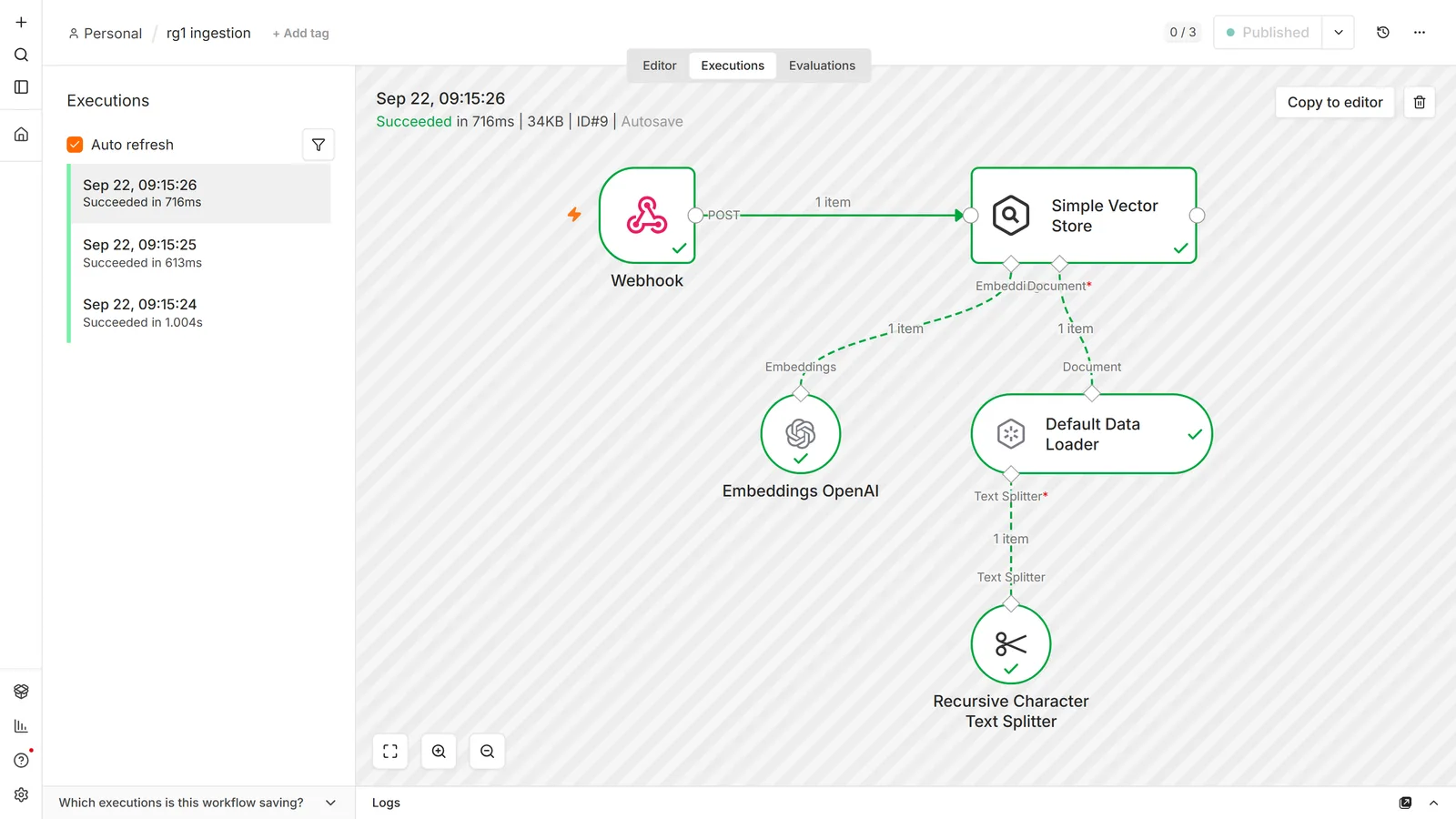
Run it once manually, then look at the store. Open the table in Supabase, or the collection in Qdrant, and confirm rows exist with non-empty content. This is the highest-value check in the whole build, because the chat workflow will happily produce fluent answers from an empty store.
The PDF trap
Loading PDFs through the Default Data Loader on a self-hosted instance can fail with "DOMMatrix is not defined". It is not a corrupted file and not a permissions problem. It is the PDF parsing library expecting a browser API that isn't present in that Node environment.
The reliable workaround is to stop asking the Data Loader to parse the PDF. Use an Extract from File node first, pass the resulting text to the loader, and set the loader's data type to JSON rather than binary. You also get better control over what reaches the splitter, which you want anyway.
Scanned PDFs are a different problem with the same symptom. A scanned page is an image, so text extraction returns nothing, or a few characters of stray header, and the loader dutifully embeds that. You get an empty-ish store and no error anywhere. If the source is scans, photographs of documents, or anything produced by a copier, you need OCR before the loader: a vision model through the OpenAI node's Analyze Image operation, or a dedicated OCR service. Check the extracted text before you embed it, every time, on any corpus you did not author yourself.
Chunking, which decides everything downstream
The Text Splitter breaks documents into pieces small enough to embed. Three options, and the recommendation is unambiguous:
- Recursive Character Text Splitter: n8n's own recommendation, and correct for almost everything. It tries paragraph breaks first, then sentences, then characters, so chunks tend to end at natural boundaries.
- Character Text Splitter: splits on a fixed separator. Use when your documents have a rigid structure worth preserving.
- Token Text Splitter: splits by model tokens rather than characters. Useful when you are close to a context limit and need exactness.
Chunk size is the parameter people tune blindly. Two failure modes, in opposite directions:
- Chunks too large (say 4,000 characters): each covers several topics, so its vector is an average of all of them and matches nothing precisely. Retrieval returns a chunk that mentions your topic in passing.
- Chunks too small (say 200 characters): each is precise but lacks the surrounding context needed to answer. The model gets a matching sentence with no explanation attached.
Start at 1,000 characters with 200 characters of overlap and adjust only when you can point at a specific bad answer. The overlap exists so a fact split across a boundary survives intact in at least one chunk.
Match chunk size to your content, not to a blog post. FAQ entries and product records want small chunks that map one-to-one onto an answer. Long-form policy documents want larger ones. If your source is already structured (a spreadsheet, a database, a support-ticket export), consider skipping the splitter entirely and inserting one row as one chunk.
Metadata is not optional
The Data Loader lets you attach metadata to every chunk. Skipping it is the mistake you discover three weeks later, and it is expensive because fixing it means re-ingesting everything.
Attach at least:
- A source field: the file name or URL the chunk came from. Without it your bot cannot cite anything and you cannot debug a bad answer.
- A stable document ID: so you can delete or update one document's chunks later without wiping the store.
- Any field you will ever want to filter on: customer, product, language, version, effective date.
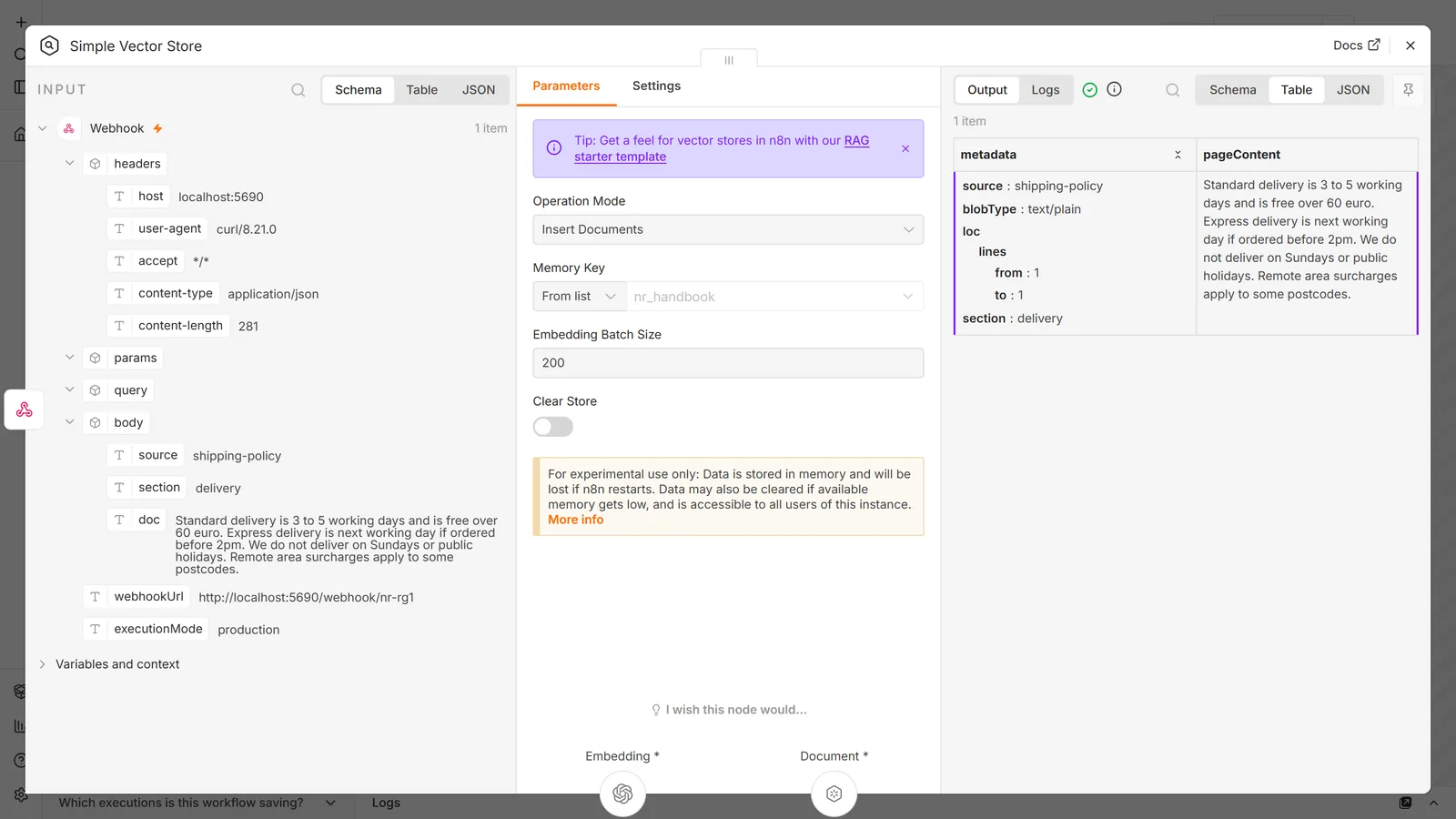
Metadata is what turns one vector store into many. A Metadata Filter in Get Many mode restricts a search to one product's documentation or one customer's records, with AND logic across the fields you set. Multi-tenant RAG is metadata filtering and nothing else, so if there is any chance you will need it, put the tenant ID on the chunk now.
The filter UI is equality-and-AND, and that is a real ceiling. There is no OR, no "in this list", no greater-than. Anything richer than "field equals value, and field equals value" is not expressible in the node. Two ways round it, and the second is the honest one:
- Design the metadata so you never need OR. If you find yourself wanting
product = A OR product = B, add aproduct_groupfield at ingestion and filter on that instead. Cheap, and it keeps you inside the node. - Drop to an HTTP Request node against the vector database's own API. Every major store supports far richer filter syntax than the n8n node exposes. You lose the convenience of the sub-node wiring and you gain the provider's full query language.
Choose the first while the schema is still yours to change, which is exactly why this belongs in the first version rather than the third.
Chunk IDs default to UUIDs, which are useless for reconciliation. If you can derive a deterministic ID (the filename plus a chunk number, or a hash of the content), set it. Re-ingesting then updates rows instead of duplicating them, which is the difference between a store you can maintain and one you periodically throw away.
Workflow 2: the chatbot
The retrieval side is smaller than people expect:
- Chat Trigger: n8n's built-in chat interface, or a webhook if the front end is yours.
- AI Agent node.
- Chat Model sub-node underneath it.
- Vector Store node attached as a tool, in Operation Mode Retrieve Documents (As Tool for AI Agent).
- Optionally a Memory sub-node, so the conversation has continuity.
The tool needs a Name and a Description, and the description is not decoration. It is what the agent reads to decide whether to search at all. "Vector store" as a description produces a bot that answers from the model's own knowledge and never queries your documents. Write what is in the store and when to use it: "Search the 2026 employee handbook for questions about leave, expenses, and equipment policy."
This is the most common cause of "my agent ignores my knowledge base." Retrieval is fine. The agent was never told the tool was relevant.
Chain or Agent?
Two valid shapes, and the simpler one is underused:
Question and Answer Chain takes a question, retrieves from the vector store, and answers from what it finds. One retrieval, one model call, fixed order. It cannot decide to skip the search and it cannot call anything else.
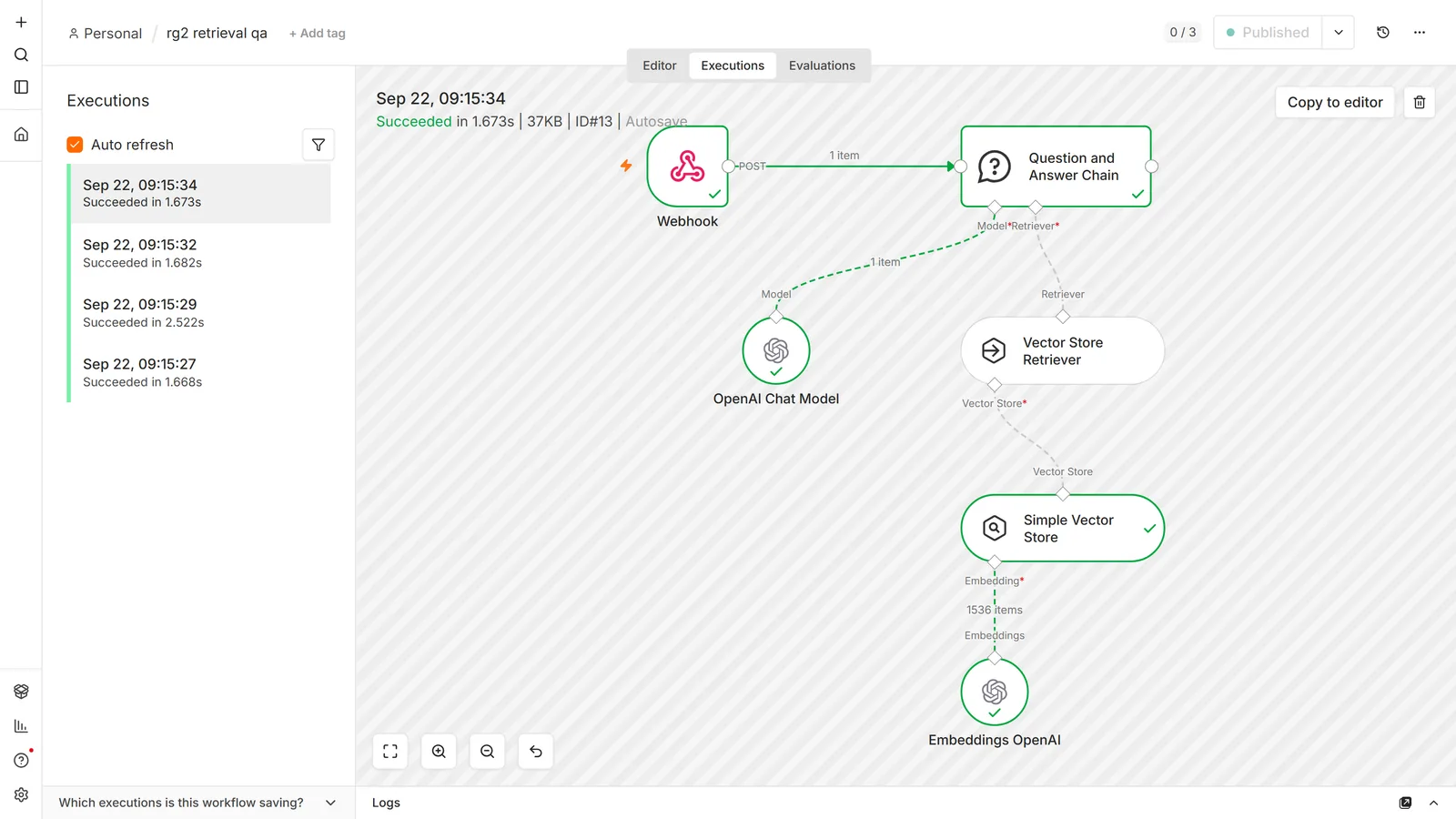
It does not connect to the vector store directly, and this is the trap. The chain's required input is a Retriever, not a vector store. The store's own mode is labelled Retrieve Documents (As Vector Store for Chain/Tool), which reads like it should plug straight into the chain — and n8n will accept the workflow if you wire it that way. The run then fails with a message that names nothing you put on the canvas:
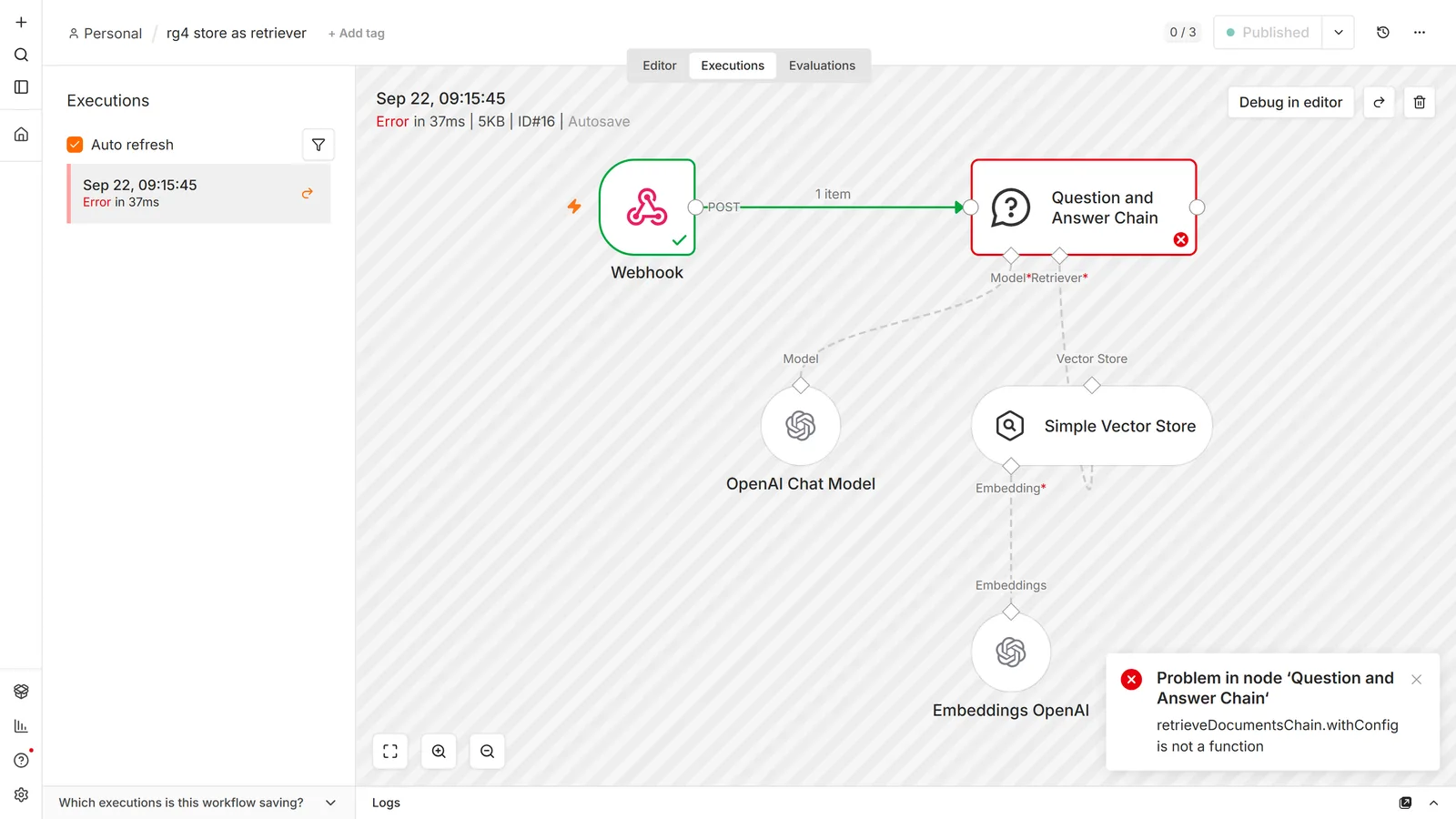
The fix is a Vector Store Retriever node in between: the store connects up into the retriever, and the retriever connects into the chain. With that one node added, the same question answers from the documents:
AI Agent with the vector store as a tool decides whether to search, can search more than once, and can combine retrieval with other tools: sending an email, writing to a sheet, escalating to a human. The agent side needs no retriever node — the store in Retrieve Documents (As Tool for AI Agent) mode outputs a tool connector and hangs straight off the agent:
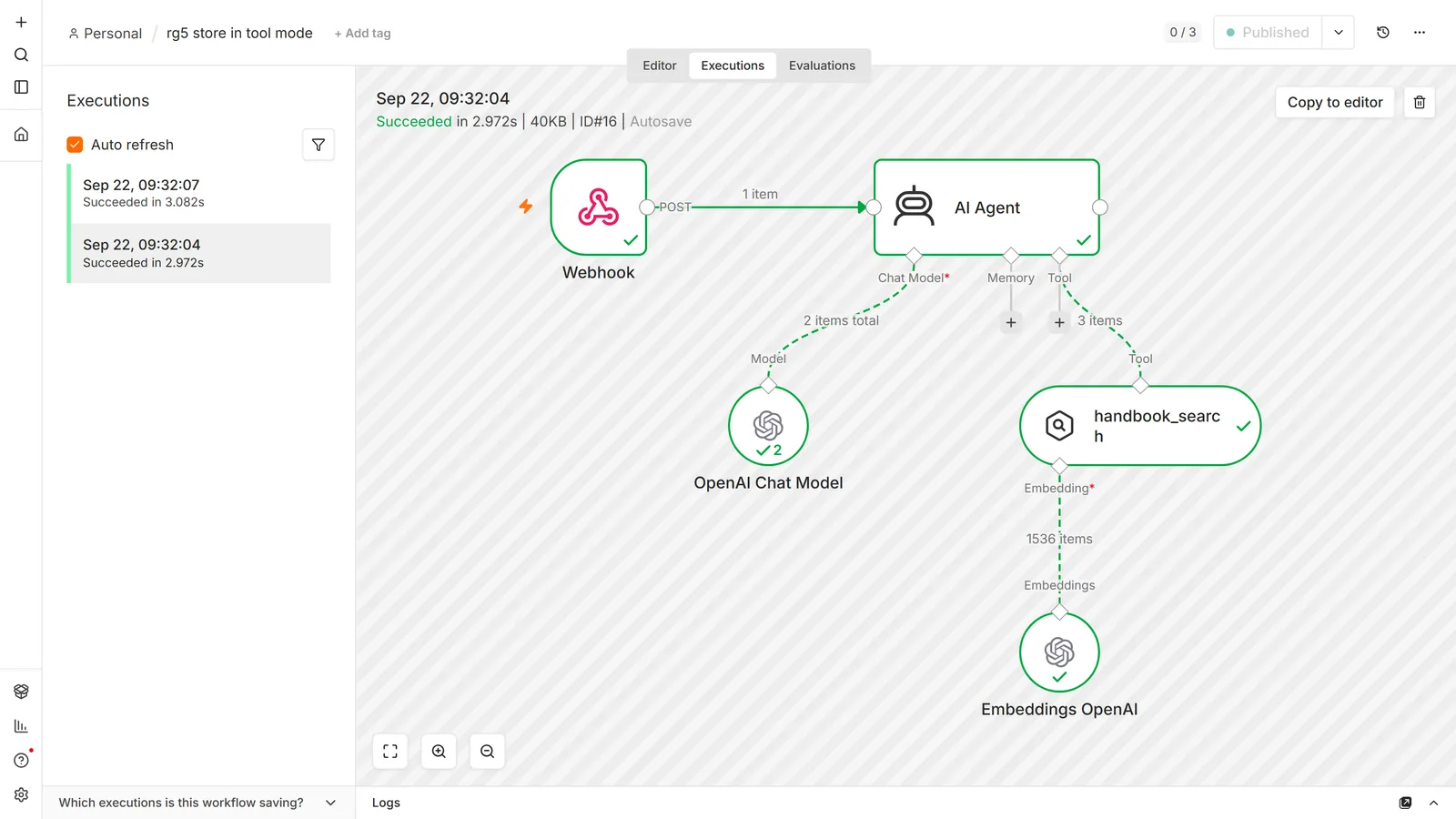
Use the Chain when the job is genuinely "answer this question from these documents." It is cheaper, faster and far easier to debug, because there is exactly one retrieval to inspect. Use the Agent when the bot needs to do things as well as answer, or when one question may need several different lookups. The n8n AI agent guide covers the agent side properly, including why one run can be ten model calls; the LangChain tutorial covers the chain side, including the Basic LLM Chain this one is built on.
The five operation modes
The vector store node changes shape entirely depending on this dropdown, which is why two screenshots of "the same node" can look nothing alike:
| Mode | What it does | Attach it to |
|---|---|---|
| Insert Documents | Writes chunks into the store | Main flow, ingestion workflow |
| Get Many | Runs a similarity search and returns rows | Main flow — this is the debugging mode |
| Retrieve Documents (As Vector Store for Chain/Tool) | Acts as a retriever for a Q&A Chain | The chain's retriever connector |
| Retrieve Documents (As Tool for AI Agent) | Exposes the store to an agent as a callable tool | The agent's tool connector |
| Update Documents | Replaces the content of one entry by ID | Main flow, maintenance |
Get Many is the mode that saves you. When answers are wrong, put a Get Many node in a scratch workflow, type the user's exact question as the prompt, and read what comes back. You will immediately know whether the problem is retrieval (wrong chunks) or generation (right chunks, bad answer). Those two problems have nothing in common, and fixing one does nothing for the other.
Embeddings: the one rule
Ingest and query must use the same embedding model. Vectors from different models are not comparable, and not merely "less accurate" but meaningless. Similarity scores come back as noise, and nothing errors.
This bites in three ordinary situations: you switch providers to save money, you upgrade to a newer embedding model, or you built ingestion and chat as separate workflows and set the sub-node differently in each. If you change the model, you re-embed everything. Budget for that rather than discovering it.
Two practical notes:
- Dimensions must match the column. A 1536-dimension table rejects 768-dimension vectors. Some models let you request a dimension count; if yours does, set it explicitly rather than relying on a default that may change.
- Check for zero vectors. OpenAI-compatible local endpoints (LM Studio, some Ollama configurations) have been reported returning all-zero embeddings through the Embeddings node. Everything succeeds, every similarity score is identical, and retrieval is effectively random. If results look arbitrary, inspect a stored vector before debugging anything else.
When retrieval returns nothing
Work through these in order. The list is ordered by how often each one turns out to be the answer:
- Is there anything in the store? Query the table directly. An ingestion workflow that errored halfway, or one you built but never ran, is the most common cause by a distance.
- Same embedding model on both sides? Compare the sub-node under the insert node with the one under the retrieve node. They are two separate settings and they drift.
- Right table, right query function? Table Name and Query Name both have defaults that quietly apply when the field is blank. Confirm you are reading the table you wrote to.
- Is a metadata filter excluding everything? Filters use AND logic. Two filters that never co-occur on one chunk return zero rows every time, correctly.
- Is the limit too low? Default limits are small. If your chunks are small and the question is broad, four chunks may genuinely not contain the answer.
- Is the tool description usable? Agent builds only. Check the execution log for whether the tool was called at all. If it wasn't, this is a prompt problem, not a retrieval problem.
Keeping the store in sync
A knowledge base loaded once and never updated becomes wrong, and a RAG bot serving confidently wrong answers is worse than no bot.
Deleting is harder than inserting. The vector store nodes are built around insert and query; delete support varies by provider and is thin in places. Plan the delete strategy before you have 50,000 rows:
- Stable IDs plus Update Documents works when you can compute the same ID for the same content twice.
- Delete by metadata is what you want for "remove everything from this document", and availability depends on your store.
- Rebuild into a new collection and switch over is unglamorous, works everywhere, and is the right answer more often than people expect for stores under a few hundred thousand rows.
For incremental updates, drive ingestion from a change signal rather than a full re-scan: a Google Drive trigger, a modified-at column, a webhook from your CMS. Re-embedding a whole corpus nightly is a real cost with no benefit.
What this costs
Three separate meters, and only one is obvious:
Embeddings at ingestion. Cheap per token, and you pay for every chunk. Re-embedding a large corpus repeatedly while tuning chunk size is where beginners spend unexpected money. Test settings on ten documents, not ten thousand.
Embeddings at query time. Every question is embedded before it is searched. Small, constant, unavoidable.
The chat model. Retrieved chunks are pasted into the prompt, so a build that retrieves eight chunks of 1,000 characters adds roughly 2,000 tokens to every single call. Raising the retrieval limit raises your bill on every message, forever. This is the lever that surprises people.
Set hard usage limits at the provider before your first real run. The OpenAI guide covers where. n8n itself adds nothing to this; see is n8n free for the full picture.
Gotchas
The Simple Vector Store is memory-only. Restart n8n, lose the knowledge base. Fine for a demo, wrong for everything else.
Sub-node expressions resolve to the first item. n8n's docs are explicit about this, and it means an expression in an embeddings or loader sub-node uses item one's value for every item in the batch. It looks like a data bug and is documented behaviour.
A vector search always returns something. Similarity search returns the closest chunks, not the relevant ones. Ask about something absent from your documents and you still get the nearest matches, which the model will then use. Say so in the system prompt: answer only from the provided context, and say you don't know otherwise.
Green executions prove nothing. As with structured extraction, retrieval failures don't raise errors. Empty context flows to the model, the model writes something plausible, the run finishes green.
Self-hosted Qdrant URLs are fiddly. The node has documented trouble reaching self-hosted instances, especially where the URL includes a port or sits behind a proxy, so collections that exist won't list. Test the same URL with curl from inside the n8n container before assuming the node is broken.
Table Name can be silently ignored. There is a reported Supabase-node bug where inserts land in the default table regardless of the one you named. If rows are missing from your table, check the default before re-ingesting.
Rotating an embeddings credential doesn't re-embed anything. Old vectors stay as they are. Changing provider means a full rebuild.
Frequently asked questions
Do I need a vector database, or can I put my documents in the prompt?
If the whole knowledge base fits comfortably in the model's context window and rarely changes, put it in the system prompt and skip RAG entirely. Vector stores earn their complexity when the corpus is larger than the context window, changes often, or needs filtering per user.
Why does my AI Agent ignore the vector store?
Almost always the tool description. The agent reads it to decide whether the tool is relevant, and a vague description means it never calls the tool and answers from its own knowledge. Check the execution log to confirm whether the tool was invoked at all.
What's the difference between the Vector Store node and the Vector Store Question Answer Tool?
The vector store node in tool mode returns raw matching chunks to the agent, which then reasons over them. The Question Answer Tool runs its own model call to summarise the matches and returns a formed answer. Use the plain store when you want the agent to see the source text; use the Q&A tool when you want a condensed answer and don't need the chunks.
What chunk size should I use?
Start at 1,000 characters with 200 overlap. Reduce it for FAQ-style content where one entry equals one answer; increase it for long-form documents where context spreads across paragraphs. Change it only in response to a specific bad answer you can point at.
Can I use a local or open-source embedding model?
Yes, anything with an OpenAI-compatible endpoint works, including Ollama and LM Studio, and n8n has dedicated nodes for several providers. Two cautions: check that returned vectors aren't all zeros, which has been reported with some local endpoints, and confirm the dimension matches the column your table was created with.
Can I use OpenRouter for embeddings?
Point the embeddings node at the provider's base URL and use their model name. The model dropdown often won't populate against a third-party base URL. Switch the field to an expression and type the name, the same workaround as in the OpenAI guide.
Why do I get a dimension mismatch error?
Your embedding model produces vectors of a different length than the column expects. The Supabase quickstart creates a 1536-dimension column. Either switch back to a 1536-dimension model, or recreate the table at the right size and re-ingest.
How do I filter results to one customer or one product?
Put the field on every chunk as metadata at ingestion time, then use the Metadata Filter in Get Many mode. Filters combine with AND logic. This cannot be added retroactively without re-ingesting, which is why metadata belongs in the first version.
How do I delete a document from the store?
It depends on the provider, and this is the weakest area of the vector store nodes. With stable IDs, Update Documents replaces content in place. Otherwise use delete-by-metadata where it is supported, or rebuild into a fresh collection and switch. Plan this before the store is large.
Why does my PDF fail with "DOMMatrix is not defined"?
The PDF parser expects a browser API that isn't available in that environment. Extract the text first with an Extract from File node and pass text to the Data Loader instead of binary.
My chatbot invents answers. How do I stop it?
Two separate fixes. Instruct it explicitly to answer only from the provided context and to say it doesn't know otherwise, because similarity search always returns something, so the model needs permission to reject it. Then check with Get Many whether the retrieved chunks actually contain the answer; if they don't, the fix is chunking or metadata, not prompting.
Do I need memory as well as a vector store?
They do unrelated jobs. Memory holds the current conversation so follow-up questions make sense. The vector store holds your documents. A bot that answers "what about the second one?" correctly needs memory; a bot that knows your refund policy needs the vector store.
Can I run RAG on the free self-hosted n8n?
Yes. All the AI and vector store nodes are in the Community edition. You pay the embedding and model providers, and whatever hosts your vector database. See self-hosting n8n.
How many chunks should I retrieve?
Four to six is a sane default. Every retrieved chunk is pasted into the prompt, so raising the limit raises the cost and latency of every message and eventually crowds the context window. If more chunks are needed to answer, that usually means the chunks are too small.
How do I know whether the problem is retrieval or generation?
Run the user's exact question through a vector store node in Get Many mode and read the returned chunks. Right chunks with a wrong answer is a prompting problem. Wrong chunks is a chunking, embedding or metadata problem. Diagnosing without this step is guessing.
Can one vector store serve several chatbots?
Yes, and metadata filtering is how. One collection, a tenant or product field on every chunk, and a filter per bot. It is cheaper to operate than parallel stores and much easier to keep in sync.
How do I do an OR in a metadata filter?
You can't in the node, where the filter is equality combined with AND, with no OR, no list membership and no ranges. Either add a grouping field at ingestion so a single equality expresses what you wanted, or query the vector database's own API through an HTTP Request node, which exposes the provider's full filter syntax.
Could I just use Google Sheets instead of a vector store?
For a small, fixed set of question-and-answer pairs, yes. Look up the row and hand it to the model. You lose semantic matching, so it only works when users phrase things predictably, and it stops scaling somewhere in the low hundreds of rows. A sheet is a keyword lookup wearing a knowledge-base costume; that is fine until someone asks the same question in different words.
What about managed RAG, such as Pinecone Assistant or a provider's built-in file search?
They collapse chunking, embedding and retrieval into one hosted step, which removes most of what this guide is about. That is a real option when your documents are simple and you would rather not own the pipeline. You give up control of chunk size, metadata schema and filtering, and you take on a provider dependency that is hard to migrate off. Own the pipeline when retrieval quality is the product; use managed when it is a feature.
My PDFs are scans and retrieval returns nothing useful. Why?
A scanned page is an image, so extraction returns no text and the loader embeds nothing. Nothing errors. Run OCR before the Data Loader and inspect the extracted text before embedding it.
Why do I get a "reading 'toString'" or similar type error from the Supabase Vector Store?
Usually the node received something other than the text it expected: an empty extraction, a binary field where text was wanted, or a document with no page content. Check what the Data Loader actually produced before treating it as a database problem.
Primary references: n8n's RAG in n8n guide, the Default Data Loader sub-node reference, and the Supabase Vector Store node docs for operation modes and options.
Next steps: the AI agent guide covers the agent side: tool descriptions, memory, and iteration limits. For the model and credential layer, see the n8n OpenAI integration. If the bot needs tools from an outside service, the n8n MCP client is the other way to attach them. If your ingestion is triggered by another system, the webhook tutorial covers receiving that request safely, Notion is a common source for the documents themselves, and our n8n workflow templates are importable starting points.