n8n and Postmark: Send Transactional Email Without a Postmark Node (2026)
n8n ships a Postmark trigger but no Postmark send node. Send with the HTTP Request node under the stored Postmark credential, and keep the error codes you need.
By Ali Ilyas · · Updated September 22, 2026
Search for the Postmark node in n8n and you will find one. Drag it onto the canvas and it only receives: it is the Postmark Trigger, and it fires on opens, clicks, bounces and spam complaints. No Postmark node sends an email.
The confusion is reasonable, because n8n does ship a Postmark credential, and a credential usually implies a node. That credential is genuinely useful, just not in the way you expect. This guide sends transactional email through Postmark's API using the stored credential, so no token is typed into a node, and then deals with the part most tutorials skip: what n8n does to Postmark's error codes when a send is rejected.
Everything below was run against Postmark's live API on n8n 2.33.7, using Postmark's documented sandbox token, so you need no account to follow along.
What's on this page
- What you'll need
- There is no Postmark send node, and you can check
- Test the whole thing without a Postmark account
- The credential test fails on the sandbox token, and that is not a bug
- Build the send
- What Postmark rejects
- The trap: n8n throws away Postmark's error code
- Retries are not free, because email is not idempotent
- The other half: reacting to bounces with the Postmark Trigger
- Frequently asked questions
What you'll need
- An n8n instance, self-hosted or cloud. Everything below was run on 2.33.7 and re-checked against 2.40.5.
- Nothing else to start. You need a real Postmark account and a confirmed sender signature only when you want mail to actually arrive.
There is no Postmark send node, and you can check
On a self-hosted install, list what the Postmark integration ships:
ls node_modules/n8n-nodes-base/dist/nodes/Postmark/*.node.js
# PostmarkTrigger.node.js
A send node would sit beside it as Postmark.node.js. It is absent on 2.33.7 and on 2.40.5.
People also read that trigger as an inbound-email trigger, which it isn't. The events it registers are:
open · firstOpen · click · delivery · bounce · includeContent · spamComplaint · subscriptionChange
Those are delivery events about mail you sent, not messages arriving in an inbox.
So the send is an HTTP Request, and it does not have to be an unauthenticated one.
Test the whole thing without a Postmark account
Postmark documents a sandbox token for exactly this:
You can do this by passing the
POSTMARK_API_TESTvalue in theX-Postmark-Server-Tokenheader field.
Requests made with it are validated and answered normally, and nothing is delivered. Use it while you build:
curl -X POST "https://api.postmarkapp.com/email" \
  -H "Accept: application/json" \
  -H "Content-Type: application/json" \
  -H "X-Postmark-Server-Token: POSTMARK_API_TEST" \
  -d '{"From":"receipts@example.com","To":"buyer@example.com","Subject":"Your receipt","TextBody":"Thanks!","MessageStream":"outbound"}'
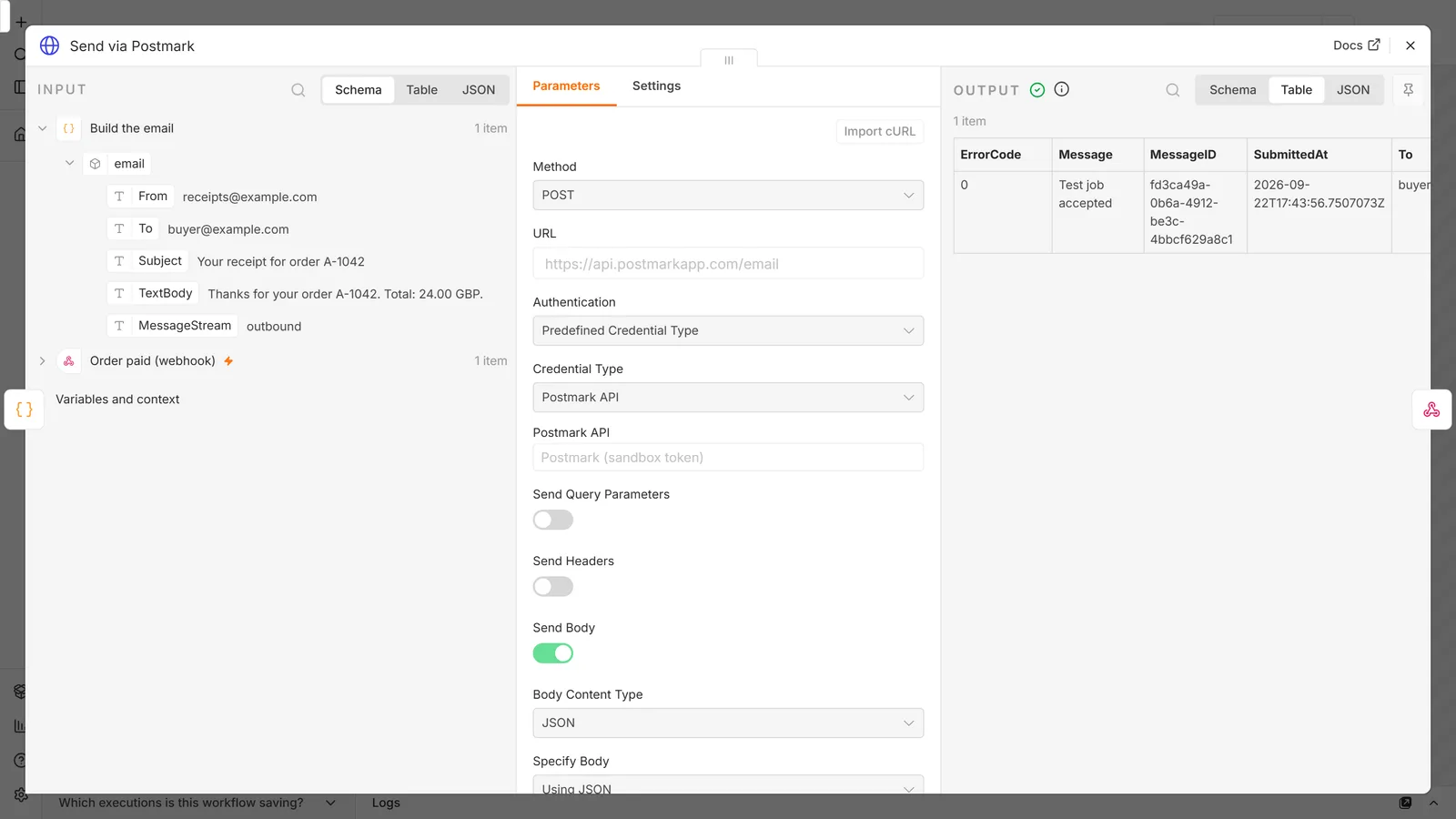
{"ErrorCode":0,"Message":"Test job accepted","MessageID":"fd3ca49a-0b6a-4912-be3c-4bbcf629a8c1","SubmittedAt":"2026-09-22T17:43:56.7507073Z","To":"buyer@example.com"}
"Test job accepted" rather than "OK" tells you the sandbox handled it.
One caveat that will bite you later, so read it now. The sandbox checks From and it checks that you supplied a body, but it does not check that your message stream exists. A send to "MessageStream":"no-such-stream-exists" came back 200 / Test job accepted. A green sandbox run shows your payload shape is right. It says nothing about your streams.
The credential test fails on the sandbox token, and that is not a bug
Create the credential first, under Credentials → New → Postmark API. It holds one field, Server API Token, and all it does is add an X-Postmark-Server-Token header to the request.
Paste POSTMARK_API_TEST into it, click the connection test, and n8n will report the credential as broken. It isn't. The built-in test calls GET /server rather than /email, and Postmark answers:
{"ErrorCode":10,"Message":"The Postmark Test API Token may only be used on the /email endpoint."}
That is a 403, and both sides are behaving correctly: the token really is restricted to one endpoint, and n8n really did test a different one. Save the credential anyway. Sends will work.
With a real server token, the same test passes and means something.
Build the send
Three nodes plus a response:
- Webhook, whatever calls n8n when an order is paid.
- Code, to assemble the flat JSON object Postmark wants.
- HTTP Request, the send itself.
- Respond to Webhook, to hand the result back.
The Code node keeps the HTTP Request generic, so one send node can serve several message shapes:
// Postmark wants one flat JSON object, so build it here and leave the HTTP Request generic.
const o = $json.body ?? $json;
return [{ json: { email: {
  From: 'receipts@example.com',
  To: o.email,
  Subject: 'Your receipt for order ' + o.order_id,
  TextBody: 'Thanks for your order ' + o.order_id + '. Total: ' + o.total + '.',
  MessageStream: 'outbound',
} } }];
Then the HTTP Request node:
| Field | Value |
|---|---|
| Method | POST |
| URL | https://api.postmarkapp.com/email |
| Authentication | Predefined Credential Type |
| Credential Type | Postmark API |
| Send Body | on |
| Body Content Type | JSON |
| Specify Body | Using JSON |
| JSON | {{ JSON.stringify($json.email) }} |
Copy the Authentication setting exactly. It is easy to reach for Generic Auth → Header Auth and paste the token into a header, which works, and which then spreads your server token across every workflow that sends mail. Selecting Postmark API reuses the stored credential instead: n8n adds the header, the token stays in one encrypted place, and rotating it is a single edit.
What Postmark rejects
Postmark validates on the way in and answers 422 with a machine-readable ErrorCode. The three you will meet while wiring this up all come back as ErrorCode 300:
| What you sent | What Postmark answered |
|---|---|
No From | Invalid 'From' value. |
From: not-an-email | Invalid 'From' address: 'not-an-email'. |
No TextBody and no HtmlBody | Provide either 'TextBody' or 'HtmlBody' (or both). |
A real server token adds checks the sandbox skips. The message stream has to exist, and the From address has to belong to a confirmed sender signature. Both come back as a 422 carrying their own error code, which is the second reason not to read a sandbox 200 as "ready to ship".
The trap: n8n throws away Postmark's error code
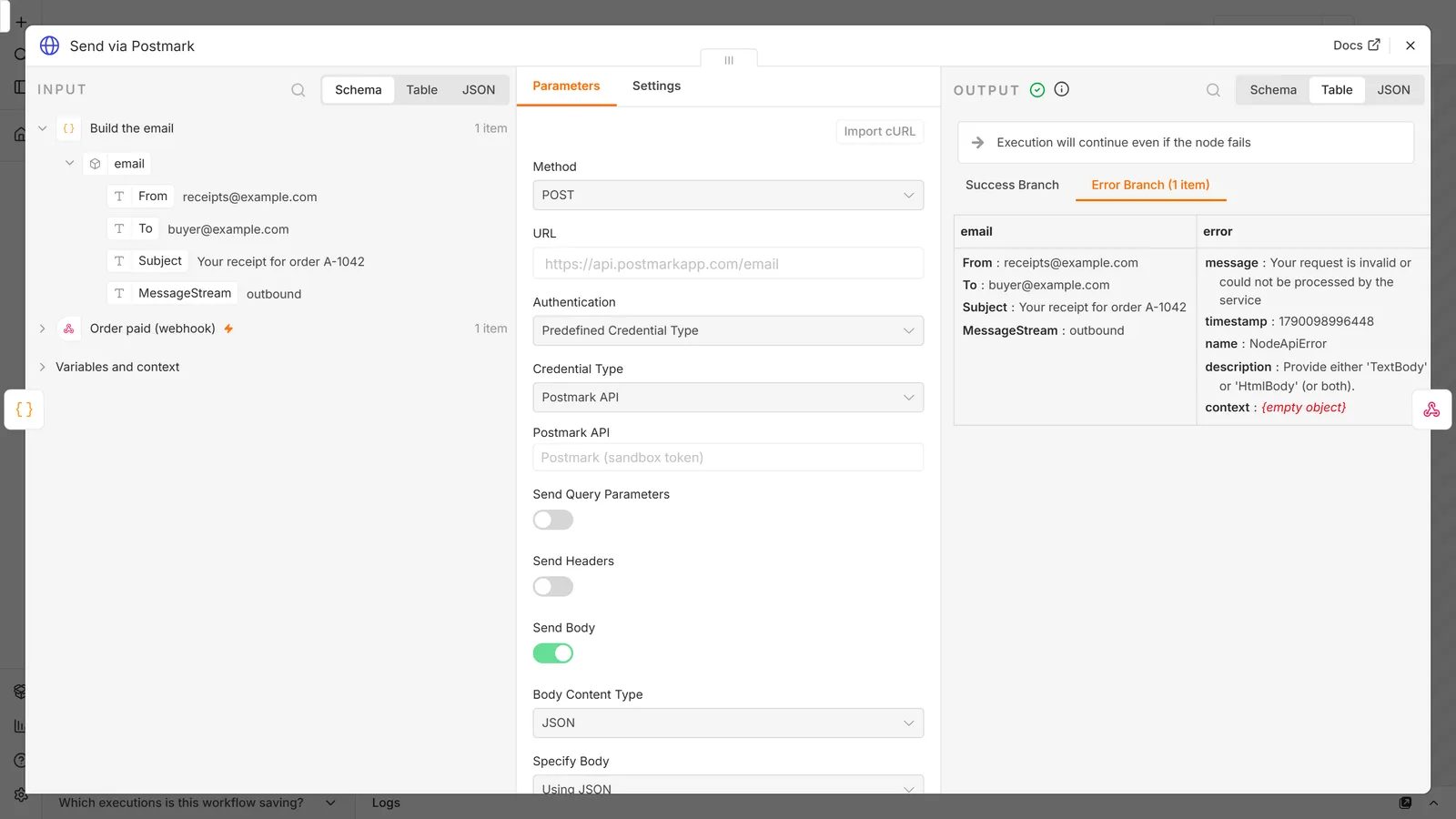
Set the HTTP Request node's On Error to Continue (using error output), which is the standard advice and good advice, send a payload with no body, and look at what arrives on the error branch:
{
  "message": "Your request is invalid or could not be processed by the service",
  "timestamp": 1790098996448,
  "name": "NodeApiError",
  "description": "Provide either 'TextBody' or 'HtmlBody' (or both).",
  "context": {}
}
Postmark's human-readable message survives, in description. ErrorCode: 300 is gone, and so is the HTTP 422. Neither appears anywhere in the stored execution, and context is empty.
The error code is the only part of Postmark's response you can safely branch on. Message text is prose and prose gets reworded; 300 is an API contract. Build a Switch on $json.error.description and you have coupled your workflow to a sentence.
The fix
Leave On Error alone and change the node's Options instead:
- Response → Never Error, so a 4xx is no longer a node failure.
- Response → Include Response Headers and Status, for the full response.
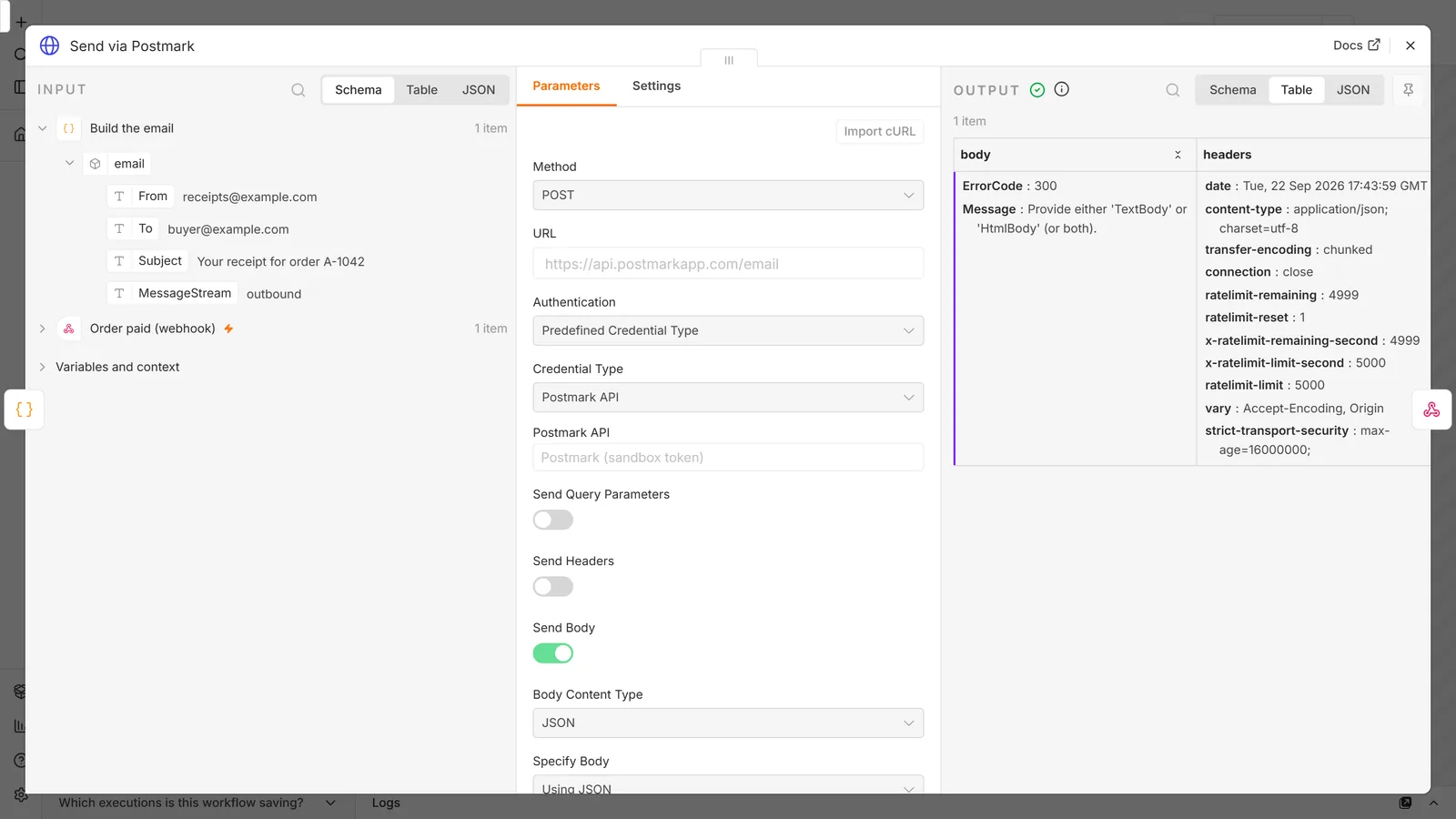
Now the same rejected send arrives as an ordinary item:
{
  "body": { "ErrorCode": 300, "Message": "Provide either 'TextBody' or 'HtmlBody' (or both)." },
  "statusCode": 422,
  "statusMessage": "Unprocessable Entity",
  "headers": { "ratelimit-limit": "5000", "ratelimit-remaining": "4999", "ratelimit-reset": "1" }
}
ErrorCode is back and so is the status code, and you can branch on {{ $json.statusCode }} and {{ $json.body.ErrorCode }} like any other data. The rate-limit headers come along with it: Postmark returned a limit of 5,000 requests per second on this endpoint at the time of testing, which its Email API reference page does not mention.
This fix has a cost. A failed send is now an ordinary item, so nothing fails on your behalf, and if you skip the branch that inspects statusCode a rejected email looks exactly like a sent one. It is the same shape as continueRegularOutput reporting success while replacing your data: a green run that did nothing. Add the check before you add the option.
Retries are not free, because email is not idempotent
Turning on Retry On Fail is the reflex, and for a send it deserves a pause.
Postmark's Email API reference documents no idempotency key. No field lets Postmark recognise a duplicate submission, and no duplicate suppression is documented. Four consequences follow that n8n's retry setting will not mention:
- Retry after a timeout. If the request times out after Postmark accepted it, the retry delivers a second identical email and the customer gets two receipts. A timeout is not evidence that nothing happened.
- Two runs at once. Two webhook deliveries for the same order run as two executions and neither can see the other. No check-then-act at Postmark's end prevents it, because the check and the send are separate calls.
- Partial failure part-way through a batch. If you loop over recipients, a failure at item 40 leaves 39 emails already sent, and re-running from the start resends all 39.
- Out-of-order arrival. "Order shipped" can overtake "order confirmed" when they are separate executions. Postmark preserves neither the order nor the relationship.
Make retries safe before you turn them on. Retry only on 5xx and network errors, never on a 422, which will fail identically forever. Key your own deduplication on something stable, such as the order id rather than a timestamp, stored where both executions can read it. Keep the count low as well: n8n silently clamps Max Tries to 2-5 and Wait Between Tries to a 5,000 ms ceiling whatever you type, so a long backoff is not available to you anyway.
The other half: reacting to bounces with the Postmark Trigger
Once the mail is sent, the Postmark Trigger node closes the loop. It registers a webhook with Postmark for the events you tick and hands you each one as an item.
It needs the same postmarkApi credential, and here the sandbox token stops being enough: registering a webhook calls /webhooks, and the sandbox token is restricted to /email. This half needs a real Postmark server token.
The events are open, firstOpen, click, delivery, bounce, includeContent, spamComplaint and subscriptionChange. For most transactional setups, bounce and spamComplaint are the two that should reach a human. A hard bounce means the address is dead and Postmark will suppress it; a spam complaint means you should stop sending to that address entirely.
If the trigger does not fire once you publish it, the causes are usually the ordinary webhook ones rather than anything Postmark-specific. See n8n workflow not triggering.
Frequently asked questions
Does n8n have a Postmark node?
It has a Postmark Trigger node and a Postmark API credential, but no node that sends email. Sends go through the HTTP Request node pointed at https://api.postmarkapp.com/email, authenticated with that same stored credential via Predefined Credential Type.
Why does my Postmark credential fail its connection test?
If you are using the POSTMARK_API_TEST sandbox token, the test is expected to fail. n8n tests the credential against GET /server, and the sandbox token is only valid on /email, so Postmark answers 403 with ErrorCode 10. Save the credential; sends still work. With a real server token the test passes.
Can I test n8n against Postmark without an account?
Yes. Pass POSTMARK_API_TEST as the server token. Postmark validates the request and answers "Test job accepted" without delivering anything. Note that it does not validate your message stream or check that the sender signature is confirmed.
How do I get Postmark's ErrorCode in n8n?
Turn on Never Error and the full-response option in the HTTP Request node's Options. The default error output replaces Postmark's response with n8n's own error object, which keeps the message text in description but discards both ErrorCode and the HTTP status.
Should I use the Send Email node with Postmark's SMTP instead?
You can, since Postmark speaks SMTP and n8n's Send Email node will drive it. What you give up is the JSON response: no MessageID to store and no ErrorCode to branch on. If you only need mail to leave, SMTP is less work. If anything downstream depends on the result, use the API.
Is it safe to retry a failed Postmark send?
Not automatically. Postmark's Email API documents no idempotency key, so a retry after a timeout can deliver a second copy of the same email. Retry on 5xx and network errors only, never on a 422, and deduplicate on your own stable key.
Grab the template
Postmark, Transactional Email With Error Codes is on the templates page: the send above with Never Error and the full response turned on, and the statusCode branch already wired, so a rejection answers 502 carrying Postmark's ErrorCode instead of quietly looking like a success.
If you are adding retries on top of it, pair it with the Idempotency Guard, for the reasons in retries are not free.