n8n Workflow Not Triggering? Work Through It in This Order (2026)
Why your n8n workflow is not triggering, in order of likelihood: publish state, test vs production URLs, timezones, webhook conflicts, and missed schedules.
By Ali Ilyas · · Updated September 22, 2026
A workflow that won't trigger gives you almost nothing to work with. No error, no failed execution, no red node, just silence. So the instinct is to start rebuilding the trigger, which is usually the one thing that isn't broken.
Work through the checks below in order instead. They're arranged by how often they turn out to be the cause, and the first two account for the clear majority of cases.
One thing to know before you start, because it invalidates a lot of older advice: n8n renamed the "Active" toggle to a "Publish" button. If you're following a guide that tells you to flip a switch labelled Active and you can't find it, the guide predates the change. Same concept, different control.
What's on this page
- Start here: is the workflow published?
- The Publish control is greyed out or missing
- Are you using the test URL or the production URL?
- Read the executions list before anything else
- It works when I run it manually
- Webhook triggers
- Schedule triggers
- App triggers: Telegram, Slack, Google Sheets
- Self-hosted-only causes
- It triggers, but nothing happens
- Make the next failure visible
- Frequently asked questions
Start here: is the workflow published?
The single most common cause, and the easiest to overlook once you've been staring at the same canvas for an hour.
Manual executions and production executions are different things. Clicking Execute workflow runs the workflow ad-hoc from the canvas. It does not make the trigger live. A workflow only responds to real events once you attach a non-manual trigger and publish it.
So: open the workflow and confirm it's published. Then confirm you published the version you're looking at, because editing a published workflow doesn't push the changes live on its own. Save, then publish again.
This also catches a subtler variant. If your workflow has a Manual Trigger node still attached from when you were building it, and no other trigger, there is nothing for n8n to activate. Manual triggers never fire on their own.
After a bulk import or migration, check publish state explicitly. Imported workflows can land effectively inactive while still looking normal in the workflow list. If a batch of workflows all went quiet at once and they were recently imported or migrated, check them one at a time rather than trusting the list view. Importing templates covers the other things that arrive half-configured: placeholders, node version mismatches, and instructions written against an older n8n.
The Publish control is greyed out or missing
A distinct problem worth separating out: you can't publish at all, so nothing about triggers applies yet.
You can't click Publish. Two usual causes. First, unsaved changes. n8n won't publish a workflow that isn't saved, and every node edit puts it back into an unsaved state, so a tweak after your last save is enough. Hit save, and the control wakes up. Second, a validation problem in the trigger node: an empty required field like a webhook path, or an unset HTTP method, blocks publishing even when the node looks fine at a glance. Open the trigger and look for a warning marker.
Hover the control before guessing. n8n generally shows a tooltip naming the reason.
There's no Publish control at all. An empty canvas has nothing to publish. You need at least a trigger node and something connected to it. This confuses people following older video tutorials, where an Active toggle was visible from the start on a blank workflow. That toggle no longer exists.
Are you using the test URL or the production URL?
Every webhook-style trigger in n8n has two URLs, and they behave completely differently.
The test URL only listens after you select Listen for test event, and it listens for one request, for up to 120 seconds. Its advantage is that incoming data appears in the editor, which makes it the right tool for debugging. Its disadvantage is that it goes dead after that single call or two minutes, whichever comes first, which produces the classic "it worked when I tested it and then stopped." Call it outside that window and n8n's own error hint says so: "In test mode, the webhook only works for one call after you click this button."
The production URL is live whenever the workflow is published, and stays live until you unpublish it. Data flowing through it is not shown in the editor, which is expected rather than a fault. Check the executions list instead.
If you registered the test URL with an external service, that service is now calling a URL that stopped listening. Swap it for the production URL and republish.
Read the executions list before anything else
This is the step that saves the most time, and it's the one people skip.
Open the workflow's executions. What you see splits the problem in half:
No execution at all means the trigger never fired. The cause is in this article: publish state, wrong URL, timezone, or a platform-side registration problem.
An execution that failed means the trigger fired correctly and something downstream broke. That's a different problem entirely, and the execution will name the failing node. Stop looking at the trigger.
An execution that succeeded but did nothing useful means the trigger fired with empty or unexpected data. Jump to It triggers, but nothing happens.
Getting this wrong is how people spend an evening rebuilding a trigger that was working the whole time.
It works when I run it manually
This deserves its own answer, because it's the most misleading symptom in the whole list. The workflow runs perfectly from the canvas, so the logic is obviously fine, and people conclude the trigger is broken when it usually isn't.
A manual test only proves the event you sent. You test with the one event you had in mind, and it passes. Real traffic brings the others, and the trigger silently ignores any type it isn't subscribed to. So a Telegram Trigger set to Message answers every text in testing, then does nothing when a user taps an inline button, because a tap is a separate Callback Query update. Nothing errors, because from the trigger's point of view nothing relevant happened.
The fix is to check what your trigger is actually subscribed to, not whether it responds when poked. In practice that means the allowed update or event types on app triggers, and the HTTP method on webhooks.
Credentials also behave differently. A manual run happens while you're sitting there with a fresh session. A production run at 3am uses a stored token that may have expired since. If manual works and scheduled doesn't, suspect the token before the trigger.
Webhook triggers
This section is diagnosis, for a webhook that exists and isn't firing. If you're still building one, the webhook tutorial covers the setup side: response modes, authentication, CORS, file uploads, and the N8N_WEBHOOK_URL setting behind a reverse proxy.
The URL returns 404. Almost always the workflow isn't published, or you're calling the test URL outside its 120-second window.
Two workflows share a path. n8n allows only one webhook per path and method combination. A second published workflow using the same pair won't register. The first keeps answering, and the second fails with "The URL path that the "Webhook" node uses is already taken." If that happens at startup rather than in the editor, the message only appears in the server log. Note it's the pair that has to be unique. A GET and a POST on the same path coexist happily, which is why one method can work while the other refuses. Unpublish the conflicting workflow, or change the path.
If both workflows are yours, webhooks are the wrong tool for the job. Use the When Executed by Another Workflow trigger with an Execute Sub-workflow node instead: no URLs, no path conflicts, and data passes directly.
The sender uses a method your node doesn't accept. A Webhook node listens for a single HTTP method by default. If the service sends GET and your node expects POST, no execution is created, so n8n's side stays silent. The sender does get an answer: a 404 reading "This webhook is not registered for GET requests. Did you mean to make a POST request?" Ask whoever controls the sender what status they are seeing. Either match the method or enable Allow Multiple HTTP Methods.
Your IP allowlist blocks legitimate traffic. Behind a reverse proxy, n8n sees the proxy's IP rather than the caller's. Set N8N_PROXY_HOPS to the number of proxies in front of n8n so the real client IP is resolved.
The webhook URL points at localhost. External services can't reach your machine. n8n advertises whatever address it believes it has, so behind a proxy you need N8N_WEBHOOK_URL (WEBHOOK_URL before n8n 2.30) set to your public HTTPS address. If you set it and the URL still shows localhost, the container was almost certainly never recreated. Why restart doesn't apply it. The proxy configuration itself is in the self-hosting walkthrough.
It responds, but the caller times out. Long-running workflows can exceed the caller's patience. Split it: one webhook that responds immediately and starts the work, and a second the caller polls for status.
Schedule triggers
The timezone is wrong. The most common cause by a wide margin, and it's easy to misread as "didn't fire" when it actually fired at 3am. Set GENERIC_TIMEZONE on self-hosted instances, or the timezone in your n8n Cloud settings. You can also override it per workflow: three-dot menu → Settings → Timezone.
Your cron expression is invalid. When Trigger Interval is Custom (Cron), a malformed expression means n8n never schedules anything. Validate it at crontab.guru, dropping the seconds column.
The schedule restarts from when you publish. This one surprises people: after changing an interval, the schedule recalculates from the moment of publication, not from the original start time. If you republish an hourly workflow at 2:40, it runs at 3:40, not 3:00. To apply a changed interval at all, unpublish and publish a new version.
Variables aren't picking up new values. Variables in a Schedule Trigger are evaluated at publish time. Changing a variable's value does nothing until you publish a new version.
The instance was down when the run was due. By default n8n schedules in memory, and a run whose time passes during downtime is skipped rather than caught up. A nightly job on a server that reboots at 3am simply doesn't happen that night, with no record that it should have. We tested it on n8n 2.33.7 with an every-minute schedule: stopped at 05:17, restarted at 05:21, and the executions list jumps from 05:17 straight to 05:22. The four runs due during the outage never ran and left no trace.
If that matters, self-hosted instances can opt into the durable scheduler, which records runs in a database-backed queue in advance so a missed run fires when the instance recovers. It's off by default and needs both N8N_SCHEDULER_ENABLED=true and N8N_USE_WORKFLOW_PUBLICATION_SERVICE=true. Worth enabling for anything where a skipped run has consequences.
App triggers: Telegram, Slack, Google Sheets
Service-specific triggers add their own failure modes on top of everything above.
Telegram and Slack: the single-callback rule. Telegram permits one webhook per bot; Slack permits one request URL per app. n8n uses a test URL in the editor and a production URL when published, so the two overwrite each other. On 2.33.7 n8n refuses a test run of the published workflow itself, but not of a copy on the same token: in our Telegram test, one test run of a copy took the webhook, and when it ended n8n deleted it, leaving the live bot deaf with no error until it was republished. Slack is different: n8n never changes Slack's Request URL, so the live workflow only goes quiet if you repoint that URL yourself. Fix: a separate bot or app for development. Full detail in the Telegram guide and the Slack guide.
The trigger is subscribed to the wrong event. The most common version of this: a Telegram Trigger set to Message only. That covers every new message, photos and files included, but not edits or inline-button taps. You tap a button, nothing happens, and no error appears, because the trigger correctly ignored an event it wasn't listening for. Add the update types you actually need.
A Telegram bot in a group can't see most messages. Telegram's bot privacy mode is on by default, which limits a bot in a group to messages that are commands or that mention it directly. If your group bot only reacts sometimes, this is why. Change it through BotFather with /setprivacy, then remove and re-add the bot for it to take effect.
Polling triggers aren't instant. The Google Sheets Trigger checks on an interval rather than being pushed to. Detection is bounded by that interval, and a change made and reverted between two polls is never seen. That's the design, not a bug. If you need immediacy you need a push-based trigger.
Credentials expired. A trigger that stops after working for days is usually auth, not logic. Two specific traps worth checking: a Google OAuth app left in Testing mode expires consent after seven days, and a Slack app with token rotation enabled expires tokens every 12 hours. Both are covered in their respective guides.
The nasty part is how an expired credential presents on a polling trigger. It often doesn't error. The poll returns an empty result instead. So the workflow keeps "running fine" forever while doing nothing, and no failure alert ever fires.
The bot lost channel access. If a bot was removed from a channel, or a Google service account lost access to a sheet, events stop arriving with no error on the n8n side.
Self-hosted-only causes
The host went to sleep. Free and low-tier hosting plans suspend idle containers, and a suspended instance runs no schedules. This is a common cause of an every-minute trigger that fires erratically or not at all. If your instance sleeps, either move to an always-on plan or accept that time-based triggers won't be reliable.
n8n isn't running. Obvious, and worth ruling out in ten seconds:
docker ps
docker logs n8n --tail 50
A container that exited or is restart-looping explains everything above it. See common Docker errors if it won't stay up.
Your public URL changed. Tunnel URLs from ngrok and similar tools rotate. Every webhook you registered with an external service now points somewhere that no longer exists. This is the strongest practical argument for a stable domain with HTTPS.
The reverse proxy is dropping requests. Check the proxy's access log, not just n8n's. If the request never reaches n8n, n8n can't tell you about it. Trigger nodes that appear to hang while listening usually mean websocket support isn't enabled in Nginx, Caddy, Apache, or Traefik.
HTTPS isn't actually terminating. Telegram and Slack both refuse to deliver to plain http://. A valid certificate isn't optional for those triggers.
It triggers, but nothing happens
The execution list shows successful runs, but nothing downstream changed.
Zero items reached the next node. A node that receives no items doesn't run, and this cascades silently through the rest of the workflow. Look at the item count on each connection, where the first 0 is your answer. A Filter or IF node that matched nothing is the usual culprit. One place it isn't silent: a webhook set to respond When Last Node Finishes returns a 500 with "No item to return was found", because the last node never produced anything to send back.
A filter is stricter than you think. String comparisons are exact. "Active" doesn't match "active", and a trailing space breaks equality invisibly.
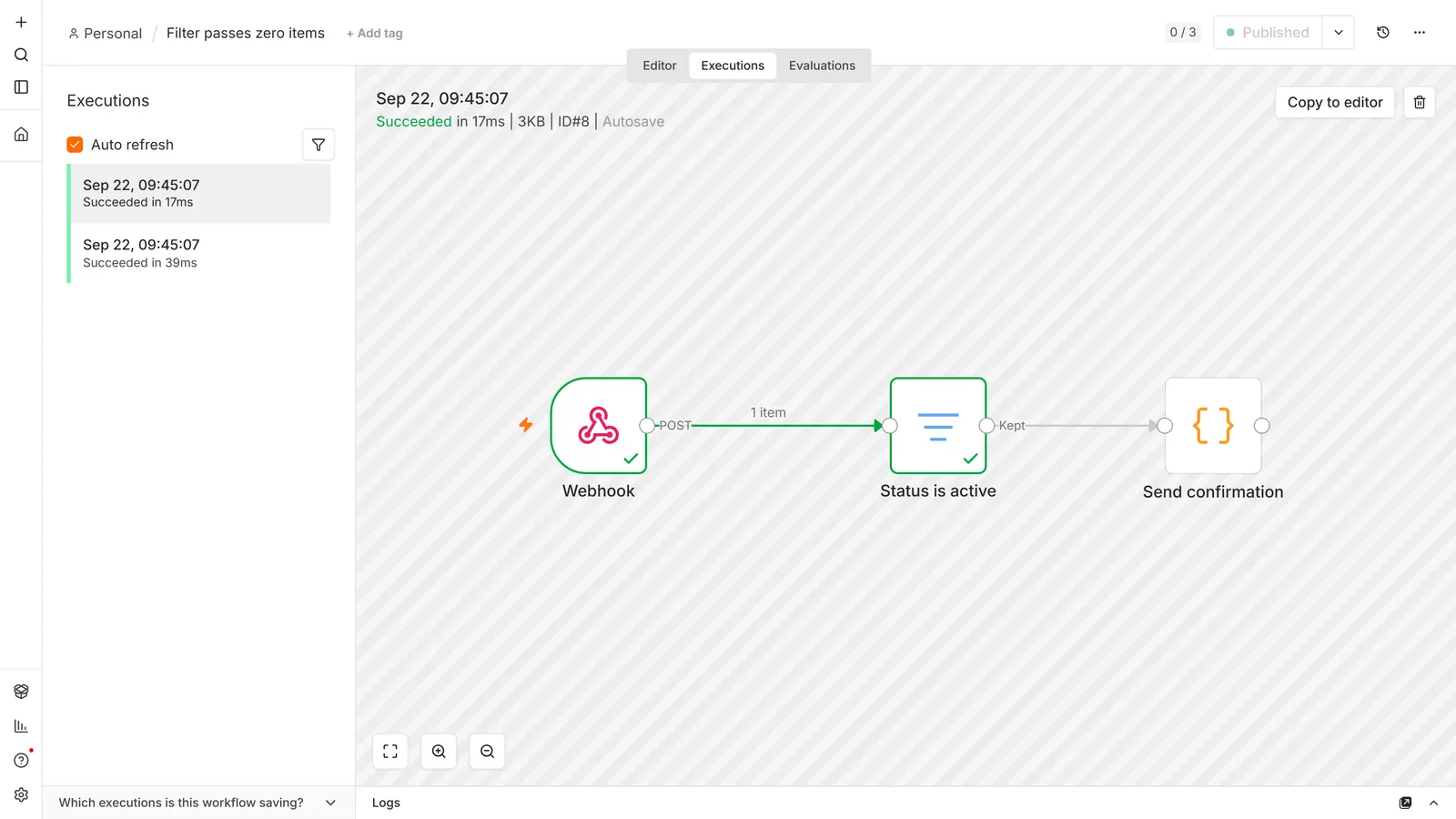
The trigger fired on the wrong event. A trigger set to all events fires on things you never meant to handle, including your own bot's activity. Narrow the event type.
You're editing one workflow and running another. Duplicated workflows with near-identical names are more common than they sound. Confirm the execution belongs to the workflow you're editing.
Make the next failure visible
Silent failure is the real problem here. A wrong trigger is only the symptom, and you found it by noticing something didn't happen, which means you found it late.
An Error Trigger is not enough, and this is the part people get wrong. An error workflow fires when an execution fails. Every failure mode in this article produces no execution at all, so there is nothing to fail and nothing to report. The alert you set up specifically to catch problems is structurally blind to the most common one.
Three principles make monitoring actually work:
Alert on absence of success, not presence of failure. Have each critical workflow write a timestamp somewhere cheap (a database row, a key-value store, a spreadsheet) and run a separate watcher that alerts when a timestamp goes stale: "this should run hourly, last success was three hours ago." That single check catches deactivated triggers, expired tokens, and the empty-poll case above, none of which ever raise an error.
Write that timestamp conditionally on real output. If you log it unconditionally at the end of the run, a green execution that produced nothing still marks itself healthy, and you've built a monitor that confirms your silent failure is fine. Assert on the actual result: rows returned, message sent, record created.
The watcher must not share fate with what it watches. This is the one that catches people out. A heartbeat running inside the same n8n instance dies with that instance and goes quiet at exactly the moment you needed it to shout. The same applies to any shared dependency. Using the same credential, the same API provider, or the same database in both the workflow and its error handler means one outage blinds both at once. Put the watcher somewhere else: a cron job on a different machine, or an external dead-man's-switch service that pages you when the ping stops.
With that in place, an error workflow is still worth attaching for loud failures. Set one in workflow settings using an Error Trigger node, publish the error workflow (on 2.33.7 an unpublished one is silently skipped, despite what n8n's docs say), and make the alert name the workflow, the node, and the input. A bare "workflow failed" with no context just trains you to ignore alerts. Route it to Slack or Telegram.
Frequently asked questions
Why does my workflow work when I click Execute but not on its own?
Manual execution and production execution are separate. Publish the workflow, and make sure it has a trigger other than the Manual Trigger.
Why did my webhook work for two minutes and then stop?
That was the test URL, which listens for 120 seconds. Use the production URL for anything external.
My scheduled workflow skipped a night. Where did it go?
The instance was probably down when the run was due. The default in-memory scheduler skips missed runs rather than catching them up. The durable scheduler changes that, but it's off by default.
Can two workflows use the same webhook path?
No, one webhook per path and method. Change the path or unpublish the other workflow.
Do I have to republish after every edit?
Yes, for the change to affect production runs. And for Schedule Triggers, publishing restarts the interval from that moment.
How do I see what a production webhook received?
Not in the editor, which is test-URL behavior. Open the execution in the executions list and inspect the trigger node's output.
Where did the Active toggle go?
It was replaced. Publishing a workflow is what makes it live now. Tutorials showing a toggle on an empty canvas predate the change.
Why can't I click Publish?
Usually unsaved changes, or a required field missing in the trigger node. Hover the control for the specific reason.
My workflow runs but processes the same item twice. Is that a trigger problem?
It's a retry. If your workflow is slow to respond, the sender may retry and deliver the same payload again, and nothing errors, because both runs succeed. Write an idempotency key before the irreversible step, not after it, and check it on entry.
What does "The requested webhook is not registered" mean?
n8n received the request but has nothing listening on that path. In order of frequency: the workflow isn't published, so only the test URL exists; you called /webhook-test/... outside the one-call window that opens when you click Execute workflow; or the path changed after whatever calls it was configured. On a production URL the message names the method, as in "The requested webhook "POST my-path" is not registered". If the path exists under a different method, you get a different 404 that says so and suggests the right one.
Can I schedule something for the last day of the month?
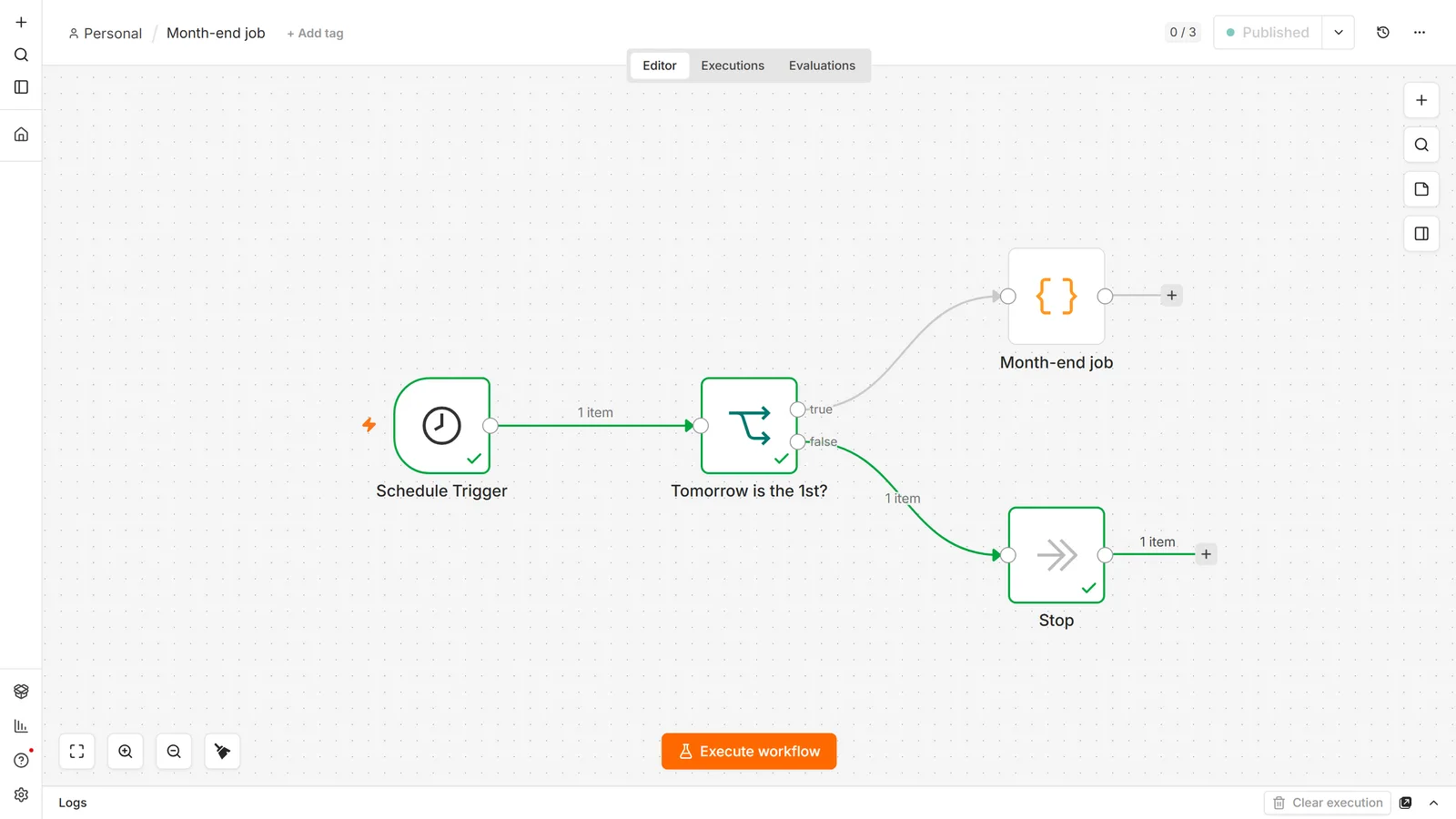
Not with the monthly mode, which fires on a fixed date and so skips any month shorter than the number you picked. Run it daily instead and exit early: an IF node that continues only when tomorrow's date is the 1st gives you the last day of every month, February included. Don't reach for the cron L last-day token either: on n8n 2.33.7, a Schedule Trigger with 0 9 L * * refuses to publish with "Invalid cron expression".
My schedule is set to run once, but it sent a hundred emails.
The trigger did fire once. The send node ran a hundred times, because n8n nodes execute once per item they receive, so a node that reads a hundred rows hands a hundred items downstream. Hover the connection going into the send node and read the item count. If you wanted one message covering all of them, aggregate the items into a single item first.
Do I need to republish after changing N8N_WEBHOOK_URL?
Yes, for any trigger that registers itself with the provider: Telegram, Stripe, most app triggers. n8n tells the provider its URL at the moment the workflow is published and doesn't send a correction afterwards, so the provider keeps calling the old address. Unpublish and republish to force re-registration.
Official references worth bookmarking: n8n's Webhook node common issues and Schedule Trigger common issues.
Still stuck? Working starter workflows, including an error-handler and a heartbeat monitor, are among our n8n workflow templates. If the root cause turned out to be your hosting setup, a self-hosted n8n instance and the Docker setup guide cover the URL and proxy configuration properly.