n8n Webhook Tutorial: Receive, Authenticate and Respond (2026)
The half of n8n webhooks no tutorial covers: when to respond, the three different failures all called CORS, and the localhost URL that survives a restart.
By Ali Ilyas · · Updated September 27, 2026
Receiving a request in n8n is a five-minute job. Add the Webhook node, copy the URL, fire a request at it, read what arrives. Every tutorial on this topic covers that part, and they are all correct.
The part that takes the rest of the day is everything after: deciding when the caller gets an answer, letting a browser call the endpoint without tripping CORS, proving the sender is who it claims to be, accepting a file, and making the production URL correct when n8n sits behind a reverse proxy.
That second half is what this page is for. If your webhook already exists and simply isn't firing, stop here. That is diagnosis, not construction, and workflows that don't trigger covers activation, test-versus-production URLs and path conflicts in the order you should check them.
What's on this page
- The shape of an incoming request
- Setting up the node
- Choosing how to respond
- The Respond to Webhook node
- Authentication is not signature verification
- CORS: three different failures with one name
- Receiving files
- The production URL behind a reverse proxy
- Verification handshakes
- Security beyond authentication
- Gotchas
- Frequently asked questions
The shape of an incoming request
Before configuring anything, know what you get. Every request arrives as one item. Four of its top-level keys are the ones you will read:
headers: everything the caller sent, including content type, signatures and your auth header.params: path parameters, if your path defines any.query: the query string, parsed.body: the request body, parsed according to its content type.
Two more sit alongside them, webhookUrl and executionMode, which say which URL was called and whether it was a test or production run.
So body.email and headers['x-signature'] are the expressions you will write most. The commonest beginner error is reaching for email directly and getting undefined, because the payload is nested one level deeper than expected.
Build against reality rather than assumption: put the node in listening mode, fire one real request from the actual sender, and read what arrives. Ten seconds of that beats any amount of reading the sender's documentation.
Setting up the node
Add a Webhook node, which is a trigger and so sits at the start, then set three things:
HTTP Method. POST for anything sending data, GET for anything a browser opens or a service pings to check you are alive. The method is part of the webhook's identity, not a filter: a GET and a POST on the same path are two different webhooks that coexist happily.
Path. n8n generates a UUID. Keep it, or set something readable like stripe-invoice-paid. Two considerations pull in opposite directions. Readable paths are easier to operate, and a guessable path on an unauthenticated webhook is an open endpoint. Readable path plus authentication is the right combination.
Respond. The one that decides your architecture, and the subject of the next two sections.
Everything else lives under Options (n8n's reference for the node lists them all), and the useful ones are worth knowing before you need them: Allowed Origins for CORS, Binary File for uploads, Raw Body when you need the unparsed payload, Response Headers, Ignore Bots, and an IP allowlist that returns 403 to everyone else.
One thing to internalise while building: the node shows a Test URL and a Production URL, and they are not interchangeable. Test the thing you are about to ship on the production URL before you call it done. A webhook that works in the editor and 404s once activated is the most common false finish in n8n. The not-triggering guide treats it as the first diagnostic step, and it has a specific consequence for third-party verification covered below.
If the webhook starts a transactional email workflow, see the Postmark send example. It shows how to keep the email API's error code before deciding what your webhook should report to its caller.
Choosing how to respond
Four modes, and the difference between them is when the caller gets an answer:
| Mode | Caller receives | Use when |
|---|---|---|
| Immediately | A response code and {"message": "Workflow was started"} | The sender only needs an acknowledgement — most third-party services |
| When Last Node Finishes | The output of the last node executed | You want the workflow's result and don't need to shape it |
| Using 'Respond to Webhook' Node | Whatever you define, wherever you place it | APIs, form endpoints, anything with error paths |
| Streaming | Output streamed as it is produced | Chat-style responses; requires nodes that support streaming, such as the AI Agent |
Immediately is right more often than people assume. A service delivering an event does not want your workflow's output. It wants a 200 so it can stop retrying. Responding immediately also means a slow workflow cannot cause the sender to time out and re-deliver, which is a real cause of duplicate processing.
When Last Node Finishes has a sub-setting worth knowing: Response Data chooses between All Entries, First Entry JSON, First Entry Binary, and No Response Body. First Entry JSON is the default, so a last node that outputs several items returns only the first of them. Switch to All Entries when the caller needs the whole list.
Streaming is the newest of the four and exists for chat interfaces, where waiting for a complete answer feels broken. It only does something if the workflow contains a node that can stream, typically an n8n AI agent.
The Respond to Webhook node
Once you need control over status codes, headers, or different answers on different branches, you need this node. The Webhook node's Respond option must be set to Using 'Respond to Webhook' Node, then place it wherever the response should be sent from.
What it gives you:
- Status codes that mean something. 400 for a bad payload, 401 for a failed check, 200 for success. A form front end can then behave correctly instead of guessing.
- Response body you shape. JSON, plain text, HTML, or no content.
- Custom headers, including the CORS headers discussed below.
- Redirects, which is how you send a form submitter to a thank-you page.
Two behaviours to design around:
One response per execution. The first Respond to Webhook node reached ends the response. A workflow with several branches needs one on each branch, and only the branch that runs will answer.
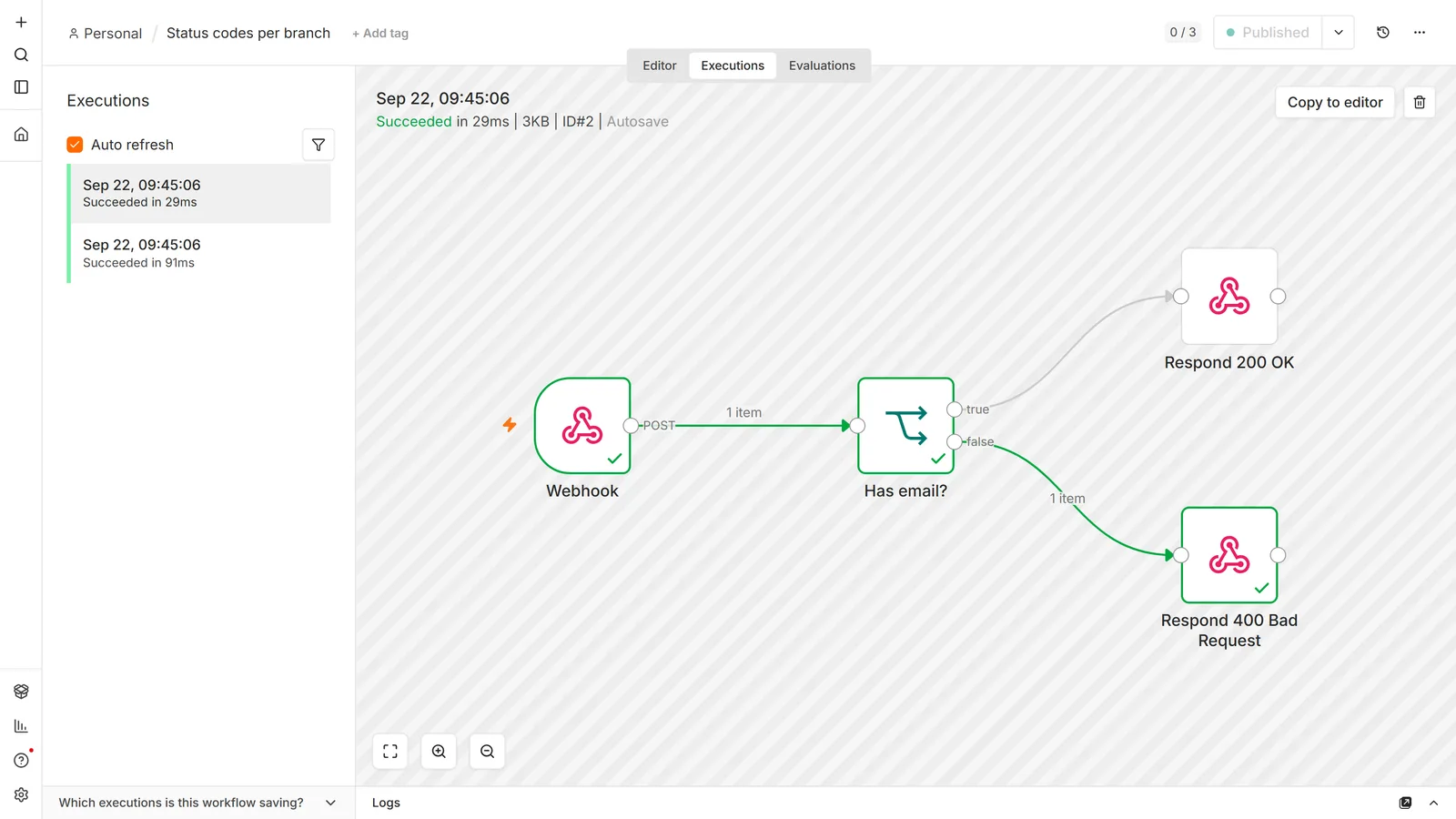
A failing workflow does not automatically send an error response. If the workflow throws before reaching a Respond node, the caller does not get the 500 you might expect. When we tested it on n8n 2.33.7, a Code node that throws ahead of the Respond node sent the caller a 200 with an empty body, which looks exactly like success. When the caller's behaviour depends on receiving an error, build that path explicitly: an error branch that ends in a Respond to Webhook node with the right status code. Few published workflows do: in our analysis of 2,030 of them, 84.8% declare no error handling of any kind.
Large binary responses deserve care. Returning a big file through this node holds the response open while the data moves. Where the file already lives somewhere addressable, returning a redirect or a signed URL is faster and much less fragile than streaming bytes back through the workflow.
Authentication is not signature verification
The node supports four settings, and the default is the wrong one for anything real:
| Method | How the caller proves itself | Good for |
|---|---|---|
| None | It doesn't | Local experiments only |
| Basic auth | Username and password | Internal callers you control |
| Header auth | A named header with a secret value | Most third-party integrations |
| JWT auth | A signed token | Callers that already issue JWTs |
Header auth is the practical default. Almost every service that calls webhooks can add a custom header, and n8n stores the expected value as a credential rather than in the workflow.
Now the limit that catches people, and it is worth being precise about, because it silently produces an endpoint you believe is protected and isn't.
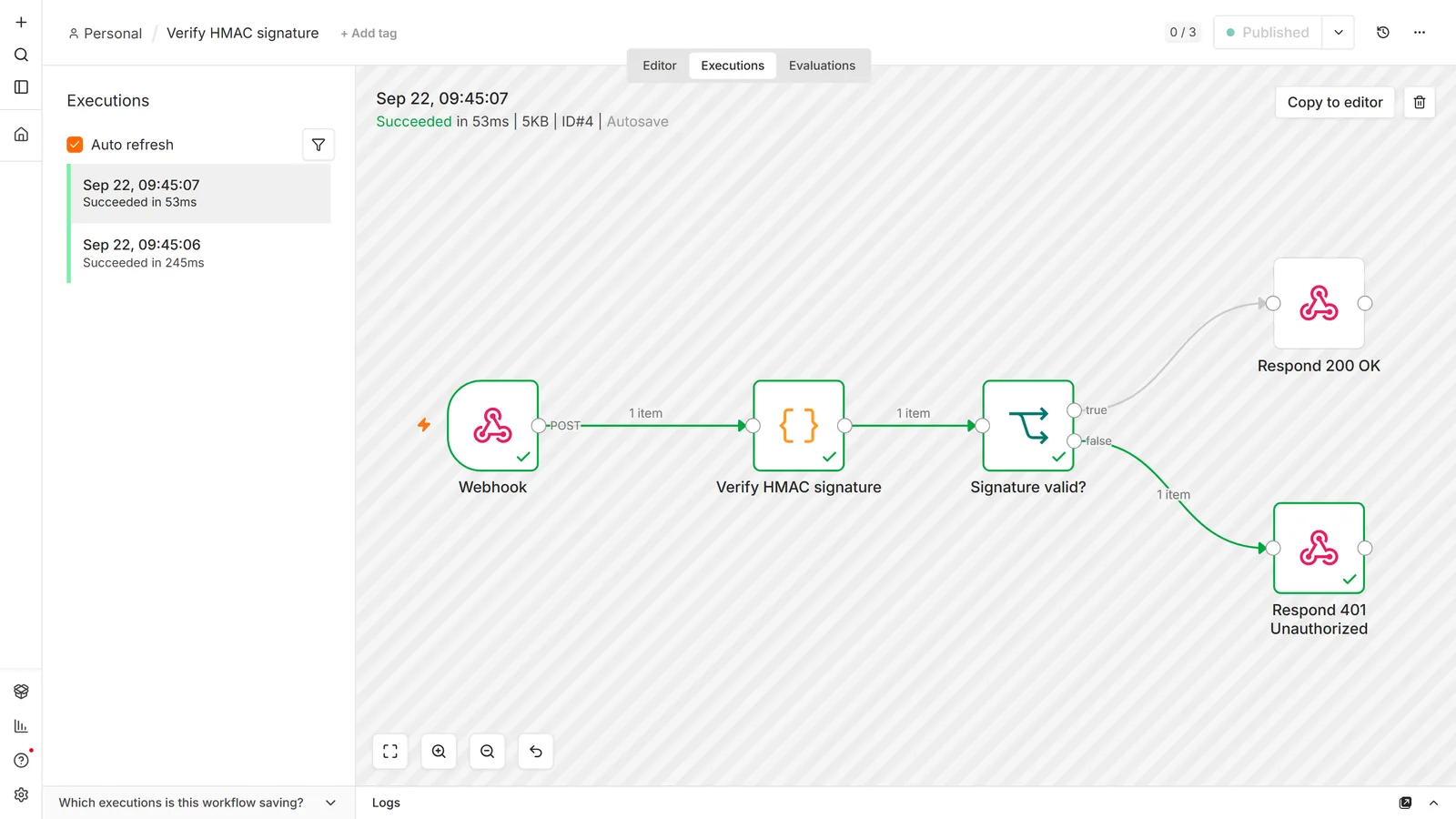
n8n's built-in auth checks a header you configured. Stripe, Slack and GitHub cannot set it. Those services sign their payloads with a shared secret and send the signature in a header of their choosing. Turning on Header auth for them does not verify anything. It rejects every genuine delivery, because the sender has no idea your header exists.
For signed senders the shape is different: set authentication to None, enable Raw Body, and verify the signature yourself in a Code node before the workflow does anything else. Compute the HMAC over the exact bytes received with your shared secret, compare it against the signature header, and stop on mismatch. It has to be the raw body, because re-serialising the parsed JSON changes whitespace and key order, and the digest no longer matches. Same reasoning as the Slack signature point.
On self-hosted n8n, that Code node fails on its first line by default. require('crypto') throws Module 'crypto' is disallowed, because the Code node blocks module imports unless you allow them. Set NODE_FUNCTION_ALLOW_BUILTIN=crypto and restart. If your task runners run in external mode, n8n's docs say to set it in the runners config file as an env override instead of on the container. With the webhook set to respond through a Respond to Webhook node, this failure is silent from the sender's side: it received a 200 with an empty body for every delivery, valid or not, in our test.
With Raw Body on, the exact bytes are on the item's binary data property, and the check itself is short:
const crypto = require('crypto');
const item = $input.first();
const raw = Buffer.from(item.binary.data.data, 'base64');
const expected = crypto.createHmac('sha256', 'YOUR_SHARED_SECRET').update(raw).digest('hex');
const got = item.json.headers['x-signature'] || '';
const valid = got.length === expected.length &&
  crypto.timingSafeEqual(Buffer.from(got), Buffer.from(expected));
return [{ json: { valid } }];
The header name and digest encoding vary by sender (Stripe and Slack sign a timestamped string, not the bare body), so match their documentation; the raw-bytes part does not vary.
And an unauthenticated webhook is a public endpoint. Anyone with the URL can run your workflow as often as they like. If the workflow costs money, an AI call or an API with metered pricing, that is a bill anyone can run up. Combine authentication with the IP allowlist option where the caller has stable addresses.
CORS: three different failures with one name
If a page's JavaScript calls your webhook, the browser sends a preflight OPTIONS request first and refuses the real call unless the response allows it. This is the "works in Postman but not from my site" problem, and nothing is wrong with n8n. It is entirely a browser rule.
The supported fix is the Allowed Origins (CORS) option on the Webhook node. Set it to your site's origin, or to several comma-separated, and n8n handles the preflight for you.
The reason people go round in circles here is that the preflight asks three separate questions, all three failures report as "CORS", and re-checking your origins only fixes one of them. Read the browser's error text closely, because it names which one failed.
- The origin. The straightforward case, and the one Allowed Origins exists for. Set the real origin rather than a wildcard once you are past testing; a wildcard means any site can call your endpoint from any visitor's browser.
- The request headers. If your front end sends an auth header, the preflight asks about that header by name. n8n's own preflight answer allows whichever headers the browser asks for, so on a bare instance this check passes. If it fails, something in front of n8n answered the preflight with its own rules, usually a reverse proxy or CDN, and the fix belongs there.
- The method. A Webhook node listens for one HTTP method. Tested on 2.33.7: a preflight for
PUTagainst aPOSTwebhook gets a 500, withAccess-Control-Allow-Methods: OPTIONS, POST, so the browser reports that the preflight response does not have an HTTP ok status. That is not an origin problem. Either match the front end's method or enable Allow Multiple HTTP Methods.
One more, if you terminate TLS at Caddy, Traefik or nginx: make sure only one layer sets CORS headers. Two layers both adding Access-Control-Allow-Origin produce a duplicate-header error that reads as though neither is configured. Reaching for a proxy rule to add CORS headers is a common detour and usually unnecessary, because the node option is enough.
Receiving files
To accept a file upload, enable the Binary File option (n8n's docs still call it Binary Property). It only appears when the method is POST, PUT or PATCH. The uploaded file arrives as binary data on the item rather than as text in the body, and downstream nodes read it by its property name.
The two things that go wrong:
Name mismatches. The property name depends on how the file was sent. A raw upload lands under Field Name for Binary Data, which defaults to data. A multipart form upload lands under the form field's name, so -F "file=@invoice.pdf" arrives as file, not data. Whatever it is called must match what the next node looks for, and most n8n nodes default to data. A mismatch produces an empty-input error that reads like a corrupt upload.
Size limits. There is a maximum payload size, and it is a setting on your instance rather than a property of the node. Large uploads fail with a payload-too-large error that has nothing to do with your workflow. On self-hosted instances that limit is an environment variable, covered in the Docker setup guide, and if a reverse proxy sits in front, it has its own separate limit that will bite first.
For anything above a few megabytes, prefer having the caller upload to storage and send you a URL. Webhooks are a poor file transport, and every layer between the internet and n8n gets an opinion about the size.
The production URL behind a reverse proxy
Self-hosted n8n behind Caddy, nginx or Traefik has one specific failure that wastes an afternoon: the URL n8n displays is not the URL the outside world should call. It shows something with an internal port, http://localhost:5678/webhook/..., because that is what the process knows about itself.
The fix is to tell n8n its public address with the N8N_WEBHOOK_URL environment variable. Set it to your public HTTPS base URL, recreate the container, and the displayed URLs become the ones you can actually hand to a third party.
N8N_WEBHOOK_URL replaced WEBHOOK_URL in n8n 2.30. Most guides, and most existing compose files, still use the old name. We checked what each does on a throwaway 2.33.7 instance:
WEBHOOK_URLalone still sets both the test and production webhook URLs, but n8n logsWEBHOOK_URL -> Use N8N_WEBHOOK_URL insteadat every startup.N8N_WEBHOOK_URLalone sets both, with no warning.- The difference shows up with
N8N_EDITOR_BASE_URL. With the old name, setting an editor URL quietly moved the test webhook URLs onto the editor's domain, while production stayed onWEBHOOK_URL. With the new name, test and production both stayed on the webhook URL.
On 2.30 or later, use N8N_WEBHOOK_URL. On older versions, it's ignored, so keep WEBHOOK_URL.
Then comes the part that generates the follow-up question, so here it is in the order the causes actually occur.
"I set N8N_WEBHOOK_URL and it's still showing localhost."
- The container was never recreated. This is the answer most of the time, and it is not obvious. Editing the variable in a compose file and running
docker compose restartdoes not apply it, because restart reuses the existing container with the environment it was created with.docker compose up -drecreates the container and picks up the change. If you have restarted three times and nothing has changed, this is why. - The variable is set in the wrong place: exported on the host shell rather than passed into the container's environment, or sitting in a
.envfile the compose file does not actually read. - The name doesn't match the version.
N8N_WEBHOOK_URLdoes nothing before n8n 2.30, where onlyWEBHOOK_URLexists. - The proxy is rewriting the port. If n8n now reports your domain but with
:5678appended, or requests reach n8n on a port your proxy config disagrees with, that is an nginx/Caddy/Traefik upstream problem rather than an n8n one.
Check the value inside the running container before changing anything else, because what n8n actually sees is the only thing that matters:
docker exec n8n printenv N8N_WEBHOOK_URL WEBHOOK_URL
This matters well beyond cosmetics. Services that verify a webhook by calling it back, or that reject non-HTTPS endpoints, fail against the internal URL, and the error they return usually says nothing about ports. It produces the specific misery of a webhook that works in the editor and dies silently in production, because the editor never leaves the machine. Any service demanding an HTTPS callback needs this set correctly, which is part of putting n8n on a real domain.
Verification handshakes
Many platforms verify ownership before they will deliver events: they send a GET with a challenge parameter and expect it echoed back, often within seconds.
Three things make this fail on n8n specifically:
- The wrong URL. Verification must be done against the production URL with the workflow active. Passing verification on the test URL and then activating leaves the service pointing at a URL that stops answering, and a service that verified once may not tell you it has started failing.
- The wrong method. The challenge usually arrives as a
GETwhile your events arrive asPOST. Those are two separate webhooks in n8n. You need a node for each, or one node handlingGETfor verification and another handlingPOSTfor events. - The wrong response. Most challenges want the raw value echoed as plain text, not wrapped in JSON. Use a Respond to Webhook node returning text.
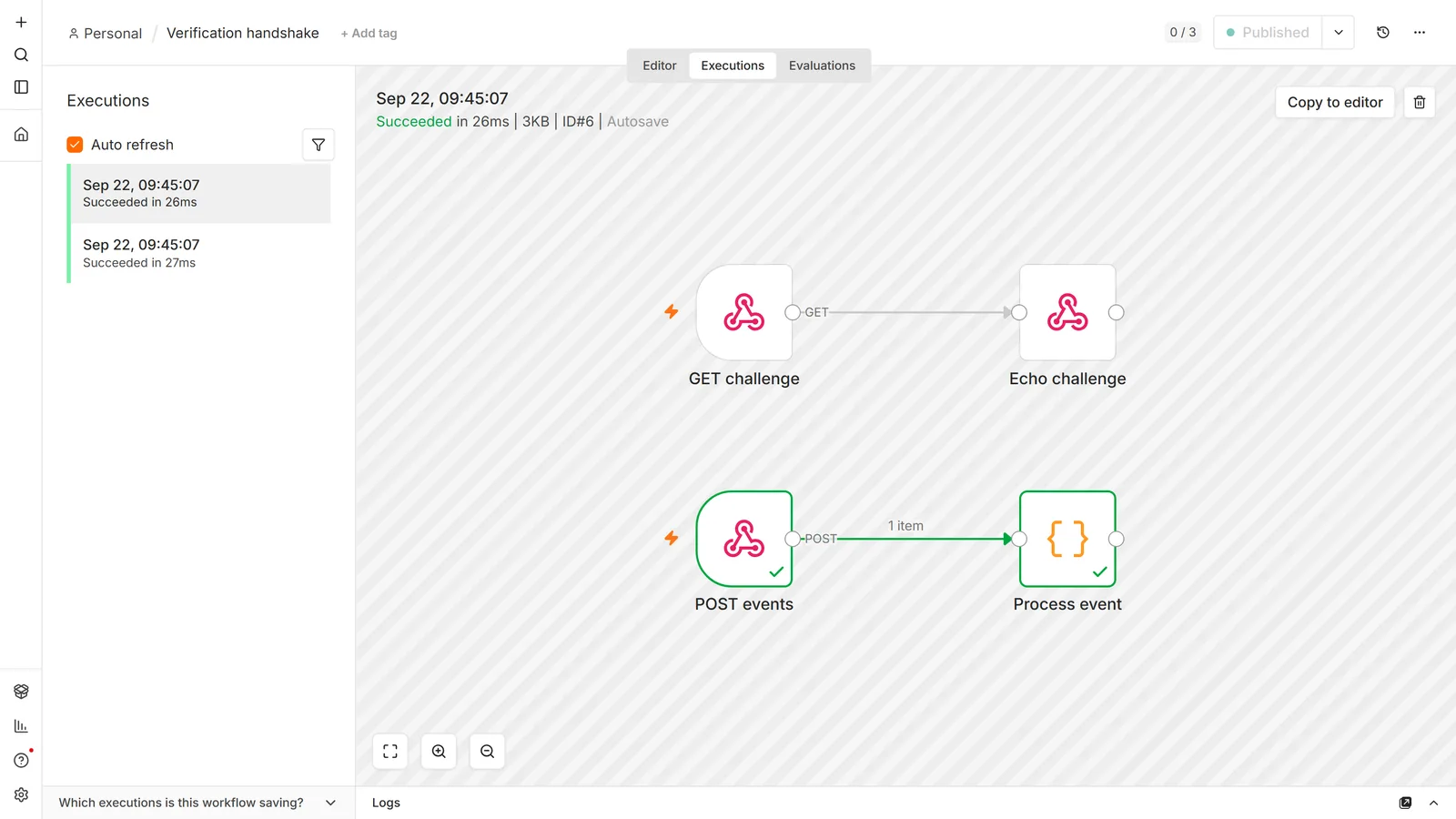
Get all three right and the handshake succeeds first time. Get one wrong and the platform reports a generic verification failure that names none of them.
Security beyond authentication
Verify signatures where the sender offers them. Covered above, and worth restating as a rule: any sender who signs payloads has given you something stronger than a shared header.
Use the IP allowlist for fixed-address callers. Many services publish their outbound ranges. Requests from anywhere else get a 403 without touching your workflow.
Treat the payload as untrusted. It arrived from the internet. Validate before you write it to a database or paste it into a model prompt.
Never put secrets in the path. A path is not a secret: it appears in logs at every hop. Secrets belong in headers, which is what the auth options use.
Turn on the bot-ignoring option for public paths. Crawlers and link previewers will hit any URL that leaks, and each hit is an execution you paid for.
Gotchas
The body is nested. It's body.field, not field. Pin a real request while building so the expression editor shows you the true shape.
Duplicate deliveries are normal. Senders retry when they don't get a fast 2xx. Respond immediately where you can, and make the workflow idempotent by checking whether you have already processed this event ID before acting on it.
Content type decides parsing. A sender posting JSON with a form content type gives you a body that looks like a string. Raw Body plus your own parse is the fix when you cannot change the sender.
Changing the path breaks the caller. The URL is the contract. Change it and every sender must be updated.
Sub-workflows and waits complicate the response. A workflow that waits on a webhook and calls sub-workflows can return data from an earlier node than you expect. If the response body looks stale, check which node actually ended the execution.
Don't use a webhook to call another n8n workflow. Use the Execute Sub-workflow node with the When Executed by Another Workflow trigger: no URLs, no path conflicts, and the data passes directly.
Failures that show up after the build (path collisions, a workflow that won't publish, an endpoint that goes quiet) are diagnosis rather than construction, and belong to the not-triggering guide.
Frequently asked questions
How do I return a proper error to the caller?
Use a Respond to Webhook node on an explicit error branch with the status code you want. A workflow that throws before reaching a Respond node does not automatically return the error you would expect.
What's the difference between Respond Immediately and When Last Node Finishes?
Immediately returns a {"message": "Workflow was started"} acknowledgement without waiting. When Last Node Finishes waits and returns the final node's output, which means a slow workflow can make the caller time out.
How do I redirect after a form submission?
Set the Webhook node to respond using the Respond to Webhook node, then configure that node to redirect. This is the standard pattern for posting a form directly to n8n.
Can I stream a response back, for a chat UI?
Yes, the Streaming mode exists for exactly that, and it requires a node in the workflow that supports streaming, such as an AI agent.
How do I call an n8n webhook from my website's JavaScript?
Set the Allowed Origins (CORS) option on the Webhook node to your site's origin. Without it the browser blocks the call at the preflight stage, even though the same request works from Postman or curl.
Why does CORS still fail after I set the allowed origin?
Because "CORS" covers three separate checks: origin, request header, and HTTP method. The browser's message names which one failed. A PUT or PATCH from your front end against a node listening only for POST fails on the method no matter how the origins are configured. n8n itself allows any requested header, so a header failure points at a proxy in front of it.
Can I allow more than one domain for CORS?
Yes, the Allowed Origins option takes several, comma-separated. Adding headers at a reverse proxy instead usually causes duplicate-header errors.
Why is my webhook URL showing localhost or port 5678?
n8n is reporting the address it knows about itself, which is wrong behind a reverse proxy. Set the N8N_WEBHOOK_URL environment variable to your public HTTPS base URL (WEBHOOK_URL on versions before 2.30).
I set the webhook URL variable and it didn't change anything.
Most often the container was never recreated. docker compose restart reuses the existing container and its original environment; docker compose up -d recreates it and applies the change. Confirm with docker exec n8n printenv N8N_WEBHOOK_URL WEBHOOK_URL before looking anywhere else, and check the name matches your version: N8N_WEBHOOK_URL needs n8n 2.30 or later.
How do I verify a Stripe, Slack or GitHub signature?
Not with the node's authentication options, which check a header you configured, and a third party cannot set it. Set authentication to None, enable Raw Body, compute the HMAC with your shared secret in a Code node, and compare against the signature header before doing anything else.
Can I get the raw, unparsed body?
Yes, enable Raw Body. This is what you need for signature verification, which must run against the exact bytes received, and for senders using a content type n8n would otherwise parse wrongly.
A service says my webhook failed verification. Why?
Three usual causes: you verified against the test URL, the challenge arrives as a GET while your node only accepts POST, or the challenge value needs echoing back as plain text rather than JSON.
How do I receive a file upload?
Enable the Binary File option. A raw upload arrives under Field Name for Binary Data (default data); a multipart form upload arrives under the form field's own name. Either way it must match what the next node expects, and most default to data.
Why does my file upload fail with a payload-size error?
You have exceeded the maximum payload size. That is an instance-level setting, not a node option, and any reverse proxy in front has its own limit that often triggers first.
Why does my webhook fire more than once per event?
Usually the sender retrying because it didn't receive a fast 2xx, so respond immediately and make the workflow idempotent. Also check for a duplicate active workflow on a different method, and for a test execution running at the same time.
Is my webhook URL private?
Treat it as public. Anyone with the URL can trigger the workflow, so add authentication, and never rely on a hard-to-guess path as your only protection.
Can I use a webhook on n8n Cloud?
Yes, and the URLs are public HTTPS with no proxy configuration needed. The reverse-proxy section applies only to self-hosted instances.
Why does my webhook work in the editor but not once activated?
The test URL and the production URL are different endpoints. That is the first step of a different checklist. Full diagnosis here.