How to Import an n8n Workflow Template Safely (2026)
The four ways to import an n8n workflow, how to review a template before you run it, and what your own exports leak when you share them.
By Ali Ilyas · · Updated September 22, 2026
There are more than 11,000 workflow templates in n8n's official library, and thousands more scattered across GitHub, YouTube descriptions, Discord servers, and blog posts. Finding one is not the problem.
The problem is the two minutes between finding a template and running it, because importing a workflow JSON is not like installing an app. It's closer to pasting a script you didn't write into a terminal that already has your passwords in it. Once you attach your credentials, every node in that file acts with your access.
That's not a reason to avoid templates. It's a reason to spend two minutes reading one. This guide covers where they come from, the four ways to import, what to look at before you run it, and, the part people never think about, what your own workflows leak when you share them.
What's on this page
- Where n8n templates come from
- The four ways to import a workflow
- Read it before you run it
- The two-minute review
- Harden the instance, once
- What you leak when you share your own
- Why the template didn't work first time
- Making a template actually yours
- Our templates
- Frequently asked questions
Where n8n templates come from
Four sources, with meaningfully different quality controls:
The official library at n8n.io/workflows is the big one, currently listing 12,394 templates across AI, Sales, IT Ops, Marketing, Document Ops, and Support. Worth understanding how it's populated: it's open to community submissions, with a Verified Creators programme layered on top. So it isn't a curated set n8n wrote and vetted; it's a marketplace with some recognised authors in it. Quality ranges from excellent to abandoned.
Inside the editor. The same library is reachable from n8n itself. Select Templates to browse it without leaving the app, which is the fastest path from "I need this" to a working canvas.
GitHub repositories. Individuals and agencies publish collections. Usually higher quality per template, because a repo with a README is a small act of maintenance. Also where you find the ones built for real production rather than for a screenshot.
Blog posts, YouTube, and Discord. Highest variance by a distance. A JSON blob in a video description has no author page, no version, no issue tracker, and no way to tell whether it worked in the version you're running. Judge these entirely on the file itself.
None of that means the official library is safe and the others aren't. It means authorship quality varies everywhere, and the file is the only thing that tells you the truth.
The four ways to import a workflow
All four are documented, and each suits a different situation.
1. Paste onto the canvas. Copy the JSON, open a workflow, click the canvas, press Ctrl+V (⌘+V on Mac). The nodes appear. n8n supports copying "a workflow or parts of it" this way, which is the underrated bit: you can lift three nodes out of someone's workflow instead of taking the whole thing.
2. Import from file. The three-dot menu in the top right → Import from file.... Best when you've downloaded a .json and want to inspect it in an editor first.
3. Import from URL. Same menu → Import from URL..., paste a link to raw JSON. Convenient, and the one to be most careful with, because you're fetching whatever that URL returns at that moment, from a server you don't control. A raw GitHub link pinned to a commit is fine. A shortened link to someone's personal domain is a different proposition.
4. The CLI. For self-hosted instances, n8n's CLI imports and exports workflows in bulk, the right tool for moving a library between environments rather than for grabbing one template.
Paste is the best default. The JSON passes through your clipboard, which means you had the opportunity to look at it, and nothing was fetched from anywhere at import time.
Read it before you run it
Here's the part that gets skipped, and the reason it matters.
An imported workflow arrives with no credentials. That's real and it's good, because n8n doesn't ship secrets in template JSON. It also creates a false sense of safety, because the moment you attach your Google account, your Slack token, or your OpenAI key to a node in that file, you've given the whole file your access. Nothing in n8n scopes a credential to the nodes you personally inspected.
So the question isn't "does this file contain secrets." It's "what will this file do with mine."
Three node types carry essentially all the risk:
Code nodes run arbitrary JavaScript. This is the big one. And there's a setting worth checking: N8N_BLOCK_ENV_ACCESS_IN_NODE decides whether expressions and the Code node can read environment variables. On a self-hosted instance, your environment is where your database password, your encryption key, and often your API keys live.
Since n8n 2.0 it defaults to true, so access is blocked. n8n's 2.0 breaking changes say so, and so did our test: on n8n 2.33.7 with a variable set, a Code node reading $env got access to env vars denied, and so did a {{ $env.… }} expression. Two things still catch people. n8n's own security variables page still lists the old default of false, so older guides repeat it. And the 2.0 migration advice for workflows that broke is to set it back to false. With it set to false, the same Code node returned our variable's value. If you ever made that change, every template you import gets the same access.
One mitigation is already on by default: n8n "disables importing modules by default" in the Code node (NODE_FUNCTION_ALLOW_BUILTIN), which meaningfully limits what that code can reach. If you've set it to * for convenience, you've removed that limit.
HTTP Request nodes can send anything anywhere. A workflow that legitimately calls an API can also POST your data to a second endpoint you didn't notice. This is trivially easy to hide in a workflow with thirty nodes and no sticky notes.
Nodes that write. Anything that deletes, sends, or posts is worth a look before its first run, not for malice, but because a template written against someone else's spreadsheet layout can cheerfully overwrite yours.
To be clear about the actual risk level: the overwhelming majority of templates are exactly what they claim to be. Nobody is seeding the n8n library with malware at scale. The realistic failure isn't a targeted attack. It is an abandoned workflow doing something careless with your data, or a copy-of-a-copy where an HTTP node still points at the original author's endpoint. Two minutes of reading catches all of it.
The two-minute review
A checklist you can actually run before your first execution:
- Count the Code nodes and read them. Most templates have none or one. Read what's there. You're looking for
$env, network calls, and anything obfuscated. Legitimate Code nodes are usually ten boring lines that reshape data. - List every HTTP Request node and check the host. Each one should point somewhere the template's description would lead you to expect. An unfamiliar domain in a Google Sheets template is the single clearest red flag there is.
- Look at what it writes to. Which nodes send, post, delete, or overwrite? Are they where you'd expect?
- Check the trigger. A Schedule Trigger set to every minute is a cost problem rather than a security one, but you'd rather find it now. Same for a webhook whose path you'd never have chosen.
- Run it once with test data. Not your production sheet. Not your real customer list. A copy.
- Attach credentials last. Import, read, run on dummy data, then connect the real accounts.
- Check whether it handles failure at all. Click through the nodes that cross the network and look at Settings. Is there a retry? Does anything catch an error? We parsed 2,030 published workflow files and 84.8% declare no error-handling field of any kind, while 0.9% have an Error Trigger. Assume a template has none until you see otherwise, because four times out of five that assumption is right.
That ordering is the whole discipline. Most people attach credentials first, because that's what the red warning triangles are asking for.
Steps 1 to 6 are about what a template might do to you. Step 7 is about what it quietly won't do for you, which is the likelier problem by a wide margin. Nobody is seeding the library with malware, but most of it will fail silently the first time an API has a bad afternoon.
Harden the instance, once
If you self-host and you import templates with any regularity, two settings are worth checking once. Both go in your environment file, covered in the self-hosting guide and Docker setup cover where that lives.
# Block env var access from expressions and the Code node.
# Default is true (blocked) since n8n 2.0. Setting it
# explicitly keeps it blocked if a migration note or an old
# guide ever gets someone to flip it to false.
N8N_BLOCK_ENV_ACCESS_IN_NODE=true

# Don't allow-list Node builtins unless something needs it.
# n8n disables module imports by default, keep it that way,
# or name the specific modules instead of using *.
# NODE_FUNCTION_ALLOW_BUILTIN=crypto
Two more defaults are already sensible, and we checked both on 2.33.7. N8N_BLOCK_FILE_ACCESS_TO_N8N_FILES defaults to true: a Read/Write Files node pointed at the instance's .n8n/config failed with Access to the file is not allowed. Module imports in the Code node are also off: require('crypto') fails with Module 'crypto' is disallowed until you allow it.
If a workflow legitimately needs a value from the environment, the better route is a credential, not unblocking the whole environment for every workflow on the instance.
What you leak when you share your own
This is the half nobody covers, and it applies the moment you post a workflow in a Discord thread to get help.
n8n's docs are direct about it: "Exported workflow JSON files include credential names and IDs." The IDs aren't sensitive on their own. The names can be, and n8n says exactly that, advising you to "remove or anonymize this information from the JSON file before sharing."
Think about how people name credentials in practice. Acme Corp Production Gmail. client-bigbank-slack. stripe-live-key. None of those grant access to anything, and all of them tell a stranger who your clients are, which environments you run, and what to try phishing you for. If you do client work, your credential names are a customer list.
We checked this by exporting a test workflow with n8n export:workflow on 2.33.7. The file contained the credential name Acme Corp Production Sheets with its ID, the hard-coded spreadsheet ID, and the pinned record with a customer email, all in plain text.
Before you share a workflow:
- Open the JSON and search for
credentials. Replace the names with something generic. - Check every node parameter for a hard-coded ID: spreadsheet IDs, channel IDs, chat IDs, internal URLs. These often aren't secret, but they're specific, and a Google Sheet ID plus loose sharing settings is a real exposure.
- Look at your sticky notes. People write internal context in them and forget entirely.
- Strip pinned data. Pinned execution data is real data from a real run, often the most sensitive thing in the file, and the easiest to overlook because it doesn't look like a setting.
That last one catches people. You pinned a live customer record to debug something in March, and it's still sitting in the export in July.
Why the template didn't work first time
Assume it won't. Templates are starting points, and n8n's own docs say you "may need to fill in credentials and adjust the configuration." In rough order of how often it's the cause:
Credentials aren't attached. Every node with a red triangle needs one. Expected, not a bug.
Placeholders are still placeholders. YOUR_SHEET_ID, an empty channel picker, a chat ID from someone else's Telegram. Good templates make these obvious; less good ones leave a real-looking value from the author's own account, which fails in a much more confusing way.
The template predates a rename. n8n moves. The Active toggle became a Publish button; the OpenAI node's Message a Model now calls the Responses API and puts its reply at output[0].content[0].text (an imported node keeps its old version, so this bites when you replace it with a fresh one); agent types were consolidated so every AI Agent is now a Tools Agent. A template built before any of those still imports, but the instructions written around it no longer match what you see. The AI section moves fastest of all. If an imported workflow's chain or parser nodes look unfamiliar, the LangChain tutorial maps what each of them is now called and does.
Node versions differ. A workflow exported from a newer n8n can reference a node version your instance doesn't have. Usually it imports with fields unset rather than failing loudly. If a node looks oddly empty, check whether your instance is current.
It works when you run it, then does nothing. You ran it manually; you never published it. That, plus the test-versus-production webhook URL trap, accounts for most "the template is broken" reports. The full diagnostic path is in workflow not triggering.
Timezone and locale. Schedule triggers run in the instance's timezone, not the author's. A template that runs at 09:00 for them runs at 09:00 for you only if GENERIC_TIMEZONE says so.
Making a template actually yours
A template you imported and got working is not yet a workflow you can rely on. Four things turn one into the other, and they're the same four every time:
Rename everything. HTTP Request 3 and Code 2 are how a workflow becomes unmaintainable. Name nodes for what they do. You'll be reading this in six months with no memory of it.
Add error handling. Almost no template ships with any, because it doesn't demo well. Set an error workflow in workflow settings, and publish that error workflow (an unpublished one never runs), so failures reach you with the workflow name, the node, and the error. A bare "workflow failed" just trains you to ignore alerts.
Add a monitor if it matters. An error workflow only fires when an execution fails. A workflow that stops triggering produces no execution at all, so there's nothing to fail and nothing to report. Have it write a timestamp on success and check separately for staleness. That reasoning is worked through in full in workflow not triggering.
Make writes idempotent. If the workflow sends, charges, posts, or creates, a retry will do it twice, because n8n tracks nothing about which steps already succeeded. Check a key before the irreversible step. This matters most for anything an n8n AI agent decided to do, because the agent might not even take the same path on the retry.
Do those four and you have a workflow. Skip them and you have a demo that happens to run in production.
Our templates
We publish eight n8n workflow templates of our own. They're free, there's no email gate, and they're deliberately small.
Small is the feature. Every one of them is short enough to read in full before you trust it, which is the standard this entire page argues for, and it would be strange to argue it and then hand you a forty-node black box. Each also carries its setup steps and its specific trap as sticky notes inside the file, so the caveats survive being copied and forwarded.
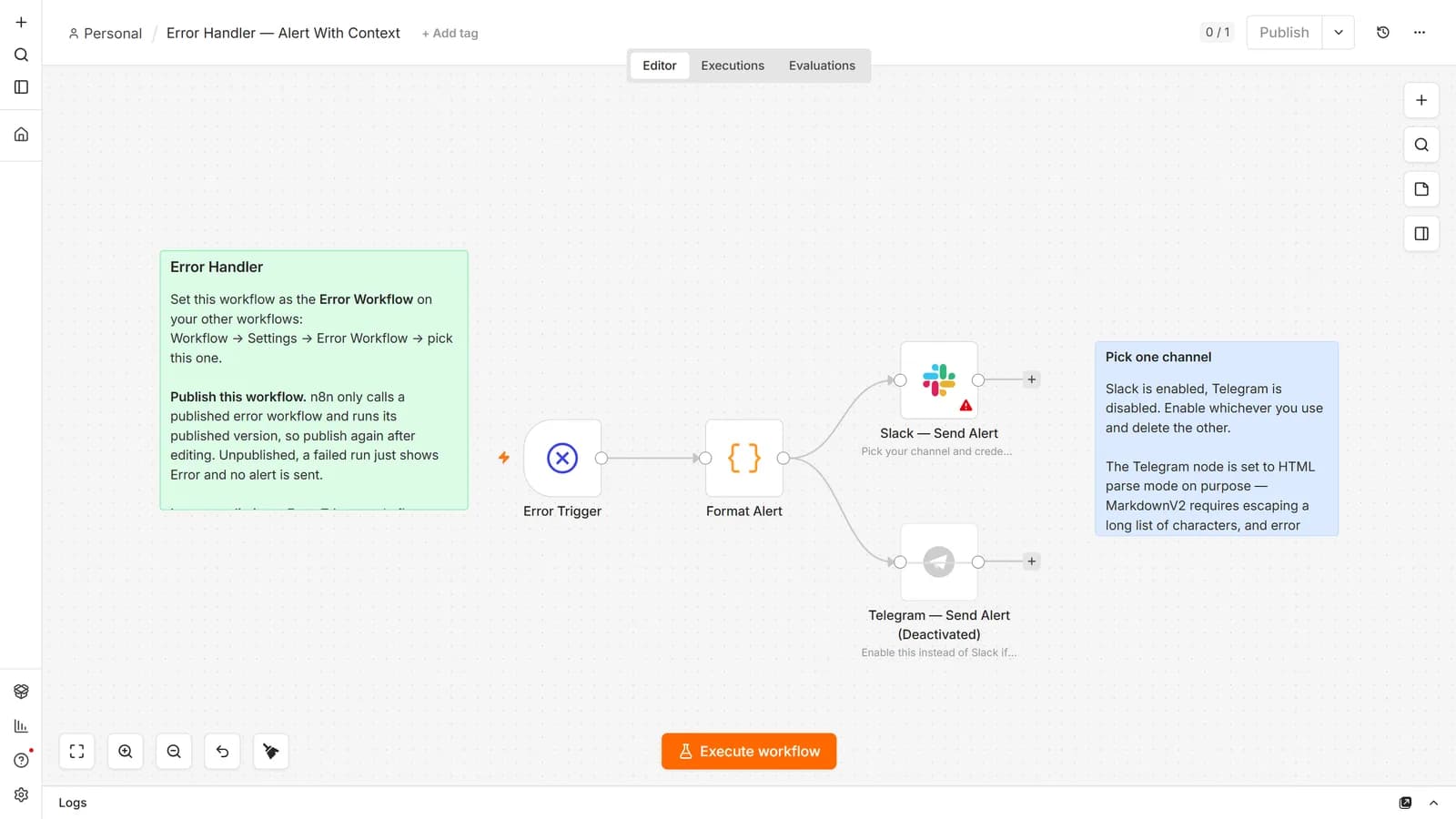
Half of them are reliability patterns rather than integrations, because those are the ones nobody publishes: an error handler that names the failing node, a heartbeat watchdog that alerts on the absence of success, an idempotency guard, and a human approval gate. The other four are working starting points for Google Sheets, Telegram, OpenAI classification, and an AI agent.
None of them contain credentials, which is checked automatically before publishing, along with a scan for anything key-shaped.
Frequently asked questions
How do I import an n8n workflow JSON?
Copy the JSON and paste it onto the canvas with Ctrl+V, or use the three-dot menu → Import from file... / Import from URL...
Are n8n templates free?
The official library and ours are. Some creators sell template packs separately. n8n itself is free to self-host. See is n8n free.
Do templates include the author's credentials?
No. Credentials aren't included in the workflow itself, so you attach your own after importing. Exports do include credential names and IDs, which is a separate concern when you're the one sharing.
Is it safe to import a workflow from the internet?
Usually, and it's still worth two minutes. Read the Code nodes, check every HTTP Request host, run once on test data, and attach credentials last.
Can an imported template steal my API keys?
Not from the file itself. On n8n 2.0 and later, Code nodes and expressions are blocked from reading environment variables by default (N8N_BLOCK_ENV_ACCESS_IN_NODE=true). The risk returns if someone set it to false, which is n8n's own migration advice for workflows that broke on upgrade. Check your environment file.
Why does the imported template have empty fields?
Either placeholders the author left for you, or a node version mismatch between their instance and yours.
Where's the Templates option in n8n?
In the workflow list, when creating a new workflow, where you can start empty or from a template. Self-hosted instances can point at a custom library instead.
Can I share a workflow publicly?
Yes, after you strip credential names, hard-coded IDs, sticky-note context, and any pinned execution data.
Why doesn't the template work after importing?
In order of likelihood: credentials not attached, placeholders not replaced, never published, or built against an older version of n8n.
Can I sell workflows I build in n8n?
Selling your own workflow JSON is your work to sell. What the licence restricts is selling access to n8n itself. The distinction is covered in which n8n licence you need.
I imported a workflow from a file and nothing appeared.
Check Overview → Workflows before importing again, because the import may have landed somewhere you aren't looking. Import from file... loads nodes onto the canvas you currently have open; it doesn't create and save a new workflow for you, so closing the tab loses it. The other cause is the file's shape: the editor expects one workflow object, and a file holding an array of several workflows won't load. That's a CLI job.
Can I import a whole folder of workflow JSON files at once?
On self-hosted, yes: n8n import:workflow --separate --input=/path/to/folder. Two things catch people. --separate expects a directory of one-workflow-per-file, not a single combined file. And every file needs a lowercase .json extension. We tested a folder of four identical workflows named .json, .JSON, .txt and with no extension on n8n 2.33.7: the CLI reported Importing 1 workflows... and gave no warning about the other three. Imported workflows arrive unpublished, so nothing starts running on you.
Do credentials come across with the workflow?
No, and that's the point. A workflow JSON stores each credential's name and ID, never its secrets, so an imported workflow arrives wired to credentials that don't exist yet on your instance. You reconnect them once per credential, not once per node. Credentials do have their own CLI export, and that one does write secrets to disk, so treat the output like a password file rather than a backup.
The CLI import can't find my file, and n8n is in Docker.
The command runs inside the container, so the path has to exist inside the container. Mount the folder with -v ~/backups:/backups, then run the import against /backups/..., not the host path. Same for exports: write them to a mounted directory or they vanish with the container.
Primary references: n8n's export and import documentation, the templates guide, and the security environment variables reference.
Start here: our eight free n8n workflow templates are importable in one paste. If you're not running n8n yet, the self-hosting guide and Docker setup get you there first. New to the platform entirely? Start with an introduction to what n8n is. Coming from another tool, n8n vs Zapier covers what changes on the bill.