n8n Error Handling: Five Signals in Public Workflow Files
We checked five error-handling signals in 2,030 representatives of grouped public n8n files. Download the data and review the method and limitations.
By Ali Ilyas · · Updated October 23, 2026
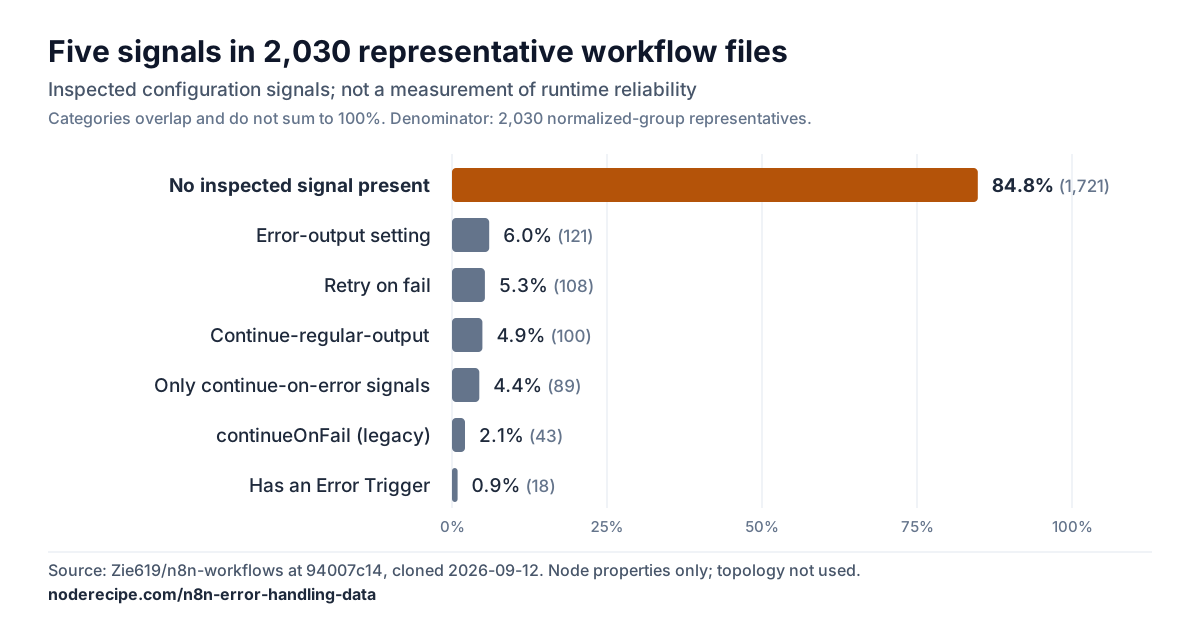
We inspected 2,061 files from one public n8n workflow collection and grouped them by normalized nodes and connections. This analysis counts one representative from each of the resulting 2,030 groups. Of those representatives, 1,721 (84.8%) lacked all five signals listed below. That measures declarations in these files, not production failure rates or every possible way to handle errors.
The five signals are: at least one node with retryOnFail=true, onError=continueErrorOutput, onError=continueRegularOutput, or continueOnFail=true; or a node type ending in errorTrigger. An absent signal means the tested condition was not satisfied, not that every related field is missing.
The downloadable data and methods below document the counts and the limits of this public collection. If nodes and triggers are new terms, our guide to what n8n is covers them first.
What's on this page
- 84.8% lack all five inspected signals
- The 4.4% with only continue-on-error signals
- Append or Update: 69 of 71 nodes specify a matching column
- What to change in your own workflows
- Can you trust these numbers?
- Take the data — CSV, JSON and how to cite it
- Reproduce this
- Frequently asked questions
84.8% lack all five inspected signals
The source is Zie619/n8n-workflows: MIT licensed, 2,061 workflow JSON files, cloned 12 September 2026 at commit 94007c14. Grouping files by the normalized nodes-and-connections fingerprint described below leaves 2,030 groups, represented by one workflow file each. This is the denominator for the whole-corpus workflow percentages; subgroup tables use their stated denominators. The grouping removes differences in selected fields, so it does not mean the files are byte-identical or proven equivalent when executed.
| signal | workflows | share |
|---|---|---|
| No inspected signal present | 1,721 | 84.8% |
| No retry, no error output, no Error Trigger | 1,810 | 89.2% |
onError: continueErrorOutput on at least one node | 121 | 6.0% |
retryOnFail: true on at least one node | 108 | 5.3% |
onError: continueRegularOutput | 100 | 4.9% |
continueOnFail: true (legacy) | 43 | 2.1% |
| Contains an Error Trigger | 18 | 0.9% |
The Error Trigger row is the one that surprised us. It is the mechanism n8n gives you for catching a failed execution across a whole workflow, it takes about a minute to wire up, and eighteen workflows out of two thousand have one.
These are not toy files. Median workflow size is 12 nodes and the largest is 246, or 9 and 174 if you discount sticky notes, which make up 23% of all nodes and do nothing at runtime. A nine-node workflow with an HTTP call in the middle of it has somewhere to fail. (Those medians include nodes the upstream rewrites added, described below. Before the rewrites they were 11 and 8.)
The 4.4% with only continue-on-error signals
In 89 of the 2,030 representatives (4.4%), at least one node declares onError=continueRegularOutput or continueOnFail=true, while none declares the inspected retry or error-output signal and none contains an Error Trigger. This does not establish whether downstream nodes inspect errors or other handling exists.
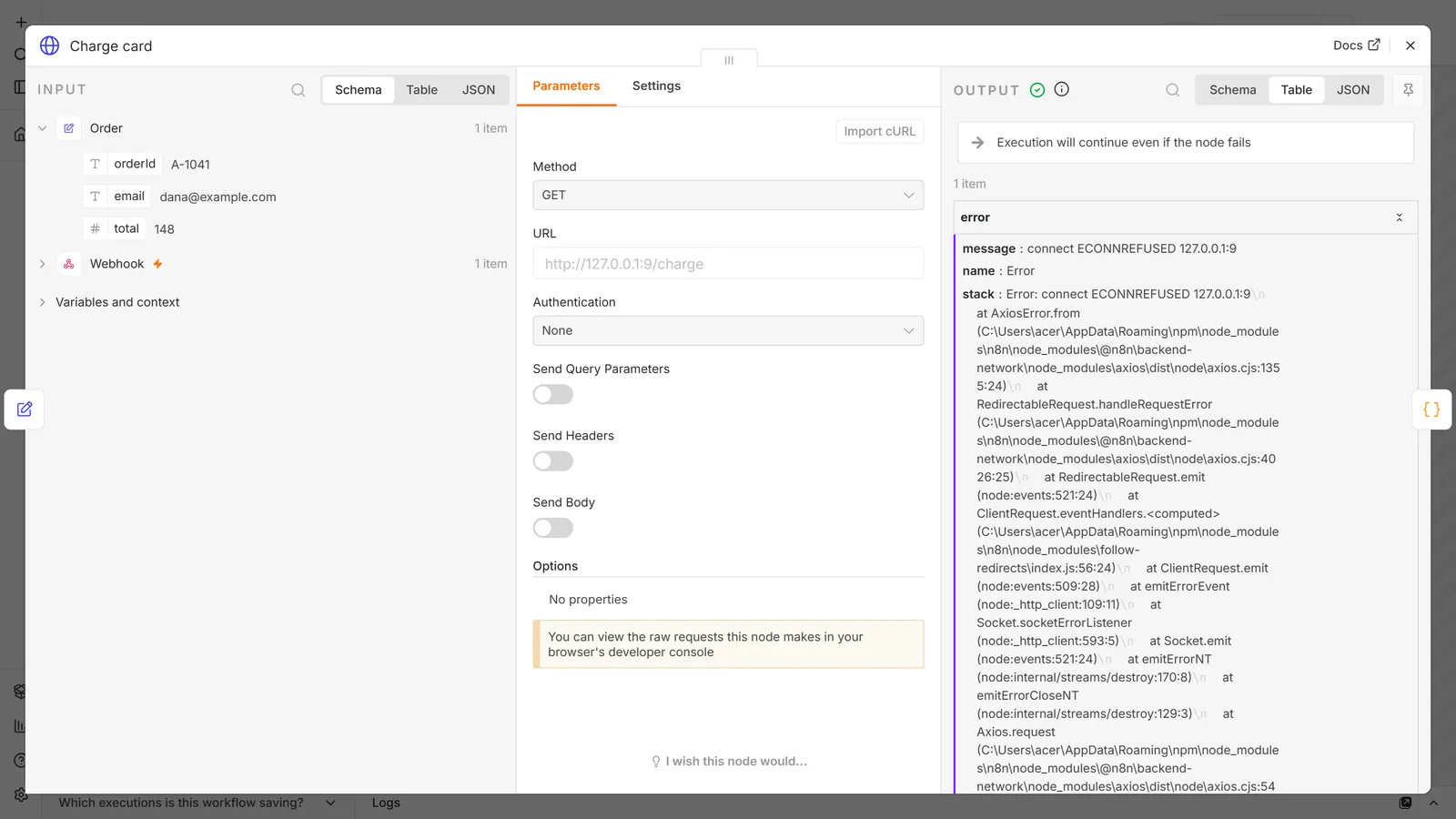
Both of those mean the same thing in practice, and we tested both on n8n 2.33.7 with an HTTP Request node pointed at a port that refuses connections. The workflow kept running, the node after it ran, and the execution was marked Success. Nothing retried and nothing branched.
The item that came out is the part to know about. The failed node's output was a single error object, and the data that went into the node was gone. The webhook payload never reached the next node. continueErrorOutput behaved differently in the same test: the item on the error output kept every input field and added error alongside them. So if you want to handle a failure rather than hide it, the error output is also the one that leaves you something to work with.
This controlled test demonstrates one failure mode. It does not establish that all 89 representatives silently fail: their runtime behavior and downstream error checks were not measured.
If you use continueRegularOutput, the thing that makes it real is checking the error field on the branch afterwards, and remembering that whatever you wanted to write is no longer on the item.
We have no data on how many do, because that check lives in node parameters we did not try to parse reliably across every node type.
Append or Update: 69 of 71 nodes specify a matching column
This is the part we went looking for, and the reason is worth stating. In September 2026 an automation consultant, Hayrullah Kar, read our Google Sheets integration guide and pointed out that our description of Append or Update was wrong in a specific way: we called the matching column an identity key, and it cannot be one. The operation reads the sheet to find a matching row, then writes. The Sheets API has no conditional write that would collapse those into a single step, so two executions carrying the same key can both look, both find nothing, and both append.
We fixed the article. The open question was how common the pattern is, and now there is an answer.
Across the corpus there are 595 Google Sheets nodes in 279 workflows. The operations break down as append 183, update 125, appendOrUpdate 70, upsert 1, other 14, unset 202.
That gives 71 Append-or-Update nodes across 53 workflows. Of those 71 nodes, 69 specify a matching column, which shows configured matching criteria, not the authors' intent or a uniqueness guarantee. The columns chosen are what you would expect: id (8), Email (5), Id (4), xid (3), email (3), ID (3), place_id (2).
Now look at those 53 workflows:
| count | share | |
|---|---|---|
| No retry, no error output, no Error Trigger | 43 | 81.1% |
retryOnFail anywhere in the workflow | 6 | 11.3% |
retryOnFail on the upsert node itself | 3 | 5.7% |
onError: continueErrorOutput anywhere | 6 | 11.3% |
| Contains an Error Trigger | 0 | 0% |
| Error suppression present | 8 | 15.1% |
Forty of the 53 contain a non-manual trigger node. Of those 40, 31 declare no retry, separate error output, or Error Trigger. This narrower count does not exclude regular-output continuation or legacy continueOnFail. It describes declarations, not whether downstream nodes inspect errors or whether executions can overlap.
Correction, 29 September 2026: this sentence previously described those 31 as having no error handling of any kind. Only 28 lack all five measured signals. The downloadable data retains the 31/40 count under a more precise metric name; its JSON records the key changes.
Three workflows in the corpus put a retry on the node doing the upsert. None has an Error Trigger.
Among the 53 representatives containing these operations, 43 (81.1%) lack the three inspected retry, error-output and Error Trigger signals. This does not measure how much their authors considered failure or whether execution is correct. Retries and error handling also do not establish atomicity or prevent duplicate writes.
What to change in your own workflows
Four things, in the order they pay off.
Add an Error Trigger workflow, and publish it. One workflow, one Error Trigger node, one notification node pointed at wherever you actually read messages. Set it as the error workflow on everything else. This is the 0.9% row above, it takes a minute, and it converts silent failure into a message. To skip the wiring, import the Error Handler from our n8n templates, an Error Trigger with Slack and Telegram alerts that name the failing node.
The publish step is the one that catches people, because n8n's docs say you don't need it. On 2.33.7 you do. We set an unpublished Error Trigger workflow as the error workflow and made a production run fail: the run was marked Error, the error workflow never ran, and the only trace was a server log line saying it is not active and cannot be executed. Published, the same workflow ran on the next failure. n8n runs the published version, so publish again after you edit it.
Put retryOnFail on reads that cross the network. HTTP GETs, lookups, anything that fetches. The default of not retrying means one timeout kills the run. Two or three tries with a wait of a few seconds absorbs the ordinary case, and the most common waitBetweenTries value in the corpus is 5000ms, which is a reasonable place to start.
It is also the most you can have. n8n clamps Max Tries to between 2 and 5, and Wait Between Tries to at most 5000ms, whatever the field says. With retry on and nothing else set, you get 3 tries 1 second apart. We set 10 tries and 20000ms on a request that always failed: the node ran 5 times, 5 seconds apart, and gave up after 20 seconds. So a retry covers a blip of about 20 seconds at most. An API that asks you to back off for a minute needs a Wait node and a loop, not a bigger number in this field.
Be careful retrying writes. A retry is safe when the operation is safe to repeat, and a write usually isn't. A request that sends, charges, posts or creates can succeed on the server and still time out before the response gets back, and the retry then does it a second time, and nothing errors, because both calls worked exactly as instructed. Retrying a write needs an idempotency key on the receiving end, which has to be built rather than configured. The long version, including why this bites hardest with agents, is in the section on rollback in the AI agent guide. The short rule: anything a customer would notice happening twice needs a key before it gets a retry.
Don't treat a spreadsheet as a key-value store with constraints. If the identity of a row matters, keep the key somewhere that can refuse a second write, such as a database column with a unique constraint. On self-hosted n8n you can narrow the overlap window with N8N_CONCURRENCY_PRODUCTION_LIMIT=1 (in a Docker install it goes in the container's environment, with -e or under environment: in Compose), but note that this is instance-wide rather than per-workflow. The full version is in Build 3 of the Google Sheets guide.
If you are importing workflows from a template library, our guide to vetting a template before you run it covers the rest of the review. Check failure handling before running a shared template. This corpus audit identifies missing declarations; it cannot establish whether an imported workflow will handle failures correctly.
Can you trust these numbers?
Partly, and the boundary is worth being precise about, because this dataset has known problems that other people found and documented before we got to it.
Three of the five top-level objects in these files have been rewritten at some point in the repo's history. Two of the three were reported publicly before we started:
- The connections are broken. Issue #200, filed 4 September 2026, reports that 27,525 of 27,544 connection targets point at nodes that do not exist in their files, mostly synthetic
error-handler-<uuid>names, across 1,363 files. We reproduced it independently and got the same figures. - The node types are wrong for AI nodes. The same issue reports that every scoped
@n8n/n8n-nodes-langchain.*type was replaced withn8n-nodes-base.noOp, and SEVENEDGE's write-up traces the change to a single commit,3c0a92c4of 29 September 2025. We confirmed it: exactly one node in the entire corpus still carries a scoped type, while 2,053 AI-named nodes are typed as no-ops. - The published stats were inflated. Issue #190 documents README badges claiming 4,343 workflows against 2,061 real files, a number hand-edited into
stats.jsonrather than derived from the data. settingsandmetaare normalised. All 2,026 files that carrysettingscarry a byte-identical one, and everymeta.createdAtfalls on 29 September 2025 within microseconds.
So why is anything here believable? Because the per-node error-handling properties survived all of it, and we checked that rather than assuming it. Taking one workflow rich in those fields and reading it at three points in the repo's history: before the type rewrite, at it, and at HEAD:
c4885eee (Aug 2025) | 3c0a92c4 (Sep 2025) | HEAD | |
|---|---|---|---|
retryOnFail | 47 | 47 | 47 |
onError: continueRegularOutput | 13 | 13 | 13 |
maxTries | 6 | 6 | 6 |
waitBetweenTries | 17 | 17 | 17 |
alwaysOutputData | 4 | 4 | 4 |
Identical throughout, while @n8n/ types went 11 to 0 and connections went from fully resolving to not resolving at all. The rewrites hit type, connections, settings and meta, and added nodes, but left the properties of the nodes already there alone.
One file is an anecdote, so in October we checked all of them. We compared every workflow file at f8639776, the last commit on main before the rewrites landed (28 September 2025), with the commit we counted, node by node. 2,057 of the 2,061 files existed before the rewrites. On the 29,363 nodes present in both, retryOnFail, onError, continueOnFail, maxTries, waitBetweenTries, the Error Trigger type and the Google Sheets type and operation are unchanged on every one, and none of the 2,057 files changes on any signal counted on this page. The only edit to a value we read was a credential scrub on two Google Sheets update nodes, which no figure here uses. The script and its full output are public.
Two things the rewrites do reach. They left about 1,200 nodes behind in 1,124 files, mostly Stop and Error (1,066) and Manual Trigger (154) nodes, and none of them carries a signal counted here. They do inflate the size figures above and the node-type counts in the downloadable data: 1,035 of the 1,072 Stop and Error nodes and 142 of the 906 Manual Triggers there are injected, and 3,977 of the 4,363 No Operation nodes were AI or community nodes before the rewrites. Don't cite the node-type counts as anything authors built. The rewrites also move the grouping, which fingerprints node names and connections: the same rule run on the pre-rewrite files gives 1,974 groups, of which 1,670 (84.6%) lack all five signals, against 2,030 and 84.8% here. Error Triggers are 18 either way.
What that permits, and what it forbids. Every statistic on this page reads node properties or unscoped n8n-nodes-base.* types, both of which we have reason to trust. We also checked that no node named like an Error Trigger or a Google Sheets node had been mistyped, and none had. What we deliberately do not claim is anything about how workflows are wired: whether an error output actually connects to something, which nodes follow which. We had a number for that and threw it away, because the graph in this dataset is not real.
The last caveat is the honest one: these are files people publish and download, not a sample of what runs in production. Nobody has that dataset. What these numbers describe is what the ecosystem hands you when you import a template.
Correction, October 3, 2026: clarified that the percentages describe five inspected configuration signals in representatives of normalized groups. Counts are unchanged. Earlier wording implied broader absence of error handling and runtime conclusions that the analysis does not establish.
Correction, October 17, 2026: published the analysis scripts and added a check of every file against the pre-rewrite history, where we had checked one. The signal counts are unchanged. The check found that nodes injected upstream raise the size statistics (median 12 nodes, 11 before the rewrites) and most of the Stop and Error, Manual Trigger and No Operation counts in the downloadable data, and that the grouping gives 1,974 groups and 84.6% on the pre-rewrite files. The JSON now carries these caveats.
Take the data
Every aggregate on this page, in two machine-readable files, free to reuse with attribution (CC BY 4.0):
- n8n-error-handling-2026-09.csv — 47 rows, one metric per row, with counts, denominators and shares
- n8n-error-handling-2026-09.json — the same numbers plus the full provenance block: source commit, grouping rule, which fields were read, which were deliberately ignored, and the caveats that travel with each figure
If you only take one thing, take the denominator with the number. "84.8%" without "of 2,030 representative workflow files from normalized groups in one public collection" is a statistic we would not stand behind.
How to cite this
Ilyas, A. (2026). n8n Error Handling: Five Signals in Public Workflow Files. NodeRecipe. https://noderecipe.com/n8n-error-handling-data
In running text: an analysis of one public n8n collection found that 1,721 of 2,030 representative workflow files (84.8%) lacked five inspected error-handling signals (NodeRecipe, 2026).
Two things we would ask you to carry across: these are published files, not production telemetry, and the figure describes what a workflow declares, not whether it works. If a sentence needs the numbers to mean more than that, they don't.
Reproduce this
Every count here comes from short Python scripts run against a clone of the pinned commit, and the scripts are public: noderecipe52/n8n-error-handling-data. The tag published-counts-2026-09 holds the exact versions that produced these numbers. The repository also has an independent re-implementation that re-derives 27 of the published rows from the pinned archive and compares them with the live CSV, and the rewrite check described above. Nothing is hand-counted and nothing is estimated.
git clone --depth 1 https://github.com/Zie619/n8n-workflows.git corpus
git -C corpus rev-parse HEAD   # ours: 94007c1445d9258a7da116646b79473e7c7c3282
From there: group files on a SHA-1 of the normalised nodes array plus connections, with id, versionId, webhookId, position, createdAt, updatedAt, meta, tags, pinData, active and instanceId stripped recursively. Sort the serialized normalized nodes before hashing. That is the step that takes 2,061 files to 2,030 groups; count one representative file per group. Recursive stripping also removes nested keys such as id inside parameters, so this is a grouping rule, not a test of runtime equivalence. Connections participate in grouping but are not used to infer wiring or error handling. Then count node properties (retryOnFail, onError, continueOnFail) and unscoped n8n-nodes-base.* types. The JSON above records the field list and subgroup definition.
The repo is a moving target, though less than you might think: its last push was 24 June 2026, nearly three months before we cloned it, which is why the commit above is still the tree these numbers describe. Check git ls-remote https://github.com/Zie619/n8n-workflows.git main against 94007c14 first — if it has moved, your numbers may legitimately differ from ours.
Frequently asked questions
Does 84.8% mean most n8n workflows are broken?
No. It means 1,721 of the 2,030 representatives lacked the five inspected signals. It does not establish whether other handling exists, whether the workflows run in production, or how frequently they fail. The grouping rule also does not establish that representatives are distinct runtime behaviors.
Why not just check each workflow's own error-workflow setting?
Because in this corpus that field is worthless. All 2,026 files carry errorWorkflow: null as part of an identical injected settings block, so the value tells you about whoever assembled the repo and nothing about whoever wrote the workflow. We detected Error Triggers by looking for the node instead.
Is continueOnFail the same as onError: continueRegularOutput?
Yes. We ran both on 2.33.7 and got the same result: the execution marked Success and the input replaced by an error object. continueOnFail: true is the older spelling and n8n replaced it with the onError field, which has the advantage of distinguishing "pass the error downstream" from "send it out a separate output". 43 workflows still use the old field. We counted both and treated them the same.
Can I trust the rest of this corpus for my own analysis?
For node properties, we think so, on the evidence above. For node types, only the unscoped n8n-nodes-base.* ones, and anything scoped is gone. For connections, settings, metadata or timestamps, no. If you read a statistic about this dataset anywhere, the useful question is which fields it was computed from.