What Is n8n? A Beginner's Guide, With Your First Workflow
What n8n is, what it is used for, and how it actually works: items, nodes, triggers and expressions, plus your first real workflow built properly.
By Ali Ilyas · · Updated October 7, 2026
n8n is a workflow automation tool that connects applications and APIs in a visual editor. You can use it to move data, run scheduled tasks, respond to webhooks, and add AI steps to a business process. Its official documentation describes it as fair-code licensed.
Start by understanding four ideas: items carry data, nodes process it, triggers start a workflow, and expressions reference values. This guide explains each one, then builds a spreadsheet reminder workflow and shows how to inspect its results. No prior automation experience is assumed.
Choose your starting point: read what n8n is used for, jump to your first workflow, or follow the 30-day learning path. For running your own instance, use the separate self-hosting guide.
What's on this page
- What is n8n?
- What is n8n used for?
- Idea 1: everything is an item
- Idea 2: nodes run on every item, automatically
- Idea 3: a trigger decides when, not what
- Idea 4: expressions are how nodes talk to each other
- Getting n8n running
- Your first workflow, built properly
- Reading an execution when it breaks
- The five nodes that cover most work
- A 30-day path
- Mistakes that cost beginners the most time
- Frequently asked questions
What is n8n?
n8n is a fair-code platform for building workflow automations and AI agents. The name is short for "nodemation" and is pronounced "n-eight-n", according to the project README, which quotes founder and CEO Jan Oberhauser. The same README lists 1,500+ integrations and 9,000+ workflow templates (checked 2026-10-07).
In practice, n8n connects steps into a workflow: a form submission arrives, a row gets added, and a message goes out. You configure the steps as nodes in a visual editor and inspect the data passed between them. It is source-available under n8n's licensing terms; the availability of its source code does not mean unrestricted use.
You can run n8n on your own infrastructure or use n8n Cloud. Hosting costs, edition features and licence terms still matter; see what is free in n8n. When a built-in integration does not cover a task, HTTP requests and code can extend a workflow. Compare those requirements with the alternatives and their trade-offs before choosing a tool.
Being able to inspect the data between every step is why people who outgrow simpler tools land here, and it's also why n8n feels harder at first. It doesn't hide the data from you. So learn to read the data, and the rest follows.
What is n8n used for?
Four kinds of job, in roughly the order people meet them.
Moving data between tools that don't talk to each other. A form submission becomes a spreadsheet row, a database record and a Slack message, without anyone copying anything by hand. This is the bulk of what actually gets built, and it is simultaneously the least impressive and the most useful category. Google Sheets and Slack notifications are the usual first builds.
Scheduled work nobody wants to remember. A report assembled every Monday morning, a nightly check that a backup really happened, a weekly sweep for stale records. The trigger is a clock rather than an event, and the workflow underneath is often the same one you would have built anyway.
Reacting to something happening in another system. A webhook fires when a record changes somewhere else and n8n responds. This is where beginners hit their first genuine wall, because an instance running on your laptop has no address the internet can reach. The webhook tutorial deals with that properly.
Putting a model in the middle of a process. Classify an incoming email, summarise a document, answer a question from your own content instead of the model's memory. The AI nodes matter here less for the model access, which you could get anywhere, and more because the plumbing around it already exists: the trigger, the retries, the place to put the result. OpenAI, AI agents and RAG chatbots go deeper.
What n8n is not is a place to build a user interface. It is a backend tool for processes, and the thing a person clicks on generally lives somewhere else.
Idea 1: everything is an item
This is the concept that, once it lands, makes the other three obvious.
Every node in n8n receives a list of items and outputs a list of items. An item is one JSON object: one row, one email, one record.
Click any node after running it and you'll see this list in the output panel. If a node fetched 12 rows from a spreadsheet, its output is 12 items. If it fetched one, its output is one item, still a list, just a list of one.
[
  { "name": "Ada",   "email": "ada@example.com" },
  { "name": "Grace", "email": "grace@example.com" }
]
That is the entire data model. Not a table, not a spreadsheet, not a variable, but a list of JSON objects moving left to right.
Idea 2: nodes run on every item, automatically
Here's the part that surprises people coming from other tools.
If a node receives 12 items, it runs 12 times, once per item. You don't build a loop. You don't add a "for each" node. The looping is the default behaviour of every node in n8n.
So a workflow that reads 50 spreadsheet rows and sends 50 emails is three nodes, not a loop construct:
Schedule Trigger → Google Sheets (Get Rows) → Gmail (Send)
The Sheets node outputs 50 items. The Gmail node therefore runs 50 times. That's it.
When you actually do need the Loop Over Items node is when you want to process items in batches rather than one at a time, usually to respect an API's rate limit, or to hold something in memory across iterations. For plain "do this to each one", you already have it for free.
One exception you will meet early: the Code node defaults to Run Once for All Items. Feed it three items and it runs once, with all three available through $input.all(). Switch its mode to Run Once for Each Item if you want the per-item behaviour every other node gives you.
This single idea resolves the most common beginner question on the forum, which is some version of "why is my node running more times than I expected?" It's running once per input item, and the fix is almost always to reduce the items, not to change the node.
Idea 3: a trigger decides when, not what
Every workflow starts with exactly one trigger node, and it answers one question: what event starts this?
There are four kinds worth knowing on day one:
| Trigger | Starts when | Use it for |
|---|---|---|
| Manual | You press Execute workflow | Building and testing |
| Schedule | A clock — every hour, every Monday 9am | Reports, syncs, digests |
| Webhook | Something sends an HTTP request to your URL | Forms, apps, other services |
| App trigger (Gmail, Notion, …) | That app reports a change | Reacting to a specific tool |
The trigger contributes almost nothing to your data. A Schedule Trigger outputs a single item: a timestamp plus readable copies of it (Readable date, Day of week, Hour, Timezone and so on). Your actual data comes from the node after it.
Beginners often expect the Schedule Trigger to somehow fetch things. It doesn't. It fires, and the next node does the fetching. If you want the webhook side in depth, the webhook tutorial covers building one properly; if a trigger you've built isn't firing at all, workflows that don't trigger is the diagnostic path.
Idea 4: expressions are how nodes talk to each other
A node's fields can hold either a fixed value or an expression, a small piece of JavaScript that pulls a value out of the data flowing through.
Toggle a field from Fixed to Expression and you can write:
{{ $json.email }}
$json means "the current item". So {{ $json.email }} in a Gmail To field means "send to the email address on whichever item I'm currently processing." Because of Idea 2, that resolves to a different address on each of the 50 runs.
Three more you will use constantly:
| Expression | Means |
|---|---|
{{ $json.name }} | A field on the current item |
{{ $json.user.email }} | A nested field |
{{ $('Google Sheets').item.json.id }} | A field from a specific earlier node |
{{ $now }} | The current timestamp |
That third one matters more than it looks. Data gets reshaped as it moves, so by the time you're three nodes downstream, the field you want may not be on the current item any more. $('Node Name') reaches back and gets it.
Drag, don't type. The left-hand panel in any node shows the incoming data. Drag a field from there into an input box and n8n writes the correct expression for you. Nearly every "my expression returns undefined" problem is a typed path that doesn't match the actual data shape, and the data shape is right there on screen.
Getting n8n running
Three routes, and the right one depends on why you're here.
n8n Cloud: sign up, no installation. Fastest way to be building in five minutes, and the correct choice if you're evaluating whether automation solves your problem at all. Paid after the trial.
Self-hosted with Docker: free, unlimited, runs on your own machine or a small server. This is the route most people end up on, and it's a genuinely reasonable first step if you're comfortable in a terminal. The Docker setup guide covers a working configuration, and self-hosting n8n covers putting it somewhere permanent with a real domain.
npx, locally: npx n8n runs it on your laptop with no install. Fine for a first hour of poking around. Don't build anything you care about here: it has no public address, so webhooks from the internet can't reach it, and it stops the moment you close the terminal. Your workflows are saved in a .n8n folder in your home directory, but nothing runs while the terminal is closed. It is also on its way out: n8n 2.33.7 prints Running n8n outside a container is deprecated. Future versions will require running n8n via the official Docker image. every time it starts this way, so don't build a habit around it.
A note on a common early stumble: "Cannot GET /" in the browser usually means n8n hasn't finished starting. When we restarted n8n 2.33.7, it answered Cannot GET / for about four seconds, then served the editor. Wait for Editor is now accessible in the terminal and refresh. Once it is up, the editor loads at http://localhost:5678 on any path, so a wrong path is not the cause. If the error persists behind a reverse proxy, the proxy is sending the request somewhere n8n isn't.
Your first workflow, built properly
Rather than a toy, here's a workflow with real structure: a trigger, a fetch, a decision, and an action. Four nodes, and it demonstrates all four ideas.
The goal: every morning, look at a spreadsheet of tasks, and message me about the ones that are overdue.
1. Schedule Trigger. Add it, set the interval to Days, hour 8. This fires once a day and outputs a single item.
Check whose 8am. Self-hosted n8n defaults to America/New_York unless you set the GENERIC_TIMEZONE environment variable, and our test instance reported exactly that on every run. Set the instance timezone, or set it per workflow under Settings → Timezone, before you trust the schedule.
2. Google Sheets → Get Row(s). Connect it after the trigger, pick your document and sheet. Run just this node (click it, press Execute step) and look at the output panel. You should see one item per row. Do not move on until you can see your data here. Every later step depends on the field names you're looking at right now. See the Google Sheets guide if the connection itself is the problem.
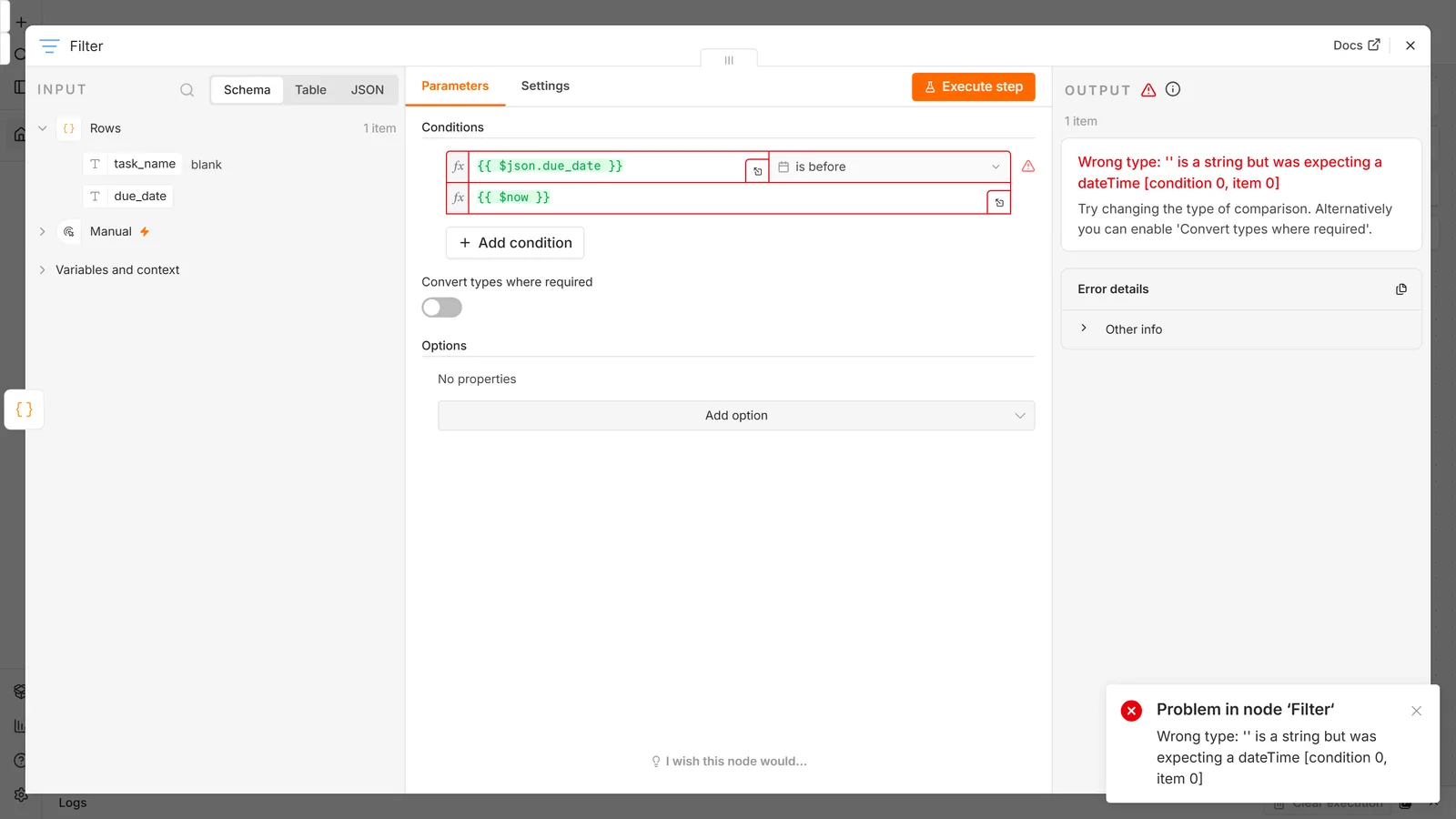
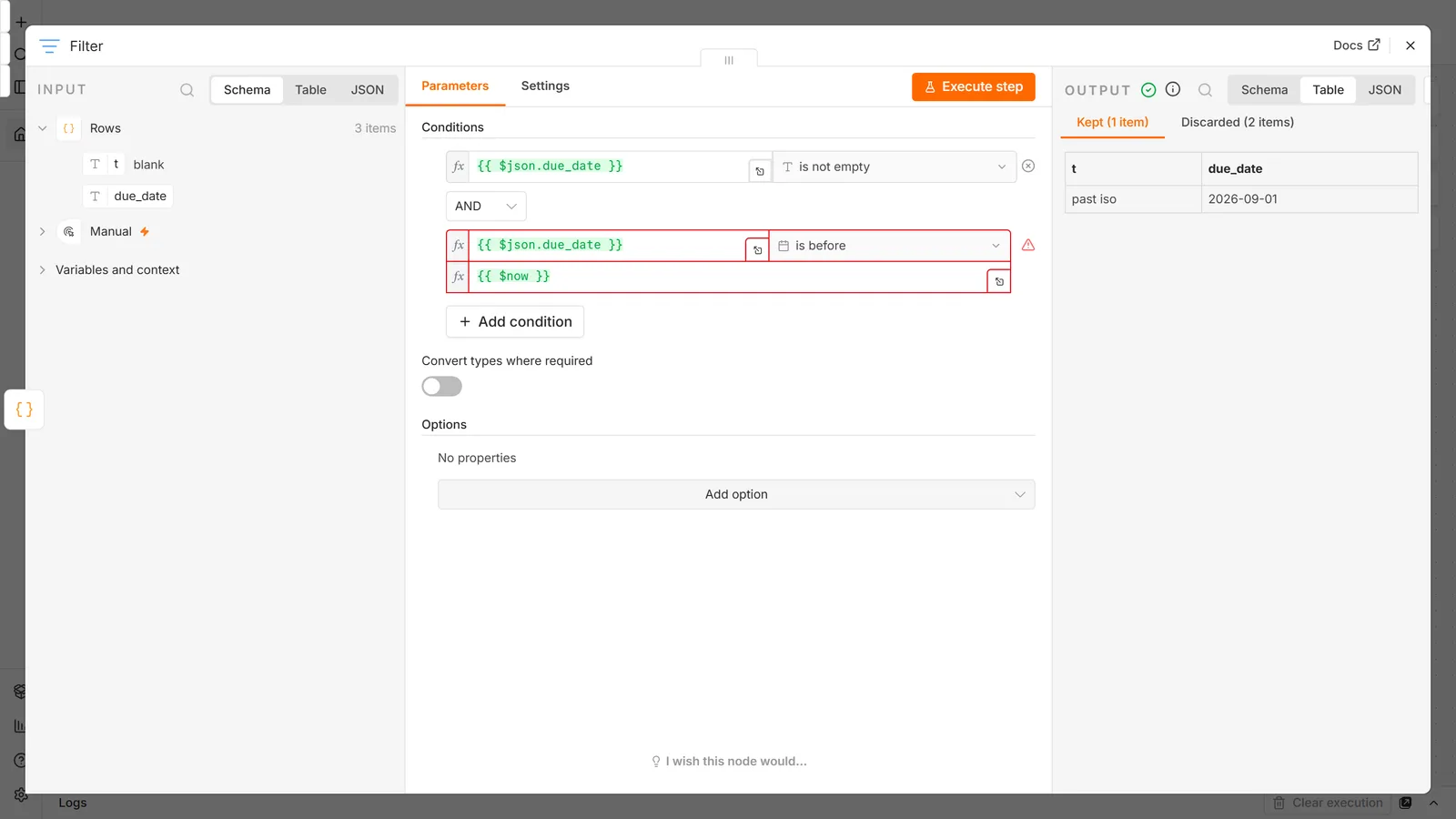
3. Filter. Add a Filter node. Set the condition to compare {{ $json.due_date }} against {{ $now }}, using the Date & Time → is before operator.
Filter drops items that don't match. So if 40 rows come in and 6 are overdue, 6 items come out, and because of Idea 2, everything downstream now runs 6 times, automatically.
We ran this Filter against the kinds of values a real sheet contains, and three of them bite:
- One blank due date stops the whole run. The Filter fails with
Wrong type: '' is a string but was expecting a dateTime, and no message is sent for any row. Turning on Convert types where required doesn't save you (Conversion error: the string '' can't be converted to a dateTime). The fix is a first condition,{{ $json.due_date }}is not empty, joined with AND. Blank rows are then dropped instead of crashing the run. - Day-first dates are read as month-first.
9/10/2026passes as 10 September.17/09/2026errors, which is at least loud. But05/12/2026, meaning 5 December, is read as 12 May and reported overdue, with no error at all. Format the sheet column as2026-12-05(Format → Number → Custom date and time) and the ambiguity disappears. - A task due today counts as overdue. A bare date means midnight, which is before any 8am
$now. If "overdue" should mean yesterday or earlier, compare against{{ $today }}instead.
4. Send a message. Add Gmail, Slack, or Telegram. In the message body, use an expression:
Overdue: {{ $json.task_name }} (due {{ $json.due_date }})
Execute the whole workflow. Six items in, six messages out.
Now make it real. Click Publish in the top right. The Schedule Trigger only runs on its schedule once the workflow is published. An unpublished workflow runs only when you press Execute workflow. Older tutorials call this "toggle Active"; n8n 2.x replaced the toggle with Publish. This catches nearly everyone once.
Notice what you didn't build: no loop, no counter, no array handling. You filtered a list and the platform did the rest.
Reading an execution when it breaks
It will break. The skill that separates people who get good at n8n from people who give up is reading the execution, and it takes ten minutes to learn.
Open the Executions tab (left sidebar, or the tab at the top of a workflow). Each entry is one run. Click one and you get the canvas as it was, with data at every step.
Work it in this order:
- Find the first red node, not the last. Everything after it is a consequence.
- Click the node before it and read its output. Nine times out of ten the error isn't in the failing node, it's that the data arriving is not the shape that node expected.
- Check the item count. A node receiving 0 items doesn't error. It silently does nothing, and the workflow "succeeds" while accomplishing nothing. An empty output on a node that should have found something is the most under-noticed failure in n8n.
- Read the actual message. n8n's errors are more specific than most. In a Code node,
Cannot read properties of undefined (reading 'email')means the object you reached into isn't on the item, and step 2 tells you what is. Expressions are quieter: when we pointed{{ $json.user.email }}at an item with nouser, the node succeeded and wrote an empty value. That is another failure you only catch by reading the output.
Getting comfortable with the executions view is worth more than learning twenty more nodes.
The five nodes that cover most work
There are hundreds. These five, plus your app integrations, do the majority of real workflows:
HTTP Request calls any API. The escape hatch for everything without a dedicated node, and once you're comfortable with it, "n8n doesn't support X" stops being a blocker.
Edit Fields (Set) reshapes items. Rename fields, add computed values, throw away everything you don't need. Use it liberally; carrying 60 fields you don't use makes every downstream node harder to read.
If / Switch create branches. If takes two paths, Switch takes several.
Filter is like If, but with no second branch: matching items continue, the rest are dropped.
Code is JavaScript for when the visual nodes get awkward. Reach for it last, not first. A workflow that's one giant Code node is a script with extra steps, and you've given up the thing you came for.
A 30-day path
The most common question in r/n8n from newcomers is some form of "give me a roadmap", usually followed by asking which course to buy. You don't need a course. You need four projects that each force one new concept.
Week 1: make one thing work end to end. Build the overdue-task workflow above, or any Schedule → fetch → filter → notify chain against data you actually own. Goal: you can read the executions view without flinching.
Week 2: make something respond. Build a webhook that receives a form post and writes it somewhere. Goal: you understand triggers vs. actions, and you've seen the difference between test and production URLs.
Week 3: connect two apps you use. Something crossing a real boundary: Telegram, Slack, Notion, your CRM. Goal: you've handled authentication, pagination and an API that returns a shape you didn't expect.
Week 4: add a model. Wire in OpenAI, then build a small AI agent. Goal: you know the difference between a chain and an agent, and why an agent needs tools.
After that, RAG and LangChain concepts are the natural next depth, and the templates library is worth reading as source material rather than just importing.
The single highest-leverage habit in that month: when something breaks, find out why before you fix it. The people who plateau are the ones who rebuild the node until it works.
Mistakes that cost beginners the most time
Building without looking at the data. Configure a node, run it, read its output, then configure the next one. Wiring five nodes and running them all at once means debugging five unknowns.
Testing on 5,000 items. Set a limit while building. You'll run the workflow forty times before it's right, and each run against a live API costs time and quota.
Forgetting to publish. Schedule and webhook triggers do nothing until the workflow is published. Also true in reverse: a published workflow keeps running after you've stopped thinking about it.
Treating Code as the starting point. If your instinct is to write JavaScript, the visual nodes will seem pointless, until you inherit a workflow made of Code nodes and can't see what it does.
Not naming nodes. "Google Sheets1", "Google Sheets2", "HTTP Request3". Rename them as you build; you reference them by name in expressions, and future-you will be reading them.
Ignoring error handling until production. Set a Retry On Fail on any node that calls an external service, and give real workflows an error workflow, published, since n8n skips an unpublished one. APIs fail intermittently, which is not an exception case, it's Tuesday.
Frequently asked questions
What is an n8n workflow?
One diagram, saved as a single unit: a trigger, then a chain of nodes that run left to right. You can activate it, run it by hand, export it as JSON and import it somewhere else. The word does double duty for the picture on the canvas and the file behind it, which is why templates are shared as JSON rather than as screenshots.
Can I connect n8n to Claude or ChatGPT?
Yes, through MCP — though "n8n MCP" names three different features and only one of them is the instance-wide connection most people want. n8n MCP sorts out which is which.
Do I need to know how to code to use n8n?
No, and most workflows contain no code at all. What you do need is comfort reading JSON, recognising that {"user": {"email": "x"}} means email lives under user. That's an hour of learning, not a programming background. Code becomes useful later for things the visual nodes make awkward, but it's an accelerator, not a prerequisite.
Am I too late to start learning n8n?
No. The tool's own AI-agent capabilities are barely a year old and are still changing every release, which means the material that made someone an expert two years ago is a fraction of what matters now. The gap between a beginner and a competent builder is measured in weeks of building, not years of tenure.
Is learning n8n still worth it if AI can build automations for me?
This is the most common form of the question in 2026, and the honest answer is that AI is very good at producing a workflow that looks right and moderately bad at producing one that survives contact with real data. Someone still has to decide what should happen when the API returns 429, whether that duplicate check is actually safe, and what the workflow does at 3am when nobody is watching. Generated workflows raise the value of being able to read one, not lower it.
How long does it take to learn n8n?
A first working workflow in an afternoon. Comfortable with items, expressions and debugging in two to four weeks of regular building. The plateau most people hit isn't n8n. It is the APIs they're connecting to, each of which has its own quirks.
What should my first automation actually be?
Something you personally do by hand every week, with data you already own. Not a client project, not something impressive. The value of the first build is that you'll notice immediately when it produces the wrong answer, because you know what the right answer looks like.
Which n8n course should I buy?
n8n's own documentation and its free official courses cover the fundamentals as well as anything paid, and the templates library gives you thousands of real workflows to read (9,000+ by n8n's own count). importing a template safely covers where to find them and how to read one before you run it. Spend money on a course only after you've built four or five things and can name the specific gap you're trying to close.
What's the difference between n8n Cloud and self-hosting?
Cloud is managed and billed per execution; self-hosted Community is free forever and unlimited, but you maintain it. A handful of features (SSO, environments, external secrets, Git version control, log streaming) need a paid or enterprise licence either way. Is n8n free breaks down what falls on which side.
Why does my node run more times than I expected?
Because it receives more than one item, and every node runs once per input item. Look at the output count on the previous node. To make it run once, reduce the input to one item, with a Limit node, a Filter, or aggregation, rather than changing the node itself.
Why is my expression returning undefined?
The path doesn't match the data, and n8n won't warn you: an expression that reaches into a missing field returns empty instead of failing. Open the node, look at the input panel on the left, and drag the field in instead of typing it. Case matters, and nesting matters: {{ $json.Email }} and {{ $json.email }} are different fields.
How do I use data from a node that isn't the previous one?
{{ $('Node Name').item.json.fieldName }}, using the node's exact display name. This is the standard fix once data has been reshaped downstream and the field you want has been dropped from the current item.
Do I need a loop node to process multiple records?
No. Nodes iterate over input items on their own. Loop Over Items is for batching, processing items in groups of 10 to respect a rate limit for example, not for basic iteration.
My workflow works when I click Execute but does nothing on its own. Why?
It isn't published. Click Publish in the top right (older versions called this toggling Active). Schedule and webhook triggers only fire for published workflows, and webhooks additionally switch from the test URL to the production URL. Workflows that don't trigger covers the rest of the causes in order.
Can I run n8n on my laptop instead of paying for anything?
Yes, with Docker, free and with no execution limits. npx n8n works too for a quick look, but n8n has deprecated running outside a container. The catch is that anything relying on an inbound webhook needs a public address, and your laptop doesn't have one. Local is fine for schedules and manual runs; put it on a small server when you need the internet to reach it.
What does "Cannot GET /" mean when I start n8n?
Usually that n8n is still starting. It answers Cannot GET / for a few seconds before the editor is ready, so wait for Editor is now accessible in the terminal and refresh. If it persists behind a reverse proxy, the proxy isn't forwarding to n8n's port.
Should I learn n8n or Zapier first?
If you want to understand automation as a skill, pick n8n. It exposes the data model that Zapier hides, and that model is the transferable part. If you need one specific integration working by Friday and never want to think about it again, Zapier is less to learn. The pricing comparison covers the cost side, which diverges sharply as volume grows.
Is there a way to see what other people have built?
Yes, and it's the most underused learning resource. n8n's template library holds thousands of importable workflows; import one, open every node, and read what it does. Our own n8n workflow templates collect starting points too. Reading real workflows teaches structure faster than any tutorial, this one included.
Primary references: n8n's quickstart and first-workflow guide, the data structure documentation for items and JSON shape, and the expressions reference for $json, $now and node references.
Next steps: get an instance running with the Docker setup guide or self-hosting guide, then build something real: Google Sheets, Slack notifications, a Telegram bot or a Notion sync. When you're ready for the AI side, start with OpenAI and move to AI agents.