n8n Notion Integration: Databases, Pages and Blocks (2026)
The Notion node changed: Data Source is its own resource and Database is read-only. The current model, page content vs properties, and the duplicate trap.
By Ali Ilyas · · Updated September 18, 2026
Most guides to this integration are describing a node that no longer exists. Notion's API changed substantially with its 2025-09-03 version, n8n's node was migrated and then overhauled, and the resource list you'll see in a 2024 tutorial doesn't match what's in front of you.
The current shape is worth learning deliberately, because almost every problem with this integration comes from picking the wrong one of three similarly-named resources.
What's on this page
- The three resources people confuse
- What the node can't do now
- Connecting Notion to n8n
- The share step everyone misses
- Reading rows from a database
- Creating and updating rows
- Property types, which are where it gets fiddly
- Page content lives in blocks, not properties
- The Notion Trigger
- The duplicate-check race
- Rate limits
- Gotchas
- Frequently asked questions
The three resources people confuse
Open the Notion node's Resource dropdown and you'll see Database, Database Page, and Data Source sitting next to each other. They are not variations on a theme.
| Resource | What it is | Operations |
|---|---|---|
| Database | The container itself — the thing with columns | Get |
| Data Source | Where a database's rows actually live | Get, Search |
| Database Page | One row in a database | Create, Get, Get Many, Update |
| Page | A standalone Notion page | Archive, Create, Get Markdown, Search, Update Markdown |
| Block | A paragraph, heading, or bullet inside a page | Append After, Get Many, Get Markdown |
| User | A workspace member | Get, Get Many |
The single most common mistake is reaching for Database when you want Database Page. In Notion's own interface a database looks like a table, so "add a row" feels like a Database operation. It is not: a row is a page, and it's under Database Page. Database itself only has Get, and it returns the schema, not the contents.
Data Source is the new one, and it's the piece the API change introduced. A Notion database can now have more than one underlying data source, so the API separates "the database object" from "the data that's in it". For a straightforward single-source database you mostly won't touch it, but it explains why the node looks unfamiliar, and it's what you use to inspect what a database actually contains.
What the node can't do now
Worth knowing before you design around it:
You can't create a database. Database has only a Get operation. If your workflow needs to make a new database, that's an HTTP Request node against Notion's API directly, not the Notion node.
You can't delete anything. There's no Delete operation on any resource. Page has Archive, which is Notion's soft-delete. It moves the page to trash and it stops appearing in queries. That's the only removal the node offers, and it's usually what you want anyway.
There's no "update page content" beyond markdown. Page has Update Markdown, and Block has Append After. Editing one specific existing block in place isn't exposed.
Connecting Notion to n8n
Two credential types. Both work; pick deliberately.
Internal Integration Token: you create an integration at notion.so/my-integrations, copy the token, paste it in. Straightforward, no OAuth dance, and the right choice for self-hosted n8n and for anything automating a workspace you control.
OAuth2: for building something other people connect their own Notion to. More setup, and on self-hosted it needs your instance to have a correct public callback URL.
For most workflows, use the internal token.
The share step everyone misses
Here is the thing that generates the most confused forum posts about this integration.
Creating an integration does not give it access to anything. A new Notion integration can see nothing in your workspace until you explicitly share pages or databases with it, the same way you'd share with a person.
In Notion, open the database, click the … menu, go to Connections, and add your integration. Do this for every database and top-level page the workflow touches.
The symptom when you skip it: the credential tests fine, and then the node returns nothing at all, or an object-not-found error for a database you're looking straight at. The credential is valid. The integration simply hasn't been let into the room.
Note that sharing a parent page shares its children, which is the tidy way to do it. Connect the integration to one workspace section rather than to twenty individual databases.
Reading rows from a database
Use Database Page → Get Many, then pick your database in the Data Source field (or pass an ID). On the current node (version 3) that field asks for a data source, not a database. For an ordinary database there's exactly one, with the same name as the database.
Two things to set every time:
Return All vs Limit. Return All is off by default, and Limit then defaults to 50. Turn Return All on when you genuinely want everything and set a Limit when you don't. While building, always set a small limit, because you'll run this node repeatedly.
Filters. The node exposes Notion's filter model, which is per-property-type: a checkbox filter, a date filter, a select filter. These build the query Notion runs server-side, which is very different from fetching everything and filtering in n8n afterwards. On a large database the difference is minutes.
The output is one item per row. With Simplify on (the default), each property is a flat field named after it, like property_status: "Todo" or property_tags: ["a", "b"], rather than Notion's nested JSON. Because nodes iterate over items automatically, anything you connect downstream now runs once per row without you building a loop.
Creating and updating rows
Database Page → Create adds a row. Pick the database in the Data Source field, then add each property you want to set. The node reads your database schema and offers the real property names, which is the good path. If a property doesn't appear in the dropdown, the integration probably can't see that database (see the share step above).
Title is required. Every Notion database page has a title property, whatever you've renamed it to. The current node has its own Title field for it, and leaving it empty stops the run with "Title is required to create a database page".
Database Page → Update needs the page ID of the row to change. You get that from a previous Get Many, typically as {{ $json.id }}. Update only touches the properties you specify; everything else is left alone.
Property types, which are where it gets fiddly
Notion properties are strongly typed and the node wants each one in its own shape. The ones that catch people:
Multi-select takes an array of option names, or a comma-separated string, which the node splits for you. We sent "a, b" and got two tags, a and b. The flip side: an option name that contains a comma can't be written from a string. Pass an array for that. (Notion's raw API doesn't split anything, so this only holds for the Notion node, not an HTTP Request.)
Options you haven't defined get created silently. We wrote Blocked to a select that only had Todo and Done, and zeta to a multi-select with a, b, c. Both writes succeeded and both options now exist on the database. So a typo in an expression doesn't fail. It adds a new option, and your filters and views quietly miss the row.
Relation wants page IDs of related pages, not their titles. Passing a title stops the run: The relation id "Ship the newsletter" is not a valid uuid with optional dashes. If you only have titles, you need a lookup: Database Page → Get Many against the related database, filtered by title, to resolve IDs first. Several IDs can go in one comma-separated string.
Date wants ISO 8601. A date that Notion displays fine but sorts strangely is usually a string that isn't really a date.
Rich text vs title are different types even though both look like text.
Formula, rollup, and created/edited-time properties are read-only. Writing one fails with n8n's generic "Bad request - please check your parameters". The useful part is in the details underneath: Notion's body failed validation list, which names the property.
A general debugging move: run a Get Many against one existing row that's already correct, and read the exact shape Notion returns for the property you're struggling with. Then produce that shape.
Page content lives in blocks, not properties
This trips up nearly everyone, and it's the single busiest Notion thread on the n8n forum.
A database row's properties are not its content. Database Page → Get returns the row's properties, meaning the columns. It does not return the paragraphs, headings and bullets that appear when you open that row as a page. Those are blocks, a separate object type in Notion's API.
To get the body content:
- Block → Get Many, with the page ID as the block ID, returns the child blocks as structured JSON. Good when you need to process the content programmatically.
- Page → Get Markdown returns the page rendered as markdown. Far easier when you just want the text, for feeding into an LLM for instance.
Nested blocks are the follow-up trap. Notion's block tree is recursive: a toggle's contents are children of the toggle. On a test page with a paragraph, a toggle and a bullet, Block → Get Many returned three items, and the toggle came back with has_children: true and none of its text. Switch on Fetch Nested Blocks and it returned four items, with the hidden paragraph as its own item after the toggle. Get Markdown handled it with no setting: the toggle came back as a <details> block with its contents inside.
To write content, use Block → Append After, which adds blocks after a given block. Note the direction: it appends, so building a page top-to-bottom means appending in order.
If you're pulling Notion pages into a knowledge base, Get Markdown into a text splitter is the clean path. The RAG chatbot guide covers the chunking and embedding side.
The Notion Trigger
A separate node from the Notion node, with two events: Page added to database and Page updated in database.
It polls. Notion's API has no general-purpose webhook for this, so n8n asks Notion on an interval whether anything changed. Two consequences:
It isn't instant. There's a lag of up to your poll interval. If you need immediate reaction, have whatever writes to Notion also call an n8n webhook directly.
Polling costs API calls continuously, which interacts with the rate limit below if you have several triggers running.
The updated-page event depends on Notion's last-edited timestamp, and that timestamp moves for edits you might not consider meaningful, including some made by your own workflow. A workflow that triggers on update and then writes back to the same database can re-trigger itself. Guard it: check a status property, or compare last-edited against last-processed, before acting.
The usual thing hanging off this trigger is a team alert: new page in the database, message in a channel. Slack notifications covers the auth split that catches people there: the Slack action node wants OAuth2, the Slack Trigger wants an access token.
The duplicate-check race
The pattern is so common it deserves naming: Get Many → If (nothing found) → Create. Look for an existing row, create it if absent.
Built the obvious way, it never creates anything. When Get Many finds no rows it outputs zero items, and n8n doesn't run a node that receives no items. So the If never runs, and the "not found" branch you built can't fire. We ran it with an external ID that wasn't in the database. The execution finished, nothing was created, and nothing reported a problem. The fix is Always Output Data in the Get Many node's settings. With it on, an empty result emits one empty item, the If sees no id, and Create runs.
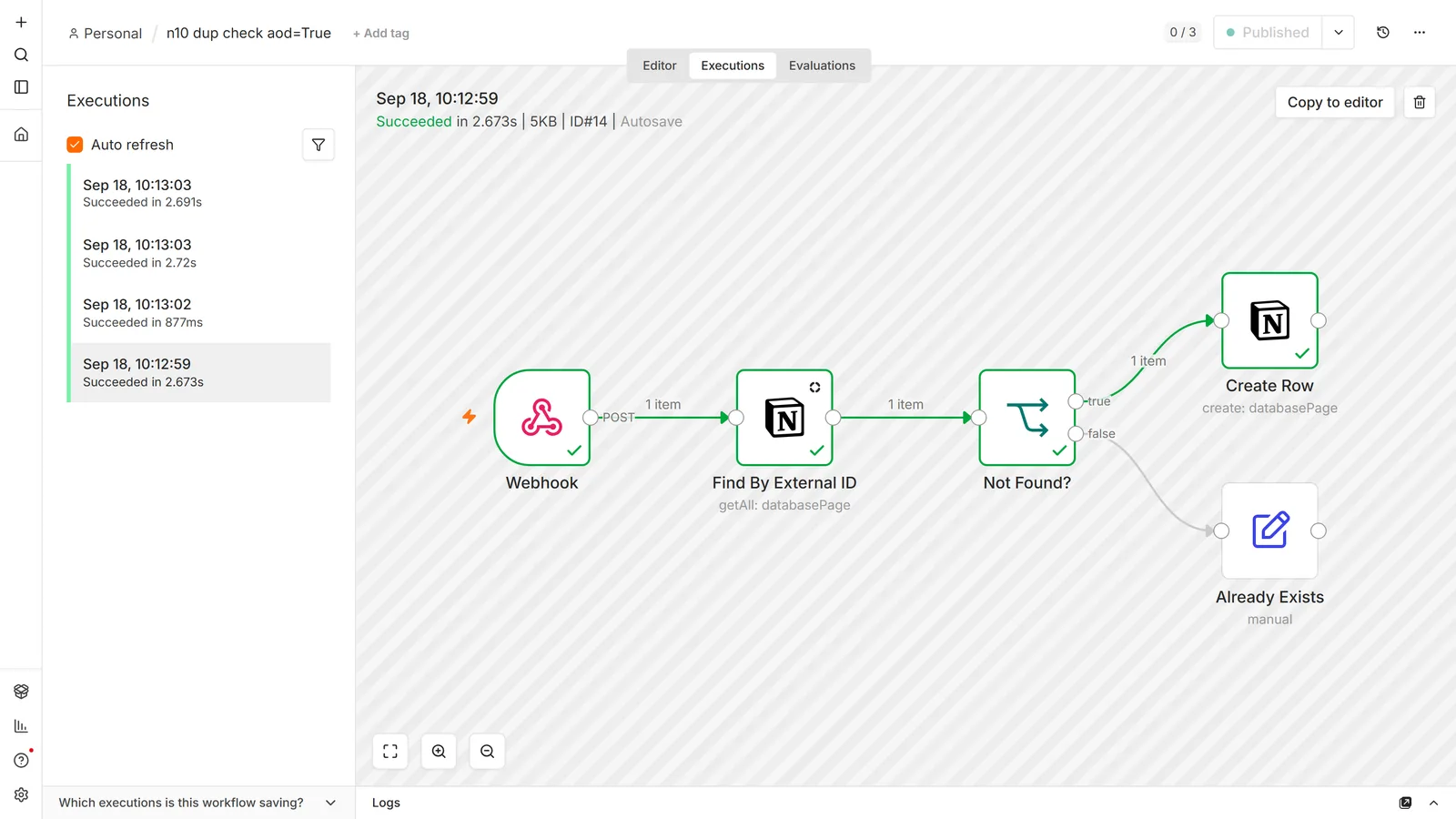
Once it does work, it produces duplicates anyway, and people report this as a bug when it isn't one.
Two causes:
The check and the write aren't atomic. Between "does it exist" and "create it", another run can create it. Two webhook events arriving close together both see zero and both create. We reproduced it on both attempts, with two simultaneous requests carrying the same new ID. This is unavoidable at the workflow level. It is a race condition, not a configuration error.
The lookup is wrong. More common in practice. The filter doesn't match a row that does exist: case sensitivity, whitespace, a title property with rich-text formatting, or filtering a relation by name rather than ID. The check returns nothing, and the workflow correctly creates a row that shouldn't be there.
Debug the second before assuming the first: run the Get Many alone with the exact value the failing run used, and see whether it finds the row.
Mitigations that actually help:
- Match on a stable unique key, not a display title. An external ID stored in its own property is far more reliable than matching on a name someone might edit.
- Reduce concurrency for the workflow so runs don't overlap.
- Deduplicate on a schedule as a backstop. A periodic workflow that finds and archives duplicates is less elegant than preventing them and considerably more effective.
Rate limits
Notion's API allows roughly three requests per second, averaged, per integration. Exceed it and you get HTTP 429.
This is easy to hit without noticing. Because every node runs once per input item, a Get Many returning 200 rows followed by an Update node makes 200 sequential API calls as fast as n8n can issue them.
Fixes, in order of preference:
- Filter server-side so you fetch fewer rows in the first place.
- Use the Loop Over Items node with a small batch size and a Wait node, to pace the calls deliberately.
- Enable Retry On Fail on the Notion node, with a delay. This handles occasional 429s but won't save a workflow that's structurally too fast.
Pagination interacts with this too: Get Many with Return All fetches in pages of up to 100 behind the scenes, so "one node" can be many requests against a large database.
Gotchas
Property names are case- and space-sensitive. Due Date and Due date are different properties. Renaming a column in Notion breaks workflows referencing the old name, silently.
Page IDs come with and without dashes. Notion's API returns the UUID dashed; URLs contain it undashed. Both usually work, but when a lookup mysteriously finds nothing, this is worth checking.
Getting the database ID from a URL: it's the long hex string before the ?, and after any workspace-name prefix. On a database opened as a full page it's the last path segment.
Empty properties come back as null, not missing. With Simplify on, an empty select is property_status: null. An expression reading it returns empty rather than failing, so a missing value flows downstream silently. Check for it explicitly where it matters.
Turn Simplify off and the JSON nests deeply, in a shape that depends on property type. A select is { "name": "Done" }, a title is an array of rich-text objects. Downstream nodes that expect flat fields then need an Edit Fields node in between.
The integration sees only what it's connected to, which includes new databases. Create a database next month and the workflow won't see it until you share that one too.
Frequently asked questions
Why can't n8n see my Notion database?
The integration hasn't been shared with it. Creating an integration grants no access. Open the database in Notion, use the … menu → Connections, and add your integration. This is the cause the overwhelming majority of the time, and the credential test passing doesn't rule it out.
What's the difference between Database and Database Page?
Database is the container and supports only Get, which returns the schema. Database Page is one row, and that's where Create, Get, Get Many and Update live. If you want to add or edit a row, you want Database Page.
What is the Data Source resource for?
It reflects Notion's newer API model, where a database can have more than one underlying data source. Data Source → Get and Search let you inspect and query where the rows actually live. Single-source databases mostly don't need it.
How do I get the text content of a Notion page, not just its properties?
Properties and content are different things. Use Page → Get Markdown for the whole page as text, or Block → Get Many for structured blocks. Database Page → Get returns properties only, which is why the content appears to be missing.
Why does Block Get Many miss text inside toggles and lists?
Notion's blocks are a tree, and by default Get Many returns one level: a toggle comes back with has_children: true and none of its text. Switch on Fetch Nested Blocks to get the children as extra items, or use Page → Get Markdown, which includes nested content with no setting at all.
Can I create a Notion database from n8n?
Not with the Notion node, where Database supports only Get. Use an HTTP Request node against Notion's API directly if you need this.
How do I delete a Notion page from n8n?
You can't delete; you archive. Page → Archive moves it to trash, which removes it from queries and views. That's Notion's own delete semantics, not an n8n limitation.
Why does my relation update fail with "not a valid uuid"?
Relations take page IDs, not titles. The Notion node rejects a title with The relation id "…" is not a valid uuid with optional dashes. Resolve titles to IDs first with a Get Many against the related database, then pass the IDs.
How do I set a multi-select property?
Pass an array of option names, or a comma-separated string, which the Notion node splits into separate options. Use an array when an option name itself contains a comma. Options that don't exist yet are created silently, so check spelling.
Why do I get 429 errors from Notion?
You're exceeding roughly three requests per second. It usually happens when a Get Many returns many rows and the next node fires once per row. Fetch fewer rows with a server-side filter, or pace the calls with Loop Over Items plus a Wait node.
Why does Get Many return 100 items when I asked for fewer?
Check whether Return All is enabled, because it overrides the limit. Notion also pages at 100 internally, so a large fetch is several requests regardless of what you see as one node.
My duplicate check runs but still creates duplicates. Why?
Either the lookup isn't matching an existing row (case, whitespace, or filtering a relation by name instead of ID), or two runs raced between the check and the create. Test the lookup in isolation with the exact failing value first; a broken filter is far more common than a genuine race.
My duplicate check never creates anything. Why?
When Get Many finds nothing it outputs zero items, so the nodes after it don't run. Turn on Always Output Data in the Get Many node's settings so an empty result still reaches your If node.
How fast does the Notion Trigger react?
It polls rather than receiving webhooks, so there's a lag of up to your poll interval. For immediate reactions, have the source system call an n8n webhook directly instead.
My Notion Trigger fires in a loop. Why?
The workflow is probably writing back to the same database, which updates the last-edited timestamp and re-triggers it. Add a guard: a status property you check before acting, or a comparison against a last-processed timestamp.
Where do I find the database ID?
In the database URL: the long hex string before the ?, after any workspace-name prefix. Dashed and undashed forms both generally work.
Can I sync Notion with Google Sheets or Airtable?
Yes, and it's one of the most common uses: read from one, write to the other, on a schedule. The Google Sheets guide covers that side. The hard part isn't the connection, it's deciding which system wins on conflict, and building a stable unique key to match records across both.
Can I feed Notion pages into an AI workflow?
Yes, and Page → Get Markdown is the right operation for it, giving clean text with structure preserved, no block-tree walking. From there it goes into a text splitter and a vector store; the RAG chatbot guide covers chunking, embedding and retrieval.
Primary references: n8n's Notion node documentation for the current resource and operation list, the Notion Trigger node reference, and Notion credentials for the internal-token and OAuth2 setups. Resource list verified 2026-08-25; property writes, page content, errors and the duplicate check re-tested on 2026-09-18 against n8n 2.33.7 (Notion node version 3) and a real Notion database. The Trigger, OAuth2 and rate-limit sections were not re-tested.
Next steps: if you're new to n8n's data model, the beginner tutorial explains the item flow that makes the rate-limit problem above make sense. For syncing Notion with a spreadsheet see Google Sheets, for reacting instantly see the webhook tutorial, and for building a knowledge base from Notion pages see the RAG chatbot guide.